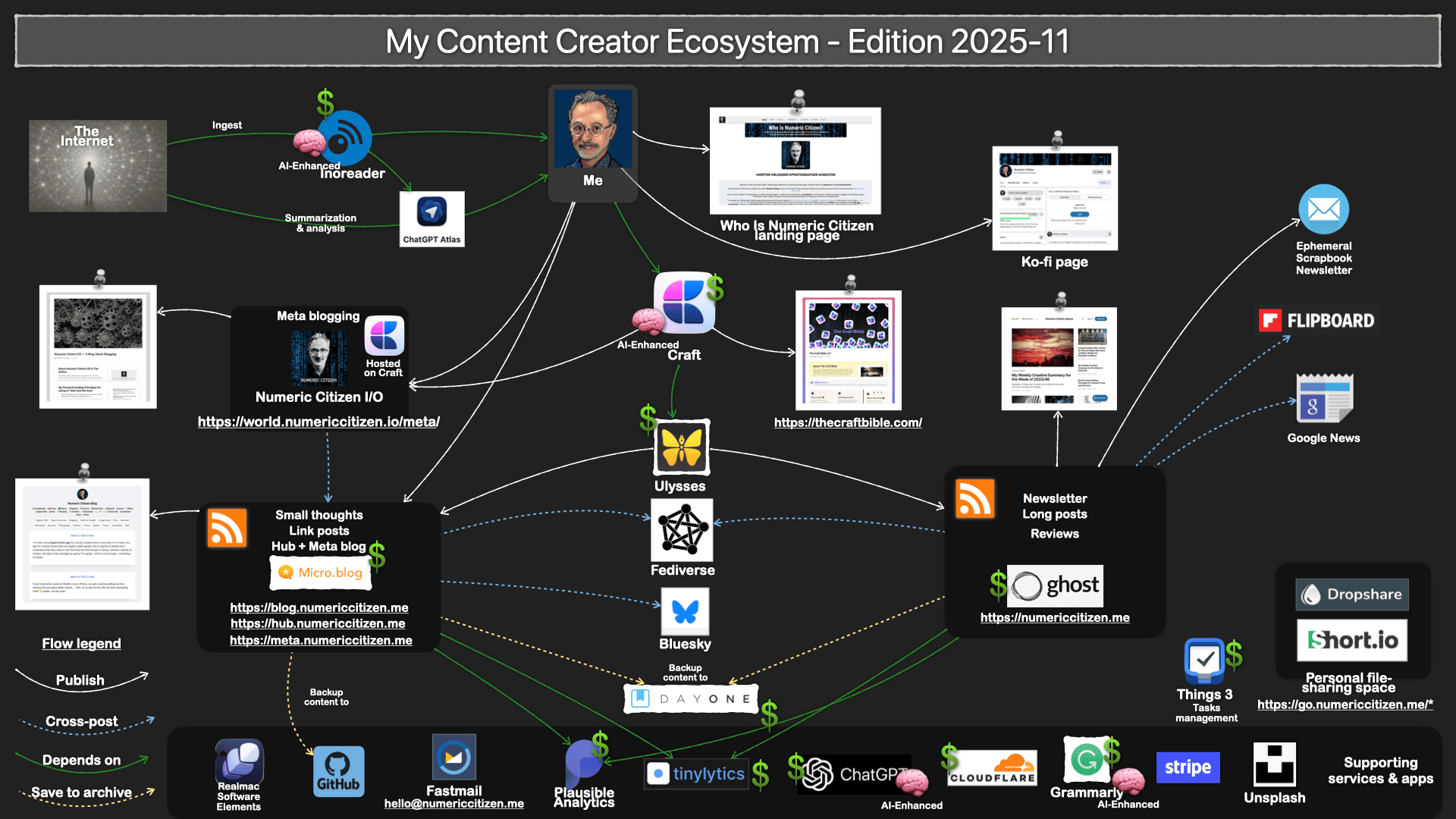
When I read about vibe coding to quickly create app mockups or even shipping an app to the App Store, I wonder if I could use genAI to vibe code a theme plugin for Micro.blog. That would allow me to use a unique visual theme inspired by my visual branding.
Now on Chillidog Hosting
The Who Is Numeric Citizen? website has moved from Cloudflare’s Workers app to Chillidog Hosting. This change was necessary to support PHP, which is required for Elements CMS. Additionally, the publishing workflow is now more straightforward since I no longer need to use a GitHub repository, which was necessary for hosting a static website on Cloudflare. It is rare to simplify a workflow while adding more features, in this case, PHP to implement a CMS component on the News page.
The migration process was relatively simple, thanks to Chillidog support, which was fantastic BTW. The process involved republishing my website using a new configuration publishing setup, which pointed to Chillidog. The setup was straightforward because Chillidog is familiar with Elements, which allows you to download a configuration settings file directly into Elements for setting up the FTP connection. Once republished, I made a DNS change at CloudFlare to replace a CNAME record with an A record to one of Chillidog’s servers. After 15 minutes, it was a done deal.
Getting Ready for Elements CMS
I’m getting ready to use the upcoming Elements CMS feature when it becomes stable enough for production use. Today, I pushed out a big update to “Who Is Numeric Citizen?” website where I decided to split the Highlights section into four as I’m expecting them to grow over time. As for the CMS feature, it will require a change of my hosting solution. The website is currently hosted on Cloudflare as a worker-based app. I’ll first move the content to Chillidog hosting first, then I’ll start adding the CMS feature in those areas: site news, redo the best articles section and add a tech wish list as CMS entries.
Now on Ghost 6!
My main website, numericcitizen.me, is now officially using Ghost 6 which was released today. It was a short and painless process to upgrade. While Ghost.org will grandfather current plans, I discovered a price increase for my subscription tier (Creator), going from $25/month to $29/month. It seems that under my current plan, I can get all the juiced up analytics, which is nice. Yet, Ghost.org is a pricey service for a blogger like me.
My Official Response To Those Sketchy Offers
Because I’m getting email inquiries many times a week for SEO improvement offers, link insertion, ads, etc. I decided to create my official response for these sketchy offers. I hope they understand the message, provided that they read it, of course, which I highly doubt. It’s probably a lost cause.
Because Diagrams for Mac seems to fall in the category of abandonware, if the latest blog post date is any indication, I decided to drop if from my tool set. The app wasn’t updated since macOS Monterey in 2022. Too bad, it was a rather promising diagramming tool.
Generative AI Applied to Website Analytics - Cool
I’m trying out the new generative AI-based analytics from Tinylytics, and I’m very impressed. Here’s an example for my main website. To my knowledge, that’s a first for website analytics and I hope that Plausible will take a look at this because it’s really useful. Plus, Tinylytics allows you to create your own prompt and see a different take than the one generated by default.
An Update About My Journey with Realmac Software Elements
I’ve been quiet lately because I’ve been dedicating more time to learning Realmac Software Elements. I plan to create a few websites for fun. The first will be a new landing page to replace the current one shared with Craft Docs (look here). The second will be my professional website, which I’ll use when I transition to a freelance career. Ironically, the third will be a rework of my current employer’s corporate website, which I find quite unattractive.
So far, it’s a rather exciting journey. Elements is an excellent Mac app, and the team behind it offers a stellar presence on their support forums. This adds to the excitement of being part of a small club trying to build a new app. Elements is still in beta and should launch this year. You should see this video on YouTube showing the app’s user interface.
My experience with Elements reminds me of Apple’s iWeb website editor, which was part of the initial MobileMe rollout. However, Elements is much more powerful and geared toward a different crowd. The learning curve is much steeper, but it is reasonable for a guy like me. Elements is built around Tailwind CSS. I don’t know CSS or Tailwind CSS, but Elements hides its complexity.
Tailwind CSS is a utility-first CSS framework created by Adam Wathan and the team at Tailwind Labs in 2017. Designed to streamline web development, it provides a comprehensive set of low-level utility classes that allow developers to style elements directly in their HTML without writing custom CSS. This approach enables rapid prototyping and highly customizable designs, making Tailwind CSS a popular choice for developers seeking efficiency and flexibility in building modern web interfaces.
As soon as my first project matures enough, I’ll share more about it.
An Update On My Craft to Micro.blog Migration
I finally completed the replication of content from the Craft-hosted website to Micro.blog-hosted website. I initiated this migration to reduce my dependency on Craft to host such content. Numeric Citizen I/O still points to Craft-hosted website (https://world.numericcitizen.io/meta), but 95% of the content is now available on Micro.blog via meta.numericcitizen.me.
Am I leaving Craft behind, not anytime soon, but I’m certainly continuing to consolidate my online presence under more open platforms.
I’m an Open Blogger
In the blogging space, “open” can mean different things depending on who you ask. There are open-source tools and services. Opening yourself up while blogging is another example. Giving a behind-the-scenes look at your workflows is another. Furthermore, being an open blogger also means a desire to write about writing and blogging.
Open blogging, a new movement (my creation 😃), also means creating, maintaining and sharing a digital garden. It contains many things, such as a list of upcoming blog posts, work-in-progress articles, never-published articles, and other digital artifacts, all accessible just by following links within the digital garden. You can even peek at my website’s analytics, too, thanks to Plausible. It’s all there. Just be curious.
Being an open blogger also means using open-source tools and services whenever possible. Such services include Ghost, GitHub, Plausible, and Micro.blog. I believe that basic, foundational tools and platforms aren’t well served when big corporations own them. Oh, did I mention being part of Fediverse is also part of my platform choices?
Supporting open-source initiatives like Plausible, Commento, and Ghost is an act of support for web openness. I subscribed to all those services because it’s like defending a principle (and because they’re of great value, too!).
On a more personal note, I openly share my anxieties about the challenges of being a blogger, writer, and content creator. Isn’t the website hosting this article, its mission after all? If you’re someone who reads all my content, on all the platforms I use, you can build a pretty good picture of who I am, what’s my values, my interests, my challenges. Each website fills a specific niche, but taken together, they form a web of content reflecting my interests in life.
I like writing about my experiences. Did you know that between 2009 and 2013, I was developing iPhone applications? While doing so, I attempted to maintain a blog about it. I wrote and published articles about my experience and the lessons I learned from iPhone intricacies. Today, I would like to write about blogging and share my experience with the applications and services I use for that purpose. I like doing this so much that I created this website about it: Numeric Citizen I/O. I maintain a meta-blog that exposes the behind-the-scenes of my workflow. Different context, same objectives. It’s my small contribution to this complicated world.
Thanks for reading.