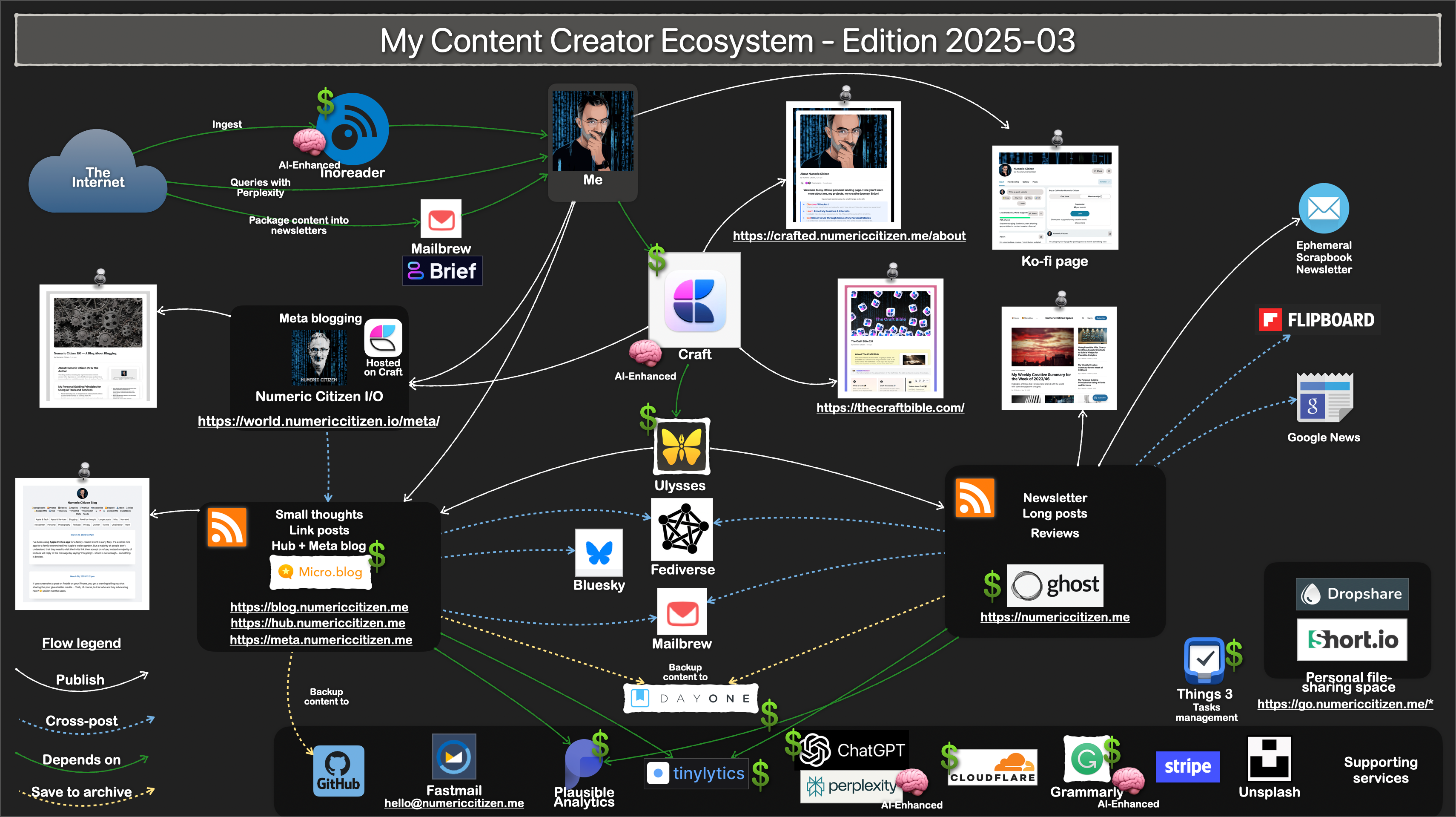
AI made me replace another subscription: Ulysses
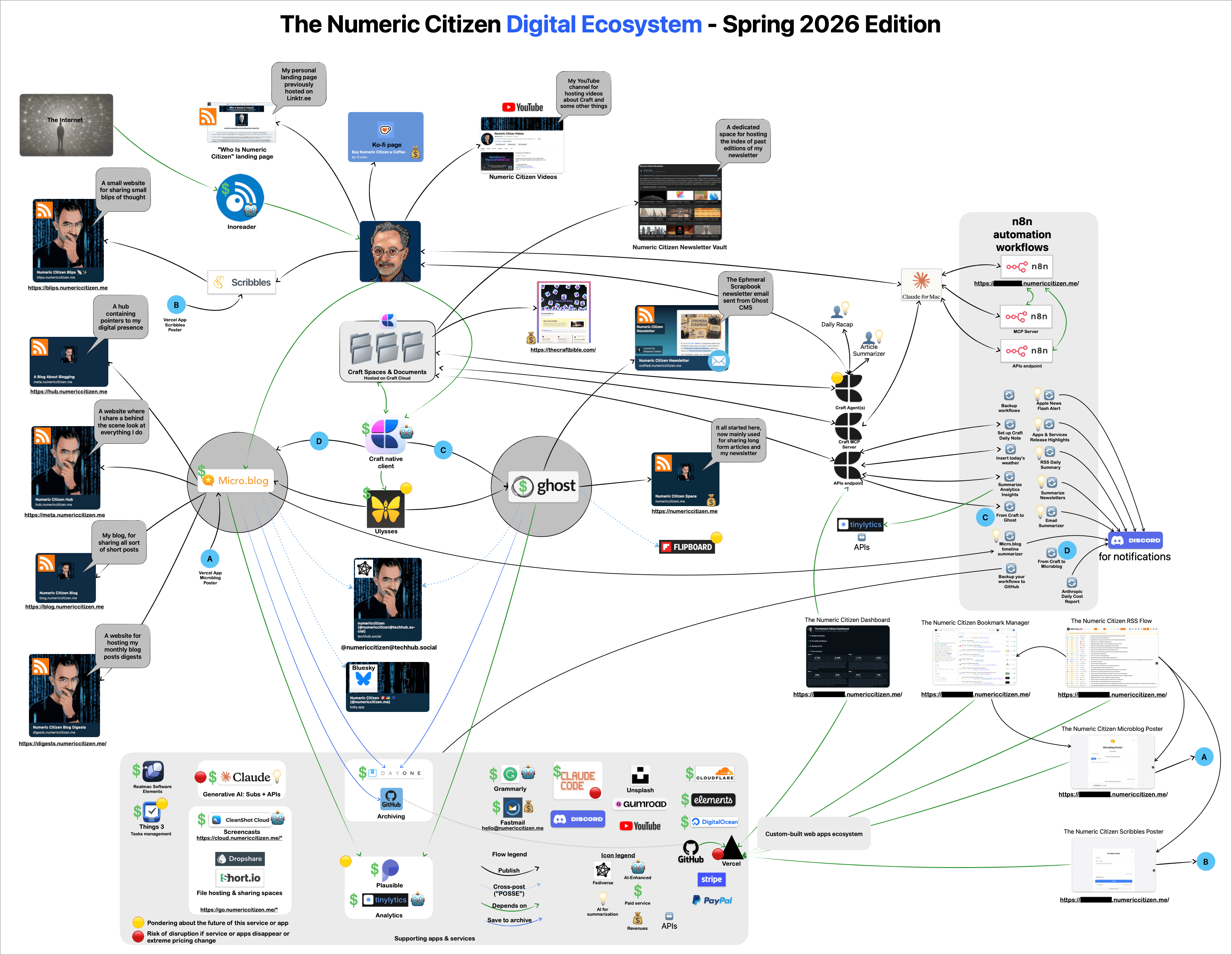
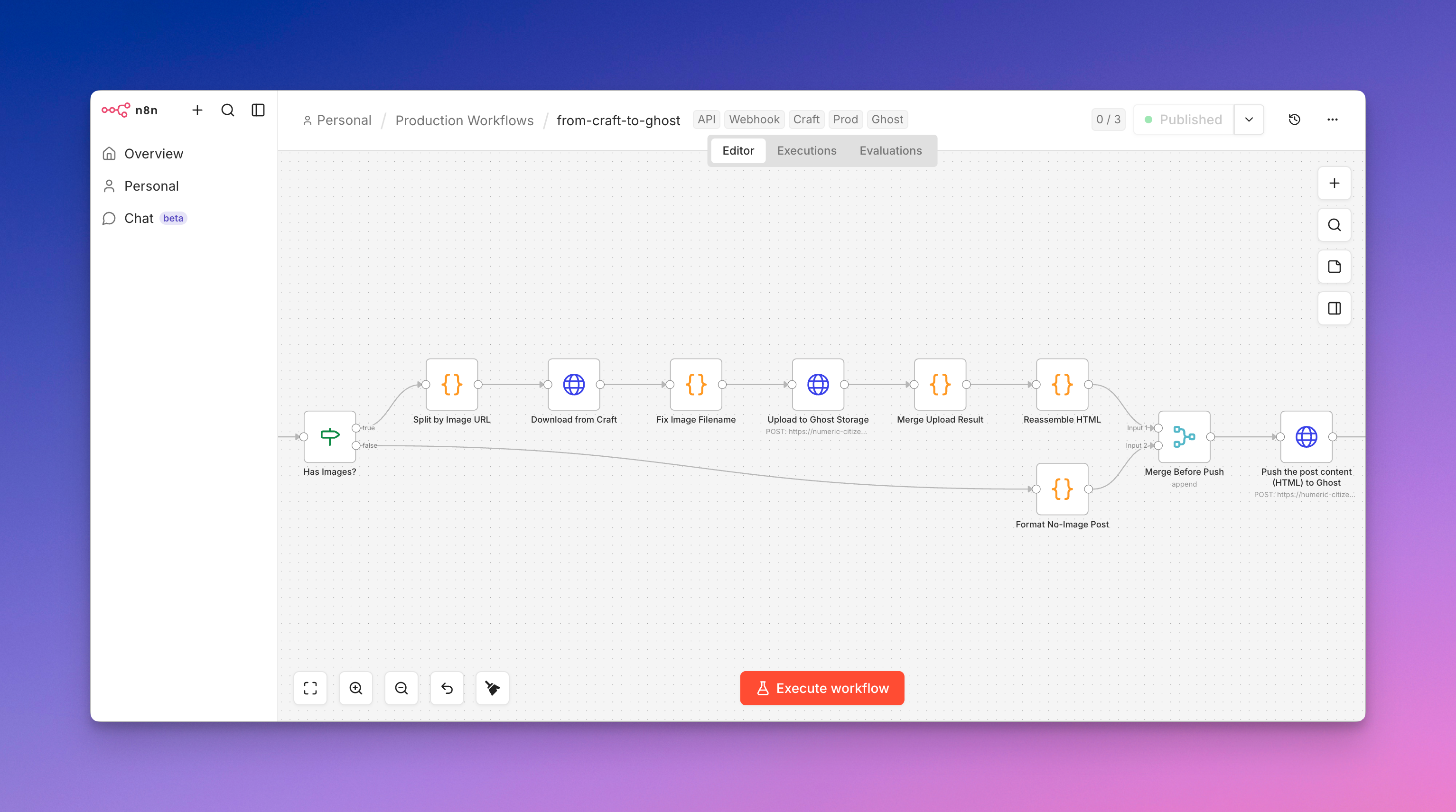
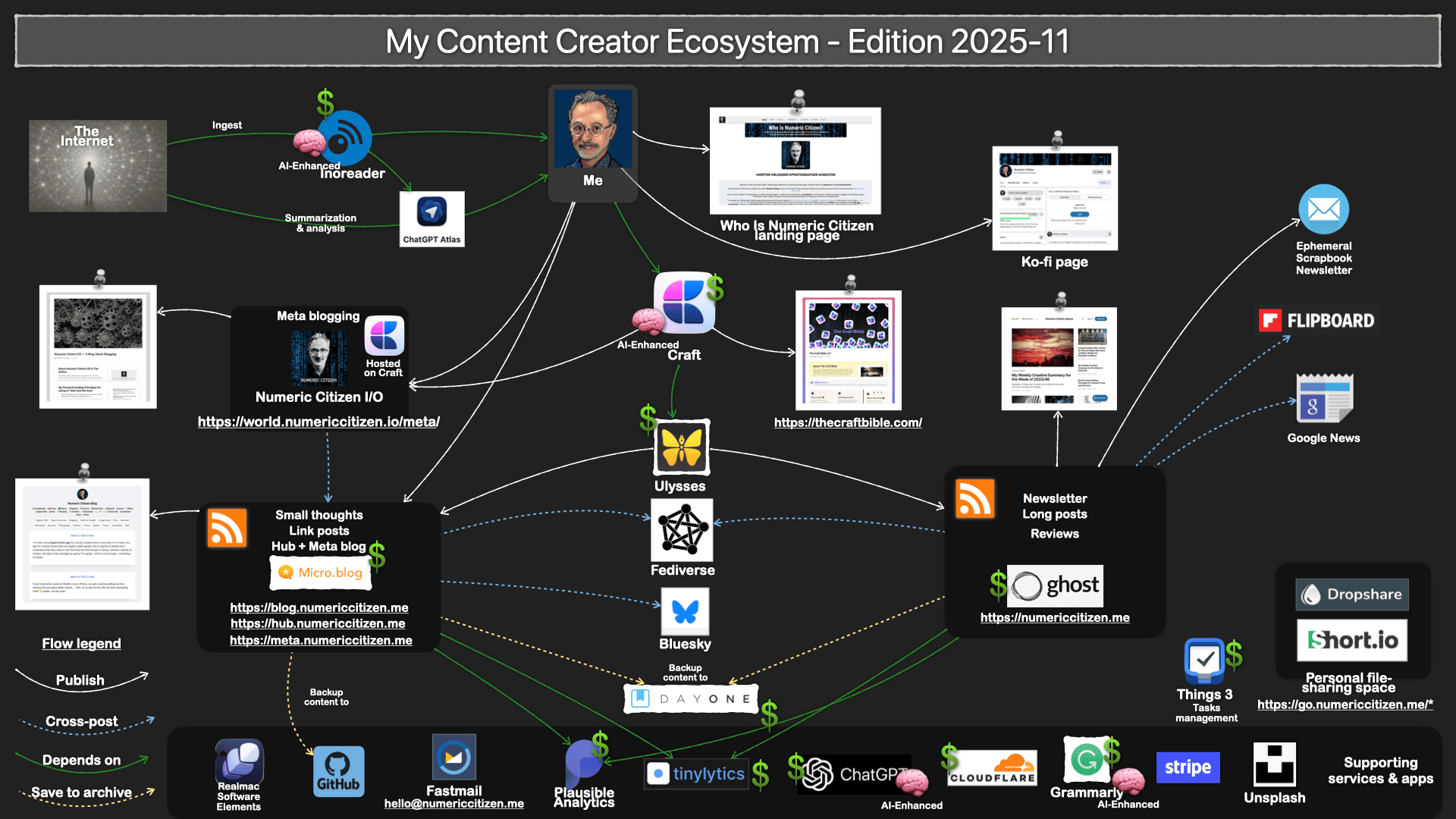
I finally cancelled my subscription to Ulysses. Why? I was using Ulysses because it supported Craft’s export document so that I could then publish either to Ghost or Micro.blog. Since the beginning of this year, I’ve created two n8n automation workflows to publish directly from Craft to Ghost or Micro.blog.
Publishing from Craft to Micro.blog with a Single n8n Workflow
This is a technical write-up of an n8n automation that takes a document written in Craft, converts it to clean HTML, rehosts its images, and publishes it to Micro.blog as a draft — all from a single webhook call. It’s a companion to an earlier Craft → Ghost publisher and reuses the same document-fetching approach, but targets Micro.blog’s Micropub API instead of a proprietary CMS.
The goal is to write in one place (Craft) and let automation handle the tedious, error-prone part: block conversion and image migration.
What it does
An AI assistant (via n8n’s MCP integration) or any HTTP client sends a webhook request naming a Craft document by title. The workflow then:
- Searches the Craft space for that title.
- Scores the search results to pick the actual matching document.
- Fetches the document’s full block tree.
- Converts Craft blocks into Micropub-ready HTML.
- Extracts every Craft-hosted image, downloads it, and re-uploads it to Micro.blog’s media endpoint.
- Swaps the original image URLs for their new Micro.blog-hosted equivalents.
- Publishes the result as a draft for manual review before it goes live.
The whole run typically completes in about 4–6 seconds, with image uploads accounting for most of the overhead.
Trigger and input
The workflow is triggered by an HTTP POST webhook that waits for the full run to complete before responding (a “response node” pattern), so the caller gets the final published URL back synchronously. It’s also exposed through n8n’s MCP server, which is what lets an assistant invoke it conversationally.
The input payload is minimal:
{ "targetTitle": "My Article Title" }
Flow overview
Webhook
  → Search Document in Craft
  → Find Best Matching Document
  → Fetch Document Content
  → Convert Craft Blocks to HTML
  → Set Micro.blog Token
  → Extract Craft Image URLs
  → Has Images?
       ├─ true  → Split by Image URL → Download from Craft → Fix Filename
       │          → Upload to Micro.blog Media → Merge Upload Result
       │          → Reassemble HTML → Merge Before Publish
       └─ false → Format No-Image Post → Merge Before Publish
  → Publish to Micro.blog
  → Respond to Webhook
The interesting problems
Most of the engineering effort went into three areas that aren’t obvious until you hit them.
1. Title matching against a full-text search
Craft’s search API does full-text search, not title-only. That means a document that merely mentions the target title somewhere in its body can rank above the document actually named that. Publishing the wrong document is a nasty failure mode.
The fix is a small scoring node that runs after the search and ranks each candidate:
- Exact title match: 100
- Title starts with the query: 80
- Title contains the query: under 50, penalized by how much longer the title is than the query
Before comparing, it strips Markdown noise — bold markers, italics, and heading prefixes — so formatting in a title doesn’t throw off the match. If nothing scores above zero, the node throws a descriptive error that lists every candidate it saw, which makes debugging a missed title trivial. The node emits the single best match in the same shape as the search results, so the downstream “fetch content” step doesn’t need to know any scoring happened.
2. Converting Craft blocks to HTML
Craft stores documents as a nested tree of typed blocks, not as HTML. A dedicated conversion node walks that tree and emits Micropub-ready markup. It covers:
- Paragraphs and headings (h1–h4)
- Blockquotes and horizontal rules
- Unordered and ordered lists — consecutive list-item blocks are grouped into a single
<ul>or<ol>rather than emitting one list per item - Task checkboxes (rendered as ✅ / ☐)
- Images, wrapped in
<figure> - Rich-link bookmarks, rendered as a styled bookmark block
- Code blocks (
<pre><code>) - Inline formatting: bold, italic, strikethrough, inline code, links, and proper HTML-entity escaping
It also handles two different document shapes — a notebook with sub-pages and a flat single document — with a fallback lookup, so it doesn’t matter how the source is organized.
3. Rehosting images across services
Craft images live on Craft’s own CDN. If you publish those URLs directly, your post depends on Craft continuing to serve them — not acceptable for a permanent blog post. So every Craft image has to be pulled down and re-uploaded to Micro.blog.
The image branch:
- Regex-scans the generated HTML for Craft image URLs.
- Splits into one item per image.
- Downloads each image’s binary from Craft.
- Fixes the filename extension based on the response’s MIME type (Craft URLs don’t always carry a usable extension).
- Uploads each image to Micro.blog’s media endpoint as
multipart/form-data.
A subtle detail: Micro.blog’s media endpoint returns 202 Accepted and puts the new image URL in the HTTP Location response header, not in the body. To capture a header you have to ask the HTTP node for the full response rather than just the parsed body. A later node maps each uploaded image’s Location back to its original Craft URL by index, and the HTML is reassembled with every Craft URL replaced by its Micro.blog equivalent.
Image failures are handled gracefully: the upload node continues on error, so if one image fails (AVIF, for instance, tends to be rejected), the post still publishes — that image just keeps its original URL instead of breaking the whole run.
Why Micropub
The most reusable idea here is that Micro.blog speaks Micropub, a W3C standard, rather than a proprietary publishing API. The final payload is a standard h-entry:
{
  "type": ["h-entry"],
  "properties": {
    "name": ["My Article Title"],
    "content": ["<h2>...</h2><p>...</p>"],
    "post-status": ["draft"]
  }
}
Any Micropub-compatible endpoint would accept the same shape, so the publishing half of this workflow isn’t locked to one host. The post-status: draft field is deliberate — every post lands as a draft so it can be reviewed in the editor before going public. The endpoint responds with the new post’s URL, a preview link, and an edit link, which the workflow passes straight back to the webhook caller.
Error handling
- A shared error-handler workflow catches failures across the automation.
- The webhook always responds, even on failure, so a caller never hangs.
- Image-upload failures are non-fatal (see above).
- A missing title produces an explicit, descriptive error listing what was searched.
- Full-text false positives are neutralized by the scoring node rather than by hoping the search ranks correctly.
Credentials and configuration (redacted)
For obvious reasons, the specifics below are not published:
- Craft Connect REST link — a private access link used to search Craft and fetch block content.
- Micro.blog app token — a Bearer token generated in Micro.blog account settings, stored in a dedicated “Set Token” node so it can be rotated in one place.
- n8n instance URL, webhook path, and internal workflow IDs — infrastructure details specific to a self-hosted deployment.
If you rebuild something like this, you’d supply your own Craft access link and your own Micro.blog token, and point the workflow at your own n8n instance.
Takeaways
- Treat a full-text search as untrusted input and score its results before acting on them.
- When migrating content between hosts, migrate the assets too — don’t hotlink another service’s CDN.
- Watch where an API returns the data you need; a
Locationheader is easy to miss if you only read response bodies. - Prefer open standards (Micropub) over proprietary APIs where you can — it keeps the integration portable.
- Publish to draft first. Automation should hand you a reviewable result, not a live surprise.