On Sharing My Writings — What Goes Where

I recently got a few comments and questions from some followers on Micro.blog about my use of Scribbles versus Micro.blog blog hosting services. One guy couldn’t figure out why I was using Scribbles to write very short posts using a one-word title while I was using Micro.blog for longer posts, most of them without a title. I replied with a short answer, but I think I should elaborate for those who have been following me for some time or for those who just got here.

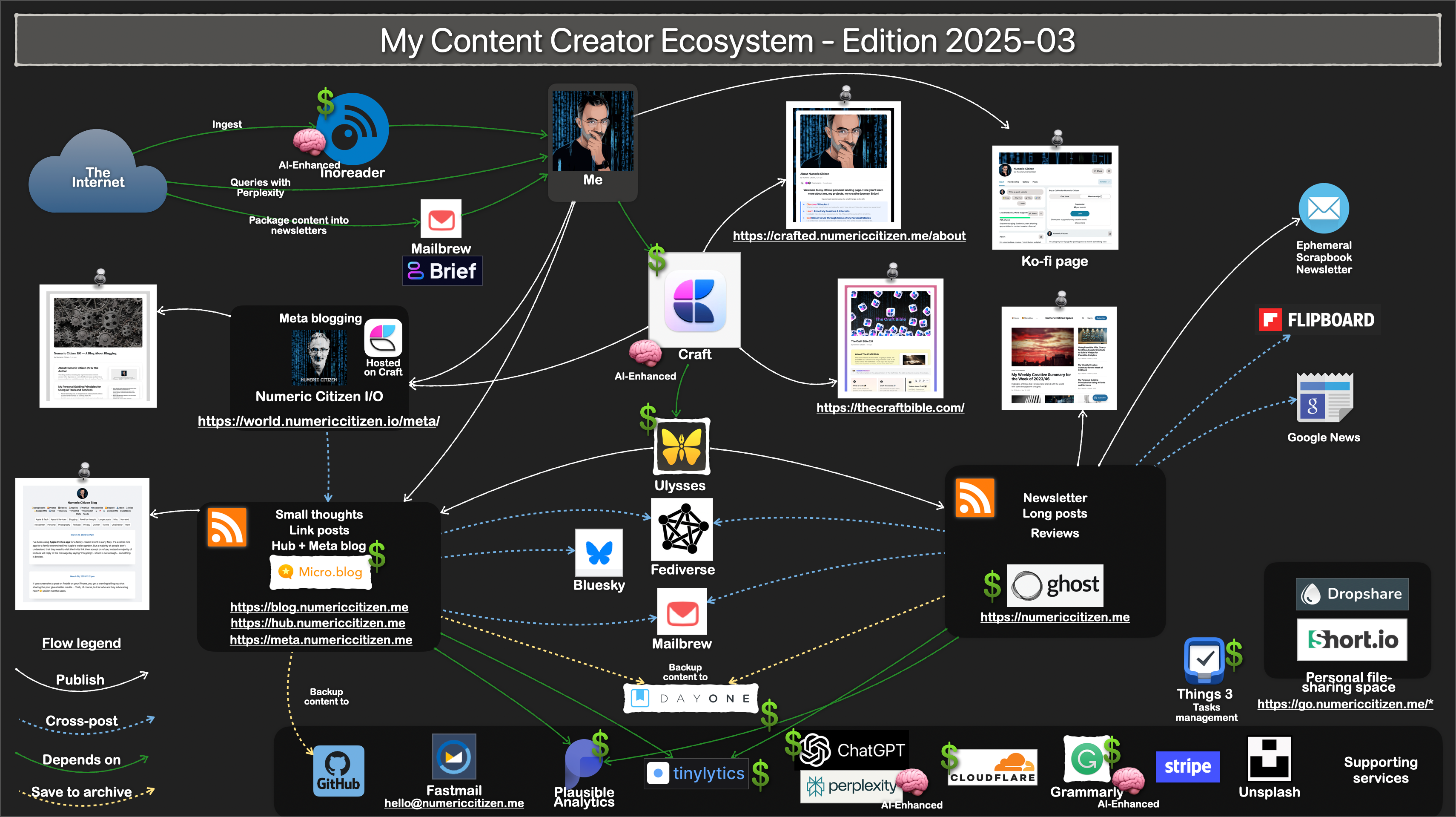
Numeric Citizen Digital Space Tip Sheet 2024-01-Hires.png

I use three distinct sites for posting written content. My main website (https://numericcitizen.me ), which came first, is currently hosted on Ghost. Next is my Micro.blog site (https://blog.numericcitizen.me), and, more recently, I added another small website hosted on Scribbles https://blips.numericcitizen.me. Let me explain each site’s purposes.

My main website is for posting longer articles like tech reviews (like “Five tools for efficient bloggers”) or for sharing long takes on a specific subject (like: “Five Steps for leaving Twitter”). My publication velocity is about one article per week. This is where my weekly creative summary newsletter gets published, thanks to Ghost’s built-in newsletter capabilities.

My second website is my daily blog, called “my blog,” and is where I post comments and thoughts about Apple, tech, photography, apps and services, and many other things. My blogging site is part of Micro.blog, there is a small community around it, thanks to Micro.blog fediverse support. Somehow, Micro.blog replaced Twitter for me, more than my presence on Mastodon did. I usually post around 10-20 weekly posts on Micro.blog. I like this place a lot for so many reasons.

I recently started using Scribbles, a small blog hosting service I like and want to support. I’m using this service to post short thoughts using a single-word title. These posts are then cross-posted to my Micro.blog timeline with a link going back to my Scribbles site. You can see an example of such a post appearing on my Micro.blog timeline in the following screenshot. Each post sports two emojis to help me spot them in my timeline. One thing I try to do is not to be too clickbait with my single-word title. The chosen word must be evocative or related to the post content.

Image.png

The post on Scribbles gets cross-posted on my Micro.blog timeline by using one of the coolest features of Micro.blog: cross-posting of content coming from RSS feeds. This is shown in the following screenshot.

Image.png

Micro.blog picks up posts from the Scribbles website RSS feed and will post content on my timeline, as well as cross-post it to Mastodon and Bluesky. This is POSSE in action. I’m a believer.

When I first thought about writing this article, I wasn’t sure where it would end up being shared. However, as the article grew in length and covered my blogging habits, it became obvious that it would go on my meta website, which is another one of my websites. There you have it.

On Sharing My Writings — What Goes Where

I recently got a few comments and questions from some followers on Micro.blog about my use of Scribbles versus Micro.blog blog hosting services. One guy couldn’t figure out why I was using Scribbles to write very short posts using a one-word title while I was using Micro.blog for longer posts, most of them without a title. I replied with a short answer, but I think I should elaborate for those who have been following me for some time or for those who just got here.

Numeric Citizen Digital Space Tip Sheet 2024-01-Hires.png

I use three distinct sites for posting written content. My main website (https://numericcitizen.me ), which came first, is currently hosted on Ghost. Next is my Micro.blog site (https://blog.numericcitizen.me) and, more recently, I added another small website hosted on Scribbles https://blips.numericcitizen.me. Let me explain each site’s purposes.

My main website is for posting longer articles like tech reviews (like “Five tools for efficient bloggers”) or for sharing long takes on a specific subject (like: “Five Steps for leaving Twitter”). My publication velocity is about one article per week. This is where my weekly creative summary newsletter gets published, thanks to Ghost’s builtin newsletter capabilities.

My second website is my daily blog, called “my blog,” and is where I post comments and thoughts about Apple, tech, photography, apps and services, and many other things. My blogging site is part of Micro.blog, there is a small community around it, thanks to Micro.blog fediverse support. Somehow, Micro.blog replaced Twitter for me, more than my presence on Mastodon did. I usually post around 10-20 weekly posts on Micro.blog. I like this place a lot for so many reasons.

I recently started using Scribbles, a small blog hosting service I like and want to support. I’m using this service to post short thoughts using a single-word title. These posts are then cross-posted to my Micro.blog timeline with a link going back to my Scribbles site. You can see an example of such a post appearing on my Micro.blog timeline in the following screenshot. Each post sports two emojis to help me spot them in my timeline. One thing I try to do is not to be too clickbait with my single-word title. The chosen word must be evocative or related to the post content.

Image.png

The post on Scribbles gets cross-posted on my Micro.blog timeline by using one of the coolest features of Micro.blog: cross-posting of content coming from RSS feeds. This is shown in the following screenshot.

Image.png

Micro.blog picks up posts from the Scribbles website RSS feed and will post content on my timeline, as well as cross-post it to Mastodon and Bluesky. This is POSSE in action. I’m a believer.

When I first thought about writing this article, I wasn’t sure where it would end up being shared. However, as the article grew in length and covered my blogging habits, it became obvious that it would go on my meta website, which is another one of my websites. There you have it.

The Date of Publication is a Must - Updated 2024-03-15

Have you ever searched the web for an article where you couldn’t see when it was published? It happens to me quite often. I don’t understand why such important information isn’t communicated to the readers.

In a fast-moving numeric world, the publishing date helps the reader gauge the content’s relevancy. I set the publication date on all my websites because it adds context to the content. When I created Numeric Citizen I/O, I used a post slug format that includes the publication date. The path to the webpage is shown in search results, which makes searching the web a more useful experience. Below are examples of URLs to my websites.

https://numericcitizen.micro.blog/2021/03/07/about-those-webp.html

https://numericcitizen.me/2021/02/27/porting-office-work-a-bad-idea/

Update 2022-11-15: Sadly, since moving to a Craft-based hosting solution, the URL can no longer include the publication date. If you are a business plan subscriber, the workaround is to set the document as a separate website individually.

Update 2024-03-15: I realized that when I moved from WordPress to Ghost, I lost this notion of date in the URL. All previous content is still accessible using the old URL format, but newly published content no longer contains the publication date in the article’s URL. We cannot have it all, I guess.

This article was first published on 2021-03-17.

No More Photo Duplicates Hopefully

I decided to disable cross-posting from my Glass feed to Bluesky and Pixelfed. This should fix the photo duplicates on your Micro.blog timeline each time I post a new image on Glass. Sorry for the inconvenience. The problem was simple: Let’s say I share an image on Glass, Micro.blog picks it up and cross post to Bluesky and Pixelfed. Micro.blog then detects a new photo from my Pixelfed feed and cross posts that to my Micro.blog timeline for the second time. Hence the duplicate.

🔗 Mobivention announces its own iOS App Marketplace

As detailed by the company in a press release, mobivention’s App Marketplace will let developers distribute B2B and B2C apps to their customers outside the iOS App Store. “The mobivention App marketplace is primarily aimed at business customers who are looking for an alternative solution for distributing their apps,” mobivention explains.

Tired: there is an app for that. Wired: There is a marketplace for that. 🤓

How Do I Read and Process an Article

Let’s say I stumble on an article I wish to read and process. I’ll follow the following steps, covering the collection and archival stages.

  1. Save the article in Omnivore1,2.
  2. Set tags in Omnivore.
  3. Read the article, highlight text as needed and write comments if required.
  4. Summarize the article using Raycast AI. I have a Keyboard Maestro macro for that.
  5. Copy and paste the summary into the Omnivore notebook accompanying the article.
  6. Archive the article in Omnivore.
  7. Export the Readwise highlights (done automatically from Omnivore syncing).
  8. Import the created markdown files into Bear.
  9. Adjust tags if required.

I realize this workflow is essentially for the Mac. Nothing like this can be done on the iPad without a major tweak or two.

You can find this article on the “My Micro-Workflows Explained” website.


  1. The article can be saved from Inoreader, Reeder or the Arc Browser. ↩︎

  2. Some articles come in using my Omnivore’s email address that I use for subscribing to some newsletters. ↩︎

Each week, I use this template in Things 3 to help me out with my planning. Each Sunday, I duplicate the whole project and rename it accordingly. I love Things 3[^1]. [^1] I tried to do this in Apple Reminders but I prefer Things 3 experience.

Today I added a new global changelog1 page to my metablog. The changelog will cover all the changes applied to my digital publishing space.


  1. A changelog is a document or record that details the changes made in a software project. It typically includes information about new features, enhancements, bug fixes, and any modifications made to the software between different versions or updates. ↩︎

Some Hurdles to Fix Already

I encountered my first few hurdles in transposing my content from a Craft document to a Micro.blog. Craft enables rich document content and supports block types like JSON output or command line examples. Posts containing these need special Markdown attention. Thanks to some help1, I figured that out, so the output looks ok. Next up are documents with images like screenshots. When exporting from Craft to Ulysses, images are inserted in Ulysses as references to Craft’s backend storage. When posting on Micro.blog, the images are not uploaded on Micro.blog’s backend. I need to manually download each image and insert them in Ulysses so they get uploaded to Micro.blog and be self-contained there. If I ever drop Craft, I want the images in my post to stay valid and display correctly.


  1. I want to thank MacGPT here for the hint. 😅 ↩︎