Browsing Past Published Articles on Ghost

Circumventing Ghost’s limited posts management capabilities.

List of publications in Ghost admin panel.

I recently decided to spend some time editing past articles published on my Numeric Citizen Space website. I first thought that by going to my Ghost admin page, I could quickly browse past published articles by month. I couldn’t be more wrong. In fact, Ghost offers limited post management capabilities, thanks to its limited content browsing capabilities. I cannot go back, say, list articles published early in 2023. I can sort by ascending or descending order, but from there, I have to scroll through a long, dynamically created list of posts. It’s not very effective for a website with 600-plus posts. I had to find a different option to locate a post for an update. This is where Ghost’s content APIs come into play.

The following API request doesn’t do the job (API key voluntarily removed!):

curl -H "Accept-Version: v5.0" "https://numeric-citizen-introspection.ghost.io/ghost/api/content/posts/?key={APIkeygoeshere}&fields=title,url,published_at,updated_at&filter=published_at:>2024-01-01%2Bpublished_at:<2024-02-01" | json_pp

Let me explain what is this API request.

First, I’m going to the request using the macOS command line, hence the curl command. Next, the whole query follows in quotes. I query the content/posts API endpoint. Next, I pass my API key, followed by a field selection (&fields), and next with the filter using the published date between two dates. Finally, I pipe the results in the pretty JSON print macro (is this a macro?) so the output looks like this:

jfm@CraftingMAChine ~ % curl -H "Accept-Version: v5.0" "https://numeric-citizen-introspection.ghost.io/ghost/api/content/posts/?key={API-key-goes-here}&fields=title,id,url,published_at,updated_at&filter=published_at:>2024-01-01%2Bpublished_at:<2024-02-01" | json_pp
	{
	   "meta" : {
	      "pagination" : {
	         "limit" : 15,
	         "next" : null,
	         "page" : 1,
	         "pages" : 1,
	         "prev" : null,
	         "total" : 9
	      }
	   },
	   "posts" : [
	      {
	         "id" : "65b6a09840566000015b0d37",
	         "published_at" : "2024-01-28T13:50:19.000-05:00",
	         "title" : "My Weekly Creative Summary for the Week of 2024/03",
	         "updated_at" : "2024-01-28T13:50:19.000-05:00",
	         "url" : "https://numericcitizen.me/my-weekly-creative-summary-for-the-week-of-2024-03/"
	      },
	      {
	         "id" : "65b6540640566000015b0cf7",
	         "published_at" : "2024-01-28T08:23:26.000-05:00",
	         "title" : "Special Message to Paying Subscribers",
	         "updated_at" : "2024-01-28T08:23:26.000-05:00",
	         "url" : "https://numericcitizen.me/special-message-to-paying-subscribers/"
	      },
	      {
	         "id" : "65b16e25bc7fde0001314ccb",
	         "published_at" : "2024-01-24T15:09:24.000-05:00",
	         "title" : "The Mac Turns 40",
	         "updated_at" : "2024-01-24T15:09:24.000-05:00",
	         "url" : "https://numericcitizen.me/the-mac-turns-40/"
	      },
	      {
	         "id" : "65ad35418532ae000169ddd2",
	         "published_at" : "2024-01-21T10:22:33.000-05:00",
	         "title" : "My Weekly Creative Summary for the Week 2024/02",
	         "updated_at" : "2024-01-21T10:22:33.000-05:00",
	         "url" : "https://numericcitizen.me/my-weekly-creative-summary-for-the-week-2024-02/"
	      },
	   ]
	}

Next, I copy the post ID of one article and paste it my browser for edition using this special URL:

https://numeric-citizen-introspection.ghost.io/ghost/#/editor/post/652e6eedb8a2650001ad9c5b

This URL brings me directly into the Ghost editor, provided that i was already authenticated with my account. That’s pretty much it. It could be much simpler. For this, I miss WordPress.

You can find the Ghost API document right here.

Browsing Past Published Articles on Ghost

Image.png

I recently decided to spend some time editing past articles published on my Numeric Citizen Space website. I first thought that by going to my Ghost admin page, I could quickly browse past published articles by month. I couldn’t be more wrong. In fact, Ghost offers limited post management capabilities, thanks to its limited content browsing capabilities. I cannot go back, say, list articles published early in 2023. I can sort by ascending or descending order, but from there, I have to scroll through a long, dynamically created list of posts. Not very effective for a 600-plus posts website. I had to find a different option to locate a post up for an update. This is where Ghost’s content APIs come into play.

The following API request doesn’t the job (API key voluntarly removed!):

curl -H "Accept-Version: v5.0" "https://numeric-citizen-introspection.ghost.io/ghost/api/content/posts/?key={APIkeygoeshere}&fields=title,url,published_at,updated_at&filter=published_at:>2024-01-01%2Bpublished_at:<2024-02-01" | json_pp

Let me explain what is this API request.

First, I’m going the request using macOS command line, hence the curl command. Next, the whole query follows in quotes. I query the content / posts API endpoint. Next, I pass my API key, followed by a fields selection (&fields), next with the filter using the published date between two dates. Finally, I pipe the results in the pretty JSON print macro (is this a macro?) so the output looks like this:

jfm@CraftingMAChine ~ % curl -H "Accept-Version: v5.0" "https://numeric-citizen-introspection.ghost.io/ghost/api/content/posts/?key={API-key-goes-here}&fields=title,id,url,published_at,updated_at&filter=published_at:>2024-01-01%2Bpublished_at:<2024-02-01" | json_pp
{
   "meta" : {
      "pagination" : {
         "limit" : 15,
         "next" : null,
         "page" : 1,
         "pages" : 1,
         "prev" : null,
         "total" : 9
      }
   },
   "posts" : [
      {
         "id" : "65b6a09840566000015b0d37",
         "published_at" : "2024-01-28T13:50:19.000-05:00",
         "title" : "My Weekly Creative Summary for the Week of 2024/03",
         "updated_at" : "2024-01-28T13:50:19.000-05:00",
         "url" : "https://numericcitizen.me/my-weekly-creative-summary-for-the-week-of-2024-03/"
      },
      {
         "id" : "65b6540640566000015b0cf7",
         "published_at" : "2024-01-28T08:23:26.000-05:00",
         "title" : "Special Message to Paying Subscribers",
         "updated_at" : "2024-01-28T08:23:26.000-05:00",
         "url" : "https://numericcitizen.me/special-message-to-paying-subscribers/"
      },
      {
         "id" : "65b16e25bc7fde0001314ccb",
         "published_at" : "2024-01-24T15:09:24.000-05:00",
         "title" : "The Mac Turns 40",
         "updated_at" : "2024-01-24T15:09:24.000-05:00",
         "url" : "https://numericcitizen.me/the-mac-turns-40/"
      },
      {
         "id" : "65ad35418532ae000169ddd2",
         "published_at" : "2024-01-21T10:22:33.000-05:00",
         "title" : "My Weekly Creative Summary for the Week 2024/02",
         "updated_at" : "2024-01-21T10:22:33.000-05:00",
         "url" : "https://numericcitizen.me/my-weekly-creative-summary-for-the-week-2024-02/"
      },
      {
         "id" : "65ac3aa68532ae000169ddb6",
         "published_at" : "2024-01-20T16:28:20.000-05:00",
         "title" : "New IT Rules at the Office Prompts Me to Revisit My Mac Usage at Home",
         "updated_at" : "2024-01-20T16:28:20.000-05:00",
         "url" : "https://numericcitizen.me/new-it-rules-at-the-office-prompts-me-to-revisit-my-mac-usage-at-home/"
      },
      {
         "id" : "65a3ed6e8532ae000169dbe0",
         "published_at" : "2024-01-14T09:24:25.000-05:00",
         "title" : "My Weekly Creative Summary for the Week of 2024/01",
         "updated_at" : "2024-01-14T09:24:25.000-05:00",
         "url" : "https://numericcitizen.me/my-weekly-creative-summary-for-the-week-of-2024-01/"
      },
      {
         "id" : "659e86018532ae000169dbbf",
         "published_at" : "2024-01-10T06:58:44.000-05:00",
         "title" : "Adobe Lightroom 2016-2024 RIP — How To Migrate From Adobe Lightroom to Photomator",
         "updated_at" : "2024-01-10T06:58:44.000-05:00",
         "url" : "https://numericcitizen.me/adobe-lightroom-2016-2024-rip-how-to-migrate-from-adobe-lightroom-to-photomator/"
      },
      {
         "id" : "659d32eb8532ae000169dba7",
         "published_at" : "2024-01-09T06:53:21.000-05:00",
         "title" : "Apple Vision Pro — The Missing Apple Keynote Case",
         "updated_at" : "2024-01-09T06:53:21.000-05:00",
         "url" : "https://numericcitizen.me/apple-vision-pro-the-missing-apple-keynote-case/"
      },
      {
         "id" : "659953468532ae000169db6d",
         "published_at" : "2024-01-06T08:27:04.000-05:00",
         "title" : "A Tough Year Ahead for Apple",
         "updated_at" : "2024-01-06T16:52:59.000-05:00",
         "url" : "https://numericcitizen.me/a-though-year-for-apple/"
      }
   ]
}

Next, I copy the post ID of one article and paste it my browser for edition using this special URL:

https://numeric-citizen-introspection.ghost.io/ghost/#/editor/post/652e6eedb8a2650001ad9c5b

This URL brings me directly into the Ghost editor, provided that i was already authenticated with my account. That’s pretty much it. It could be much simpler. For this, I miss WordPress.

You can find the Ghost API document right here.

https://ghost.org/docs/content-api/

This article is also available here.

My Content Creator Workflow as of 2023-11

My-Creative-Workflow-2023-11.png

My creative workflow as of 2023-11. You can download an higher resolution here.

This 2023-11 version has a few changes and a cleaner and more focused workflow. Before going into specific details, I wanted to remind readers that I support the " POSSE " idea. You can read one post about it here. This workflow presented reflects this. As a reminder, here is one definition of the POSSE principle according to ChatGPT:

“POSSE” is an acronym that stands for “Publish (on your) Own Site, Syndicate Elsewhere.” It’s a content publishing model that first encourages publishing content on your own website, and then syndicating (or sharing) that content on other platforms or websites. This approach is often recommended in digital marketing and personal branding strategies, as it allows individuals to maintain control over their original content while still benefiting from the audience and engagement found on larger, established platforms. The POSSE model is particularly relevant in the context of blogging, social media, and online content creation.

Welcome AI, welcome ChatGPT, Dall-E, Midjourney

AI is making an official entry in my creative workflow. I wrote a long piece stating my guidelines for using AI in my creative work. You should read those and maybe get some inspiration out of them. The header image of this article was generated using Dall-E.

A new setup to share files easily

Dropshare coupled with Short.io enables me to share files like screenshots or other things. The setup was documented in detail in a previous article on this meta blog. Behind the scene, Dropshare is configured to use Backblaze to store files in a S3 bucket.

Bye bye to my Digital Garden

I came to the conclusion that a digital garden isn’t something for me. I decided to move some portions into my official about page. You can still access the remains of the garden, here.

A fun experience with Tinylytics

I’ve been using Plausible for my analytics needs but a cool guy (the same who’s also working with Manton Reece on Micro.blog hosting service, developed a lightweight version which I decided to support.

Safari-Personal (Default) — Sites tinylytics@2023-11-23@20.13.49@2x.png

The Tinylytics dashboard

Google Sheets is out too

I was using Google Sheets to save links to every post on Micro.blog via an IFTTT automation. I no longer feel the need to key this in place.

Brief

Brief is now part of my workflow because they also took over Mailbrew, both are forming a powerful content consumption enabler duo. Some of my Mailbrew newsletters contain Brief as a source for news, which is heavily using AI for summarization.

My Reading Workflow Explained

The many facets of my reading workflow needed to be examined and studied. When do I read, using which device and application? How is my reading affecting or contributing to my creative workflow? What happens when I find something interesting while I’m reading? How do I store important information pieces? How do I get back to them? How often and for what purpose? The answer to these numerous questions drive my choice of application for reading.

I’ve been thinking for a long time about ways to improve my reading workflow for a few reasons. First, I want to read more and more consistently. Two, I’m not sure which app is better to support this. I’ve been switching read-later service many times and until now, I wasn’t able to settle on one. Third, when reading, I want to get the most out of it and use the gathered knowledge more effectively. The following diagram depicts the flow of my reading workflow, inspired by the CODE methodology. Each box is explained in more detail below.

Freeform-My Reading Workflow as of 2023-09@2023-09-30@21.26.57@2x.png

First, let’s start with my possible reading sources.

  1. RSS feeds can be imported directly into Omnivore by using the RSS feed address. I follow a few dozen feeds via Inoreader and Reeder, but just a few are selected to go directly into Omnivore for the quality of their content. As I’m writing this, four feeds are configured for direct importation. This feature was only recently introduced into Omnivore, and it works great. Occasionally, I go into Omnivore, select the RSS tag and start reading from there.

Image.png

  1. Reeder is a very popular RSS reader. There are so many of them, but something hard to describe in Reeder sets it apart. Simplicity but not simplistic might be a good characterization. Reeder is also a great Inoreader client. Recently, I decided that for interesting articles in Reeder that I want to read, I save them into Things 3. One of the reasons is that when the article is read and analyzed, I can check it off from the to-do list, and Things will log this into the LogBook. I like the journaling capabilities of Things 3. I use it in my weekly creative summary.

Image.png

  1. Safari is my go-to browser. Surfing the web triggers reading opportunities. When I’m not ready to plunge into a 2500-word article, I use the Omnivore Safari extension to save it for a read later occasion. Another possibility is to save a bookmark directly into Craft from Safari (via Copy & Paste, thanks to Craft Safari extension limitations). When this happens, it’s because I was looking for something in Safari and needed to keep the bookmark for later use. The same process sometimes happens right in Reeder. In that case, a simple “copy & paste” of the bookmark is executed from Reeder to Craft. But, overall, I try to save a bookmark into Things 3 for the same reason I do it from Reeder. Things 3 helps me keep track in an effective way of all my future readings.

Image.png

  1. Things 3 helps me manage and be consistent with my creative activities. Unsurprisingly, it plays a role in the Collect portion of my CODE workflow. For each article I plan to read and possibly analyze, I create a new task in Things 3 with a link to the article in the task’s note. As I wrote previously, each time I check an item from the list, the item is logged in Things 3’s logbook. This way, I keep track of what I have read and when.

Image.png

  1. From Things 3, I’ll open the link in Safari for the article I decided to read. Sadly, I cannot save the link from Things 3 to Omnivore directly. It’s possible only through Omnivore’s Safari extension. From there, if I think the article is long enough and needs more thorough reading, I’ll send it to Omnivore. I might save the bookmark into Craft also, depending on my needs. I often visit an article only to copy and paste its URL into a Craft document as a reference. However, I could directly import the article’s content into a new Craft document using a “CraftClip” shortcut. In this scenario, I want to import knowledge into Craft to backlink to it and select the portion to include as a quote in another document.
  2. Omnivore is my go-to “read-later” service. I won’t write a review here (maybe for another article). Once the content is saved into Omnivore (via the Safari browser extension or automatically from the few selected RSS feeds, articles are stored in Omnivore’s Inbox and are available for reading, highlighting, annotation and tagging. The nice thing about Omnivore is that it is free, it is constantly evolving, and, more importantly, I can copy and paste all my highlights and annotations in one click and paste them into a Craft document, and they will be formatted exactly the way it should be.
  3. Omnivore highlights are synced to Readwise. I also copy and paste the link to the stored article back into Craft for easier and quicker access.

Image.png

  1. Central to my creative workflow, Craft is a repository of bookmarks from Safari, Reeder, and highlights stored in Readwise. I import those from time to time to consolidate knowledge. Anybox, a bookmarks manager, has a different role of holding bookmarks about specific subjects without contextual information. This is why I don’t consider Anybox part of my reading workflow.
  2. When working on a review or an article about a specific subject, I will create a unique document container in Craft based on a template I made (the template is available for sale here). Everything I read, potentially highlighted and annotated, might be stored in this container as a reference, a bookmark, or the full article. The idea is to bring related things closer together so I can build relations.

My reading workflow might look complex but it really isn’t. I’ve been testing it while reading articles about the iPhone 15 Pro Max. It’s not perfect but it is close to be just right for my needs. There are always possible improvements, but those will come in due time. Previously, my workflow was centered around Craft, you might take a look at the following video if you are curious.

My Reading Workflow Using Craft

Still to come: how do I read the newsletters I subscribe to? 🤔

Moving Out of WordPress — The DNS Side of the Story

The migration from GoDaddy to CloudFlare was mandatory to support the ability to use a custom domain with Ghost at the root level (numericcitizen.me), using CNAME. This is something that is not possible using GoDaddy. The process is relatively simple once you’ve done your homework of reading ALL the documentation from both GoDaddy and CloudFlare.

WordPress: numericcitizen.me current config

Hosted on GoDaddy, the host file:

numericcitizen.me.txt

Image.png

WordPress configuration to use numericcitizen.me

Image.png

Image.png

website will only be available through: https://numericcitizen.wordpress.com once domain disconnected

Ghost: numericcitizen-introspection.blog current configuration

Hosted on CloudFlare

Image.png

CloudFlare host file:

numericcitizen-introspection.blog.txt

Image.png

Start of DNS changes

Because I’m planning to use a root domain for Ghost, as per this Ghost article, GoDaddy doesn’t support root domain:

Image.png

The numericcitizen.me domain will need to be transferred from GoDaddy to CloudFlare first.

  1. On GoDaddy: Update contact information on the source domain on GoDaddy to be exactly the same for both domains.
  2. On GoDaddy: Unlock the domain to allow for registrar change.

Image.png

  1. On CloudFlare: Add the domain name to my CloudFlare account.

Image.png

Image.png

CloudFlare name servers:

hans.ns.cloudflare.com

noor.ns.cloudflare.com

  1. On GoDaddy, edit nameservers on the domain:

Image.png

Proceed to the CloudFlare procedure, but first, add the numericcitizen.me domain to the CloudFlare account using this article. Then, continue using GoDaddy’s procedure. Once done, proceed with the following steps.

Steps to follow once the domain has been successfully transferred to CloudFlare.

  1. Disconnect numericcitizen.me from WordPress (website should stop resolving under numericcitizen.me except https://numericcitizen.wordpress.com).
  2. In the GoDaddy domain manager, remove two A records pointing to WordPress servers (192.0.78.*).
  3. Add CNAME @ numeric-citizen-introspection.ghost.io so that https://numericcitizen.me (root domain) resolves to numeric-citizen-introspection.ghost.io.

The use of a CNAME for a root domain is explained in super and great details here.

  1. Wait for propagation using https://www.whatsmydns.net (like a few hours).
  2. In Ghost(Pro) > Domain, Update current domain:
    1. change the following according to the actual process.

Image.png

Image.png

Safari-Ghost(Pro) - Numeric Citizen Blog@2023-03-24@15.55.40@2x.png

Safari-Ghost(Pro) - Numeric Citizen Blog@2023-03-24@15.55.48@2x.png

  1. Still using Ghost(Pro) > Domain, set new ghost subdomain to numericitizen-me.ghost.io
  2. Wait for the process to complete
  3. Test https://numericcitizen.me
  4. Test intra-links.

Done.

Why It’s So Hard to Make Up My Mind About Digital Tools?

This article posted back in 2022, was a glimpse at a great moment of confusion. Following the publication of “Things That Don’t Stick With Me”, the next logical thing to do now is to talk about my seemingly permanent state of confusion with my choices of many digital tools.

In short, the problem is that, in many cases, I use different apps to do the same thing. The worst case to come to my mind is RSS feeds readers. After many years with News Explorer, I tried NetNewsWire, Reeder and Inoreader. Oh, I forgot about ReadKit too. The light at the end of the tunnel is in sight because News Explorer is now out. After discovering and experimenting with Inoreader, I concluded that News Explorer no longer fit my needs. One of them being the text-highlighting capability. That is one less app to use or consider. NetNewsWire simplicity makes the app attractive. Reeder’s design is also attractive. I do use Inoreader with Inoreader web service. I’m not decided yet on the next steps: which one should I keep?

Twitter vs Tweetbot was another example. When I was on Twitter, I constantly switched between those two. The funny thing is that for those still on Twitter, third-party apps for Twitter are all dead. This would have fixed my issue! Now, with Mastodon, it’s worst because of the plethora of available apps. There are too many to list here and the list keeps expanding. Thankfully, I don’t use Mastodon much, but if I did, well, you know the drill by now, right?

On Micro.blog, same issue. I’m constantly moving between the original Micro.blog app and Gluon. Both are great but latter is a bit more complete.

Box and Dropbox used to be examples of my indecision before I went all in with iCloud Drive a few years ago. I still use Google’s Drive for storing Google’s Sheets updated via an IFTTT automation. That, I’m no longer sure about its usefulness.

Clipboard managers were another source of conflicting views. There were three apps in that space: Copied, Pastebot and Unclutter. I’ve settled on the latter because it is so much more than a clipboard manager. Yet, it took me way too long before deciding which one to keep. I don’t use a clipboard manager on the iPhone anymore.

Unclutter window on my Mac — Three Areas: the clipboard history, content of a folder and content of a specific text file.

  • Here’s another one: Apple’s Notes, Notion or Craft. I use Craft 95% of the time, Notes 4% of the time, and Notion 1% for the rest. Oh, I forgot to mention Tot, a nifty tech editor! What is preventing me from settling on Craft for everything? I use Notion for storing information about a sideline project because Craft is not as good for that type of information.
  • For my photo processing and retouching needs: Acorn 7, Pixelmator Pro, Photomator, Adobe Lightroom CC and Lightroom Classic are installed somewhere on my devices. I should probably drop Adobe Suite, but It would be a mess to retrieve all my photos backed up to the Adobe Cloud. I’m being lazy here. I’m really enjoying Photomator on my iPad and iPhone. This application is better designed than Apple’s Photos for photo editing. Photomator is coming soon to the Mac, too, apparently, to make matters worst, I guess. I’m on the waiting list for a TestFlight invite.
  • As a computer performance enthusiast, I use utilities like Sensei, iStats Menu, iStatistica Pro, and the open-source project “Stats” available on GitHub. I use iStats Menu on my Mac mini, Stats on my Mac Pro (used for my SDDCbox project) and iStatistica Pro on my MacBook Air. Sensei should probably be dropped.

Image.png

  • Reddit, Apollo, Slide and Comet. There are all Reddit clients. They all offer nice and different things when consuming or interacting with Reddit content. For example, Slide comes with the best widgets, but is lacking active development and isn’t the best at browsing content. Comet isn’t been updated in two years. Apollo runs on Apple Silicon Macs but suffers from some display bugs.
  • Password Managers, another story of indecision and laziness: 1Password and Apple’s Password Keychain. I should move from 1Password to Apple’s solution once and for all. Maybe if Apple had a discreet password manager? I’m undecided.
  • Tasks managers represent another case of spreading myself all over the place. For personal to-dos, I depend on Apple’s Reminders. For my creative workflow, I depend on Things 3 but there was a time last year when I tried using Craft as a to-do manager. It didn’t go well, and I decided to bring back Things 3 in my workflow. I documented my change of heart in this video. One comforting thought, I know that I’m not alone in my quest for the best tools. This documented case with Things 3 and OmniFocus is a good example.

There is hope

I might sound like a tormented person, but I’m not. I would say that I’m not as focused as I should be. But there is hope because I do make decisions from time to time when things become clear or obvious. Let’s see a few examples.

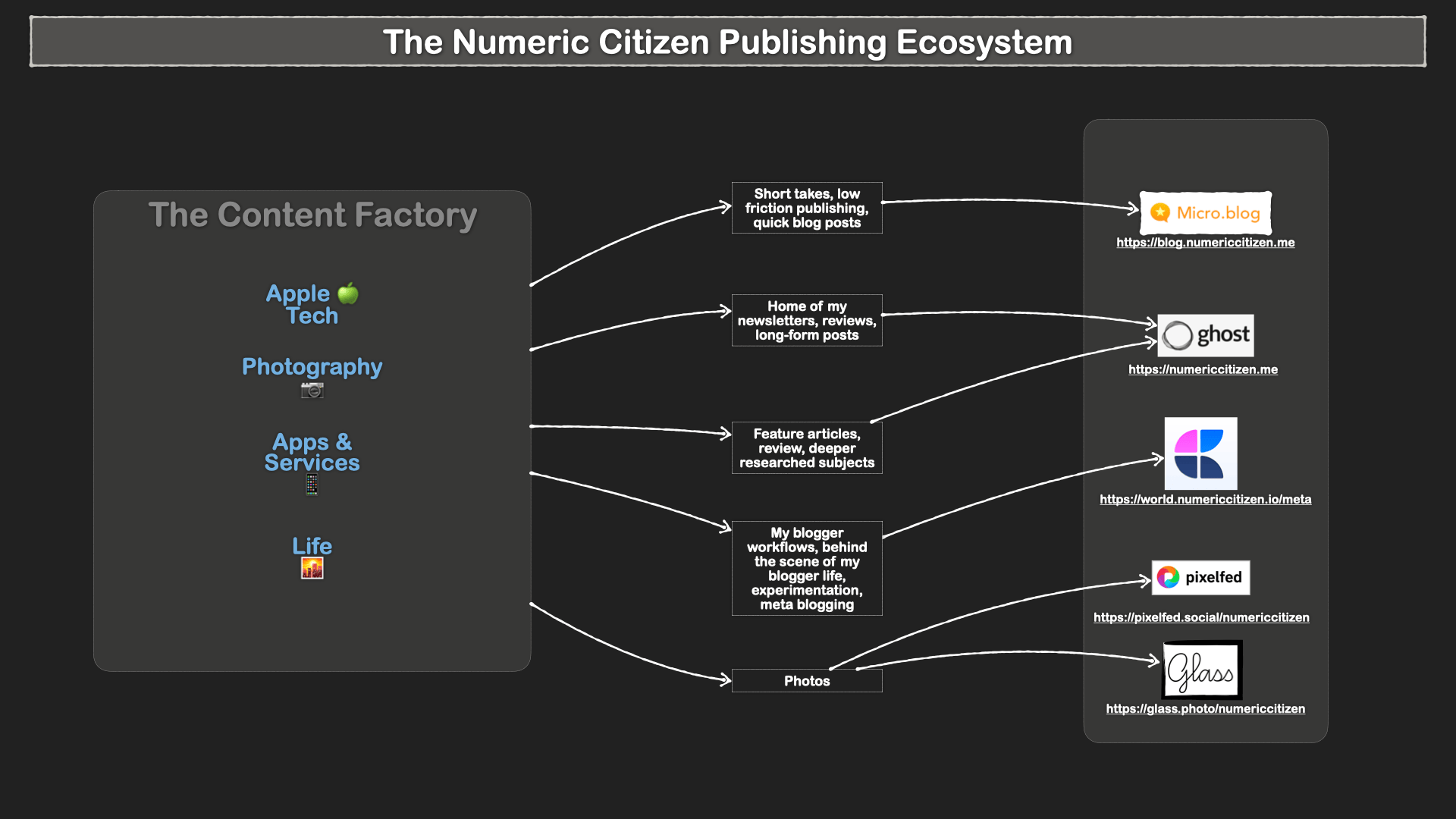
  • On the publishing platforms front, things are improving. Thankfully, this year, I’m focusing. There use to be WordPress, Micro.blog, Substack, Ghost, Blot and Write.as. WordPress is out. Substack is out. Blot is out. I’m down to two publishing platforms: Ghost and Micro.blog. That’s it. Sure, i cross-post some content to Mastodon, Bluesky and Flipboard. But that doesn’t count.
  • On the photography side, at some point, there was 500px, Smugmug, Unsplash, Glass, Exposure. 500px is out. I decided to move out of Smugmug by the end of my subscription (next year), so that I can focus on Glass and Exposure.

Image.png

  • I recently dropped Pocket, Matter and Readwise Reader. So, you see, there is hope!
  • For bookmarking, at some point, I was using Apple’s Safari Reading List, Pocket, Craft bookmarks, Apple’s Quick Notes, and Mailbrew saved items. I dropped all of these in the last year to focus on Anybox. I couldn’t be happier. Oh, I sometimes use Micro.blog bookmarking feature to archive articles than I can highlight then create a linkpost using these highlights.
  • Ever since I got my M1-based Mac mini, I bought a M1 MacBook Air. I constantly use both of them. One thing that I like to do is to use on app on one Mac and another competitive app on the other Mac. For example, on my MacBook Air, I use “Stats” and on my Mac mini, I use iStats Menu.
  • iPad Pro vs MacBook Air: because reasons. I love both but in different usage scenarios. I’m fortunate enough to have both.
  • My reading workflow was in a state of flux: https://numericcitizen.micro.blog/2022/05/07/my-reading-workflow.html. But, thanks to my decisions to drop traditional read-later services like Matter or Pocket, I’m more focused now in that area.

I should probably update this article occasionally because my digital toolkit is constantly evolving. You probably should keep an eye on my documented toolset that I keep up to date.

This article was previously published on Numeric Citizen Space:

Why It’s So Hard to Make Up My Mind About Digital Tools?

From an Idea to a Blog Post

In this blog post, I want to share a different “behind the scene” look at how I process information that will eventually give birth to a new blog post. It’s a bit different than the one I publish from time to time about my blogger workflow. This behind-the-scenes view emphasizes something vital to me: the process. Sure, the results are always important, but the process that leads to these results is equally important. Moreover, tools are involved in each process, which, for a blogger and writer like me, are applications and services. I often think that I love creating because I usually love to use tools in general, especially if they are well crafted. For example, the act of writing in a great writing app like Ulysses is a satisfying experience. So. let’s see how I do all this.

In general, my inspiration comes from my readings and my time spent on Inoreader. Each morning, I spend between thirty and ninety minutes doing just that: consuming content from many sources like RSS feeds, Reddit, etc. I do spend time on YouTube, but I’m mostly reading stuff. I spend less than 10% of my time on video consumption. I force myself into reading; it’s one of the best ways to find subjects to write about or get new post ideas. There is too much content available online; I do have to use applications to bookmark things to read later. For that, Inoreader and Anybox (review of Anybox here) help me bookmark articles on which I want to react or write in a very short time frame.

When I write, depending on the expected length, complexity or destination of the piece, I may write it down directly on Micro.blog or use their macOS application which is good enough. When I plan to publish on my main blog, I’ll go with Ulysses, which is the case for this current blog post.

Another important tool that I use is Craft. This application is a repository for many things like future articles in the research phase. I do use Anybox to collect all the pieces that will go in a future issue of my Numeric Citizen Introspection newsletter. Craft will support my writing process as I can reuse tidbits of information that I saved in there for longer posts. The more I use Craft, the more I depend on it for everything. This is why Craft has a special place in the following diagram, showing how all the pieces fit together. Finally, all references to my posts on Micro.blog are stored in Google Sheets so I can easily refer to and include them while writing. It’s a time saver.

My information processing workflow.

I guess my process has nothing really special, but it is perfectly crafted for my needs. I do publish a lot, and I need to be as efficient as possible, and this process enables and supports it every day.

My Content Creator Workflow as of 2023-04

Time for another workflow update (the previous update can be found here). This update probably contains the most profound changes in a long time. My journey with WordPress as a CMS (content management platform) has ended. It started in 2015, after closing my indie developer blog hosted on Google’s Blogger. There are a lot of moving parts. The dust is starting to settle a bit now. Let’s dig in.

CleanShot-CleanShot@2023-03-26@20.05.48@2x.png

As for the diagram, I wanted to make it more focused on digital tools and how they relate to each other, so I removed the devices representation as well as icons of apps that are better documented in my toolset (see down below). I kept the essential making the foundation of my workflow.

Bye Bye WordPress.com

Following the completion of my migration from WordPress to Ghost, I think it’s the right time for an update to my content creator workflow. This WordPress migration forced a reconsideration of many tools that I use to create. This post will highlight most of these changes.

Bye bye Twitter

Up until a few months ago, Twitter was really at the center of my online presence. It’s no longer the case. It’s (nearly) nowhere to be seen (except for searches through Inoreader). With Twitter out from my digital landscape, the following are no longer needed.

  • Birdbrain, an iPhone app that allowed me to track who was following or unfollowing me.
  • Buffer, a scheduling service to post content on Twitter. It was used to repost past content to stimulate exposure and traction. If I consider the price of the service, I don’t think the return on investment was worth it.
  • My @Apple_Observer Twitter account is in read-only mode. My @numericcitizen Twitter account is also in read-only mode but is used in conjunction with Inoreader for searching and scrapping Twitter for specific content using specific keywords.

Changing reading habits

My reading habits are evolving too. Reading is the fuel behind my creative activities.

  • Speaking of Inoreader earlier, this content consumption service appeared on my radar and was later adopted. It is replacing News Explorer, an RSS reader. Inoreader allows for much more than reading RSS feeds. Reeder (read my review here) and ReadKit are two RSS readers that I use alternatively to consume my content on Inoreader simply because these two apps offer a native experience on the Mac that Inoreader currently doesn’t offer. I’m still undecided as to which of the two apps I’m going to keep. That’s for another content creator workflow update.
  • Gone is Matter and Readwise Reader. Since I’m mostly reading content through RSS feeds, these two services are no longer needed. I keep Readwise highlights subscription, though. It serves as an archiving service of some sort. All text annotations by Inoreader are saved to Readwise.

A more focused publication channel

  • Content publishing services were also reconsidered. Medium is out. Spending time there’s no longer viable as readership is stagnant at best. Tumblr is out too. I was cross-posting content there, but it is no longer viable too. Even if it was an automated process, thanks to Micro.blog cross-posting ability and to IFTTT, it doesn’t make sense to maintain Tumblr as this platform is a walking dead.
  • Back to the WordPress migration, for obvious reasons, all my WordPress plugins, like Yoast, are no longer needed. Many others were dropped, too, saving me quite a lot on recurring expenses. Yoast was useful when writing a blog post to optimize SEO content but added some friction and probably didn’t make a big difference for my SEO optimization aspirations.

Is my Craft usage fading out?

  • My Craft usage is still important, but a few use cases were dropped. I don’t use daily notes to manage my things to do (as explained in this video “Why I’m No Longer Using Craft Daily Notes”). I went back to Things 3 for this. The other use case that was removed from Craft is bookmarks management, as explained in detail in this video “Why I’m Moving My Bookmarks Out of Craft”. Now, I’m depending on the excellent Anybox bookmarks manager, as I explained in this article: “Anybox – My Experience with a Bookmarks Manager”. Switching to Anybox also means I dropped Raindrop.io too. Even as a free service, it was redundant to keep.

Finally, since my tool set is always changing, I created and shared a Craft document where you can have a complete view of the apps and services I depend on to create things and put them out there on the net. You’ll also see tools that are under consideration and the tools that I dropped in the past. Link: https://world.numericcitizen.io/meta-toolset.

Image.png

Moving Out of WordPress — My Detailed Experience

So it began. Then it concluded. After thinking about it for a while doing some detailed planning, I’m officially done with moving out of WordPress.com for my blog hosting service. I’m leaving after so many years of joy and pain (I’ve been on WordPress since 2015).

https://numericcitizen.me/bye-bye-wordpress-hello-again-ghost/

https://numericcitizen.me/special-announcement-some-important-changes-coming-soon/

https://numericcitizen.me/2023/01/20/a-message-to-my-readers-followers-on-wordpress-com/

https://numericcitizen.me/important-change-coming-to-this-website/

https://numericcitizen.me/a-message-to-my-readers-followers-on-wordpress-com/

I recently spent quite some time working on my WordPress.com exit. First, I prepared a project plan and make it one of my main focuses for the year. Second, I started to clean up my content. I reviewed in more or less detail all of my 766 posts. Many posts were deleted for different reasons: too much time-sensitive, irrelevant content, posts with many embedded tweets, etc.

All in all, I’m now down to 325 posts. These are the ones that I want to migrate out of WordPress. Here is why.

Why

  • WordPress is needy. It requires a configuration to run correctly when using many plugins.
  • Posting on WordPress requires too much work before a post becomes online.
  • I want to focus more on content less on management. I value frictionless experiences.
  • WordPress.com is very expensive. I was subscribing to the business plan because of my plugin usage, and I wanted to suppress ads for my readers.
  • By quitting Twitter, there were many plugins that I was longer using.
  • Many plugins are not free, and I was tired of paying for something with questionable value.
  • Some plugins didn’t have the expected effects on SEO.
  • I’m also on Ghost.org, and I feel it was redundant to keep both. Ghost is more polished, lighter to manage, cleaner to experience, and easier to use when posting content.

Expected gains

By moving out of WordPress, and merging content to Ghost, I’ll be gaining these features.

  • Newsletter functionality which could allow me to send mail on an as-needed basis.
  • A refreshed and more straightforward design is needed for a more responsive website.
  • The possibility to post directly from Craft to Ghost. I’m not expecting to use this, but if I want, it’s there.

Image.png

The process

The next step was to dig a little bit into the migration process itself which is based on the use of a plugin: Export to Ghost, which is free and is currently at version 1.2.1. The process is well documented on Ghost’s website and on the web in different articles. Issues arise when you start to look deeper into the process. Upon the first try to export my content, the process timed out and I got a message from WordPress.com’s gateway (nginx). Ouch. A second try produced the same results. I couldn’t image either losing my content or having to move manually. I thought it was an issue with my WordPress instance so I asked for some help from WordPress.com’s support for an investigation. These guys are always willing to help but they couldn’t really fix it. After a bit more of reading, I tried connecting to my WordPress website with FTP and saw what was in there. I was surprised to see the following:

Image.png

The wp-content folder contained another folder called “uploads” and another named “ghost-exports”. The files I was expecting to start downloading to my Mac were sitting right there. The JSON file is the file to import into the Ghost service, while the other zip file was the images referenced by my posts. Exploring the JSON file revealed a typical structure Ghost expects while importing content.

Image.png

Oh, one thing that I learned: Firefox is a great tool for reading and parsing JSON files. Did you know that?

The “mobiledoc” node is where the actual post content is. Digging a bit deeper, I could find HTTPS requests for each image like the following example:

Image.png

I was curious how this would work at the import stage. The ?w=124&… was added by one of my WordPress plugin for some image optimization purposes. I wasn’t quite sure it would work when trying to import that file into Ghost. I started to search for tool to remove those HTTPS parameters. Eventually, I gave up this path.

Then I started questioning my strategy. Maybe it was easier to just translate everything from WordPress to a more portable format, like Markdown. I did some manual testing by downloading a single post, then tried to edit the resulting file in Ulysses and then upload it to Ghost. It required too much manual work. On top of that, I couldn’t back-date the article I was trying to push on Ghost. I gave up that route too.

While searching for other solutions, I came across a web page on Ghost.org about a concierge service for Ghost(Pro) subscribers. I decided to write and ask If I was eligible. In less than 12 hours, I got an affirmative response. I was relieved.

Over the course of three days, we exchanged emails detailing the migration process and for answering my numerous questions about the expected results. I cannot overstate enough how great the support was. Just before the weekend, everything was moved and my domain name setup updated. The latter part was on my responsibility. I’ll post a more detailed article just for the DNS portion of the migration.

Plugins

A few words about WordPress plugins and Ghost Integration. WordPress plugin economy is large and deep. It’s a rich ecosystem. On Ghost, plugins are called Integration. I’m not seeing the equivalent ecosystem, but that’s ok. I’m using the follow integration.

  • Unsplash for easy insertion of images into posts.
  • Ulysses for easy posting from this wonderful writing app.
  • Plausible for analytics.
  • Stripe to receive subscription fees from subscribers.
  • Custom integration for Craft support of posting from within the app.
  • Custom integration for cross posting of content from my Write.as account.

Some important migration details

  • The first thing was to change the DNS from WordPress to GoDaddy where my domain name is registered. I later discovered that I the domain needed to move to CloudFlare to support CNAME for the root domain, something GoDaddy don’t support.
  • Domain name https://numericcitizen-introspection.blog will eventually lead to https://numericcitizen.me via the help of a forwarder. I still have this to fix.
  • Links should with slug /year/month/date in them should continue to work, thanks to redirections that were created the Ghost’s support personnel.
  • I created a backup file with WordPress.com backup plugin for archives purposes. I extracted all my images and uploaded them on my DS720+ Synology NAS for easy access.

Image.png

A few things were lost along the way

  • The possibility of getting “likes” on WordPress posts. I don’t care.
  • Past comments on each post couldn’t be migrated. That was expected. I’m a bit sad for this, but my content is worth more.
  • My 154 WordPress.com followers. I don’t have a mean of moving them to Ghost. The only thing is to write a blogpost asking them to subscribe to my new blog, with Ghost’s newsletter feature. After publishing such article, I didn’t see any increase in subscribers. I expect most of my WordPress followers just don’t care or are simply inactive.
  • Jetpack app and WordPress app on the iPad and iPhone, these are no longer needed.

What I’m going to miss

  • Native application support on the iPad; Ghost doesn’t offer an iPad or iPhone app. The solution is to use Ulysses for my posting needs. I’m fine with this, I’m already using it for my Micro.blog posts.
  • Custom themes are seemingly more limited on Ghost compared to WordPress. I’ll probably explore alternatives in the future.
  • Posts path no longer uses the YYYY/MM/JJ/ document-title. I like it when the date if part of the path.
  • RSS feed users on WordPress will need to update their subscription so their feed keep working.

Core web vitals change

The following are snapshots of my PageSpeed Core Web Vitals stats.

Safari-PageSpeed Insights@2023-03-24@17.46.49@2x.png

Safari-PageSpeed Insights@2023-03-24@17.46.39@2x.png

Before the migration

Safari-PageSpeed Insights@2023-03-24@17.46.05@2x.png

After the migration

Overall, migrating to Ghost is an improvement. I’ll be monitoring this over the course of upcoming weeks and months so see how this will affect my visitors statistics.

Conclusion

It took me many long hours to make this move, but it was well worth it. I’m using a more modern and easier platform for my publication needs. I had to refresh my knowledge of a DNS service too. Since 2015, I learn a bit of WordPress and I consider to be an intermediate user. I prefer Ghost now.

I hope you learn a few things with this article Feel free to post comments using the commenting feature of this Craft-made site.