The Numeric Citizen Digital Ecosystem — Edition 2026-04
11 min read
Today, I’m excited to share my latest digital ecosystem update, previously known as “The Numeric Citizen Content Creator Workflow”. The diagram sports a new title: “The Numeric Citizen Digital Ecosystem” to better reflect its scope: to enumerate services and apps at the center of my digital presence. It was entirely rebuilt in Apple Freeform, leaving Apple Keynote behind. Freeform is a joy to use; it’s much more flexible and powerful than Keynote, too. The content was also expanded to include a new set of tools I have built over the last few months since publishing the previous update. Let's dive in for all the details.
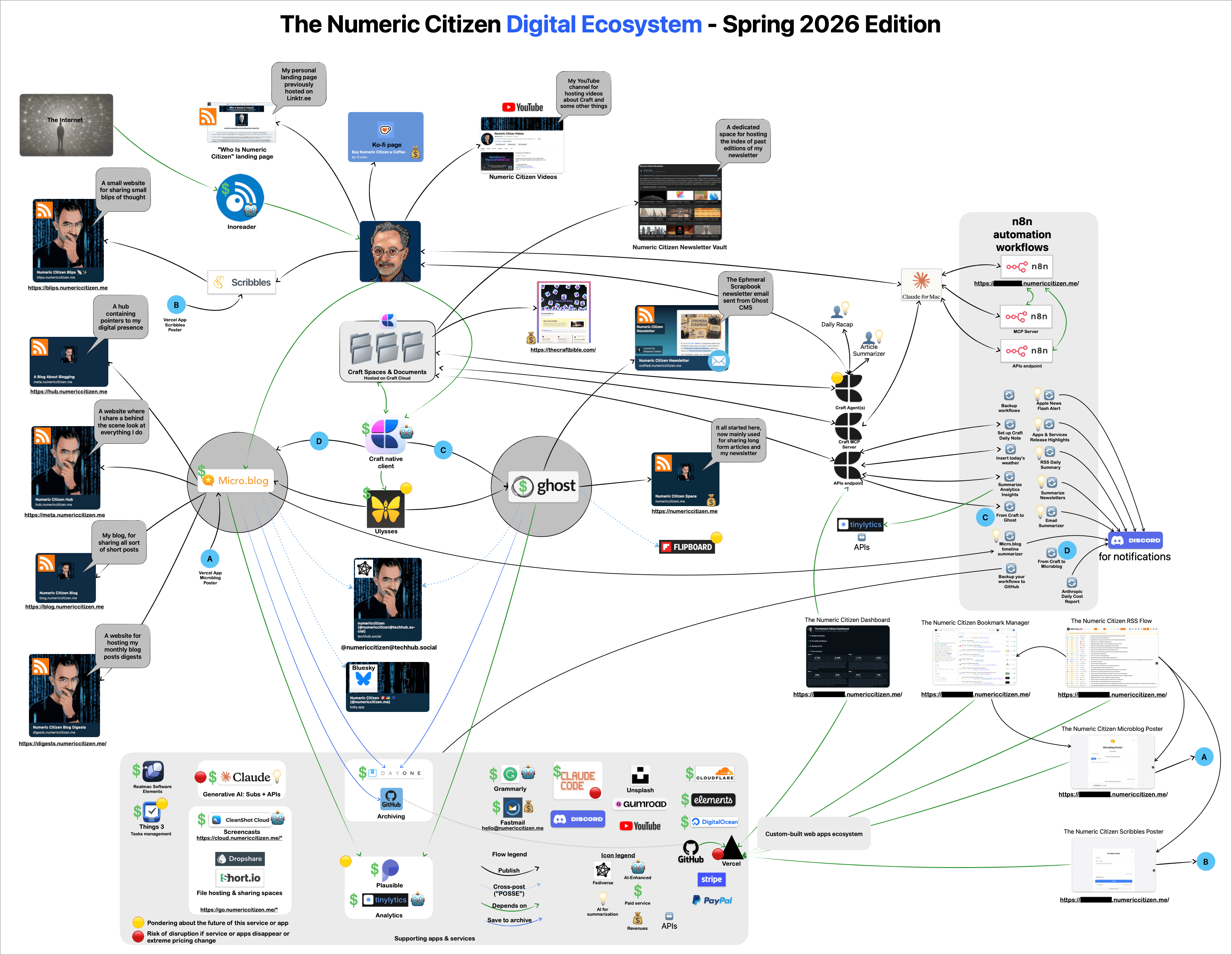
The entire ecosystem diagram was rebuilt from the ground up. Full resolution version available here.
At a high level, both Micro.blog and Ghost remain the two hosting and publishing pillars for most of my *.numericcitizen.me websites, while a few other websites, like my Ko-fi page and my new about website, Who Is Numeric Citizen, are hosted elsewhere. On the diagram, my websites are positioned on the left and in the top-left portion.
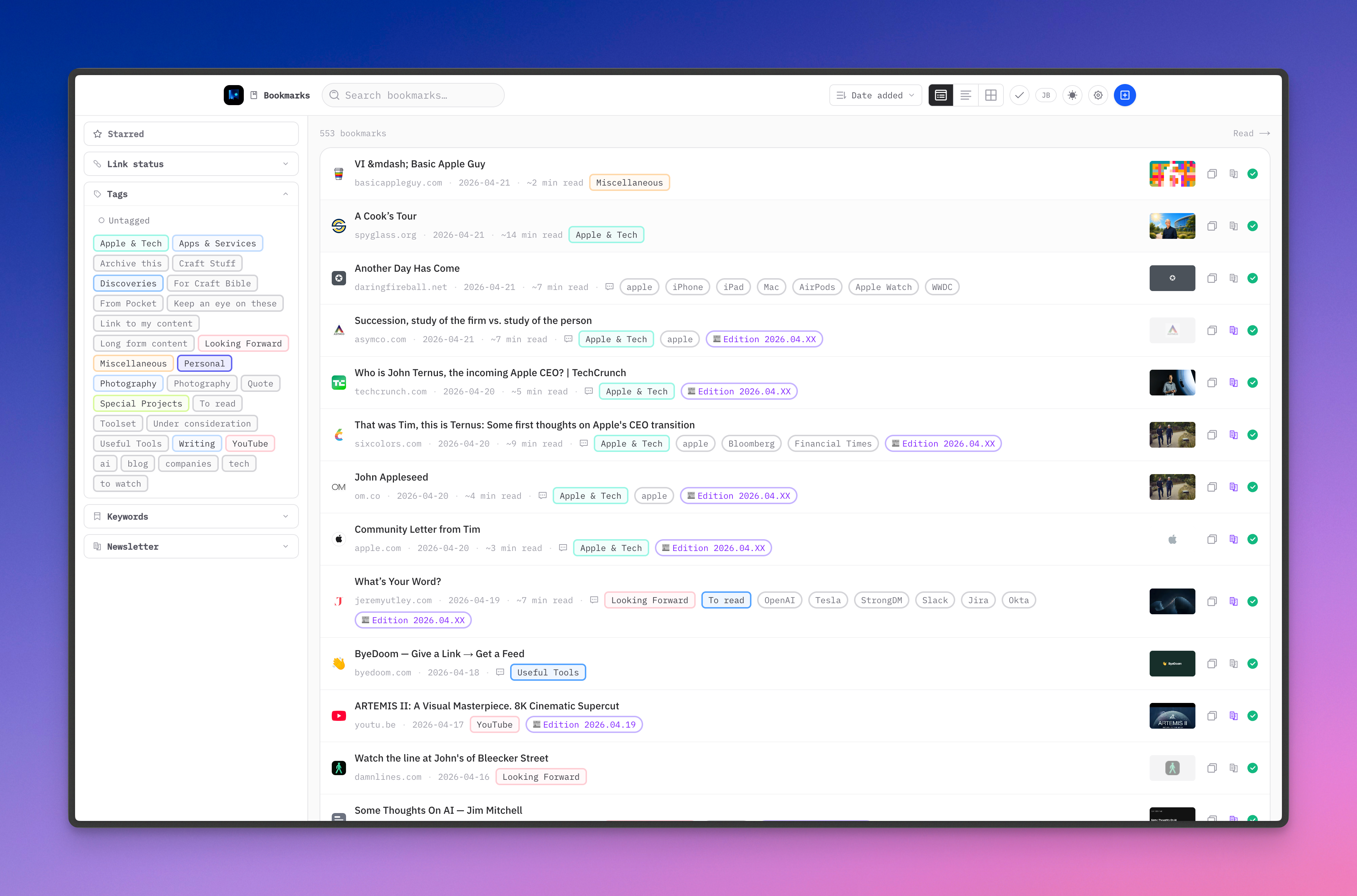
As you might notice, a lot has happened since my last update. Thanks to Claude AI and Claude Code, I made a major shift toward web app to meet two fundamental needs: a brand new bookmark manager (replacing AnyBox), and a lightweight RSS reader that integrates with my bookmark manager. Together, they support my reading workflow and help me produce the Ephemeral Scrapbook newsletter. See both web apps in this YouTube video.
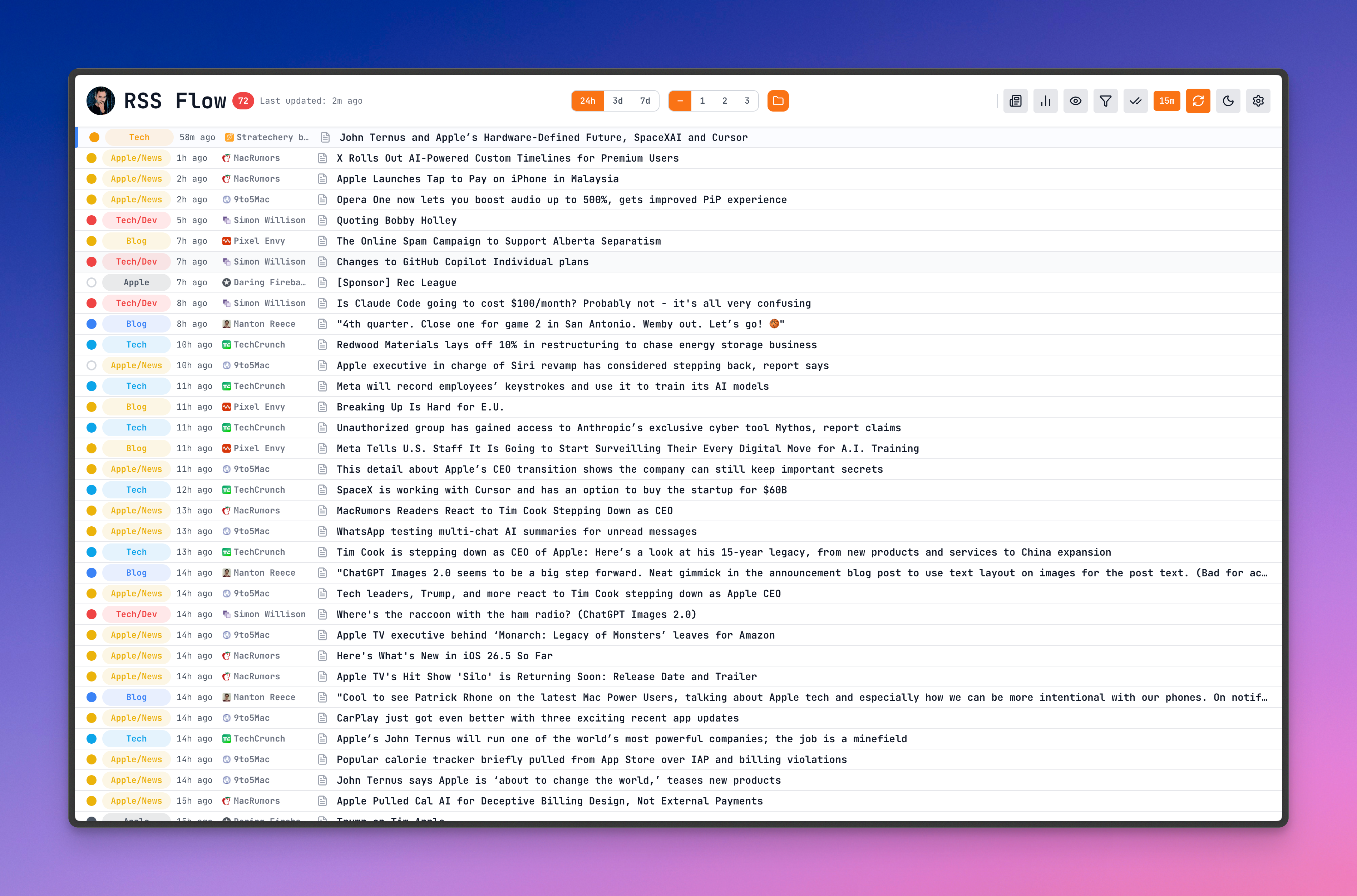
My custom-built RSS reader web application
What’s in, what changed since last fall
AI is now playing a more prominent role in my digital ecosystem since the beginning of 2026. It’s mainly used for vibe coding, maintaining my web applications, and content summarization. You’ll see little light bulbs (💡) in the diagram; they indicate where AI summarization is involved. Anthropic’s Claude AI replaced OpenAI’s ChatGPT in all my workflows. Plus, Claude AI and Claude Code enabled many new possibilities for helping me build small digital services and web apps for my personal needs. It’s something I couldn’t have imagined a year ago.
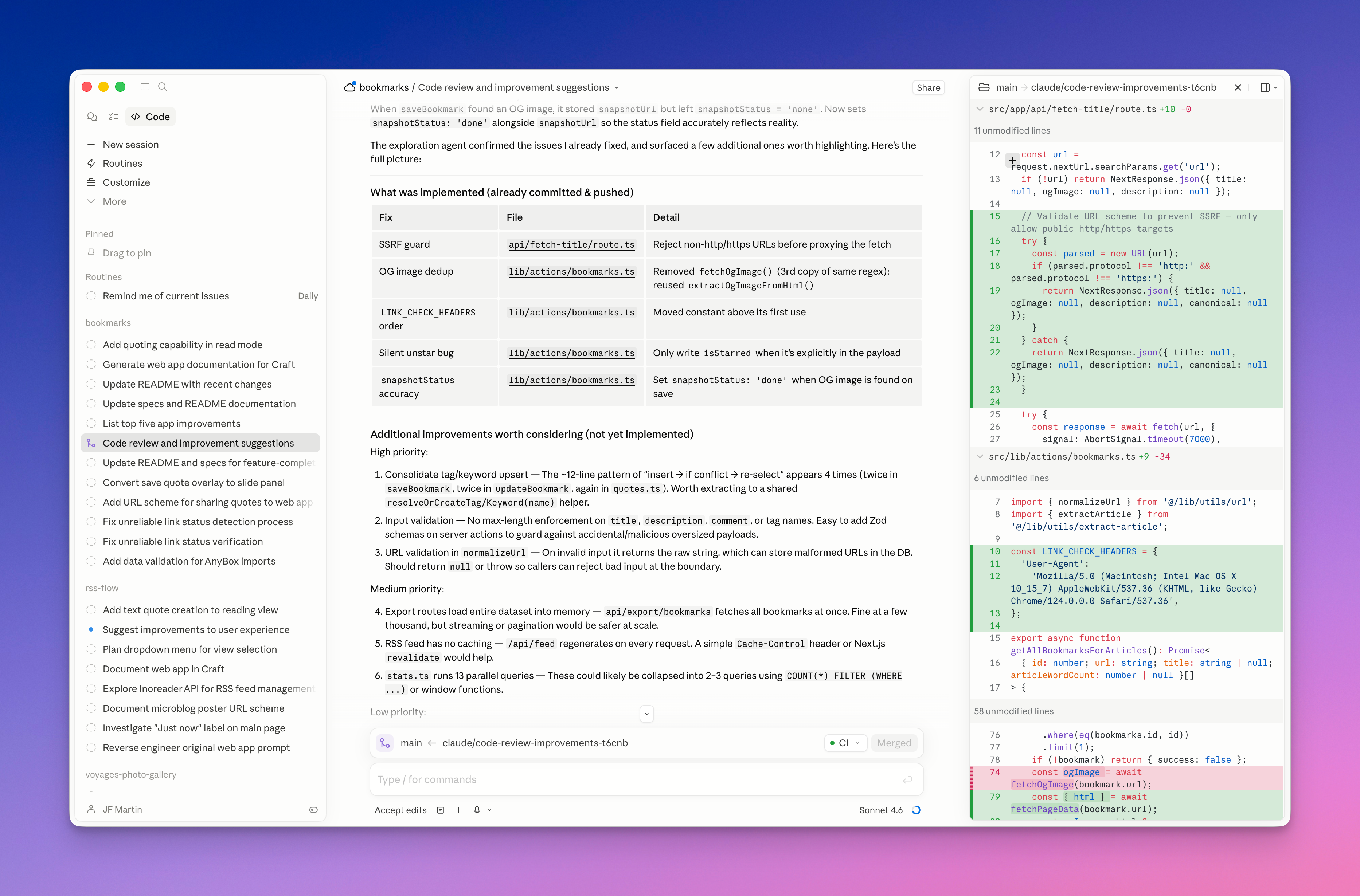
Claude Code’s main window with some of my projects on the left sidebar and the DIFF view shown on the right
Another milestone was to replace IFTTT with n8n automation. It’s a major upgrade in functionality and usability. My n8n instance is running on the Digital Ocean hosting service, inside a pre-packaged “droplet” with 1 GB of RAM and 10 GB of disk space for $6 a month. Digital Ocean provides a one-click install of n8n which really made a difference in selecting Digital Ocean as a hosting service. I created more than a dozen automations, far more complex and useful than what I could build with IFTTT. Claude AI was also involved in optimizing many n8n workflows. It was possible because n8n supports the MCP endpoint that is exposed to Claude AI. In the following table, I present a summary of my n8n automation workflows. As you will see, Discord is a new entry, as it provides a custom server to receive n8n workflow outputs and some status reports from Tinylytics. Also good to know: all my n8n workflows are automatically documented in a Craft document, thanks to Claude Code, which connects to both the n8n and Craft backends. To get a well-structured documentation, I created a Claude Skill.
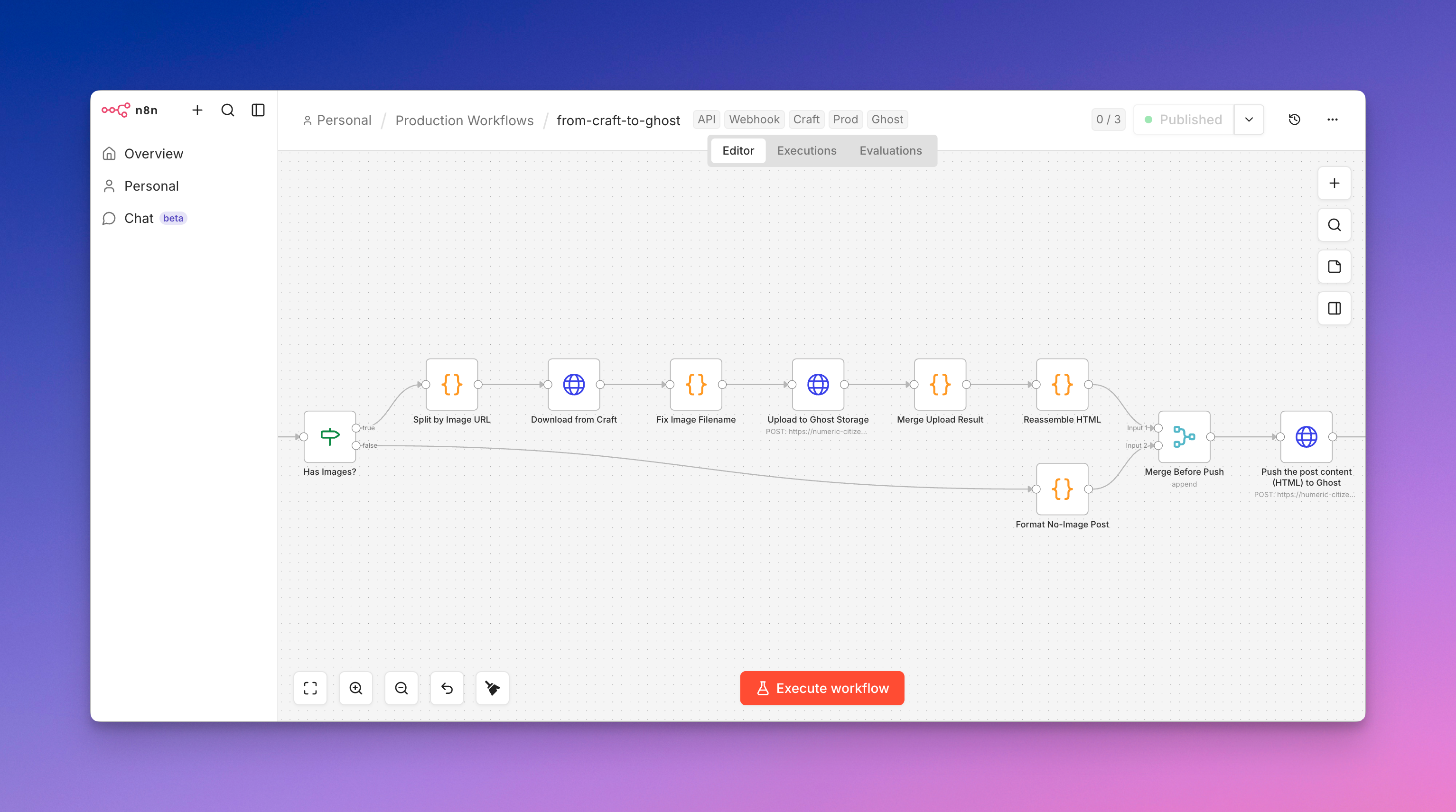
A portion of an automation workflow shown in the n8n canvas
My automated n8n workflows
Here’s a list of utilities running as n8n workflows on my self-hosted DigitalOcean instance.
- API Credit Health Check — Pre-flight check on Anthropic credits; alerts Discord if depleted
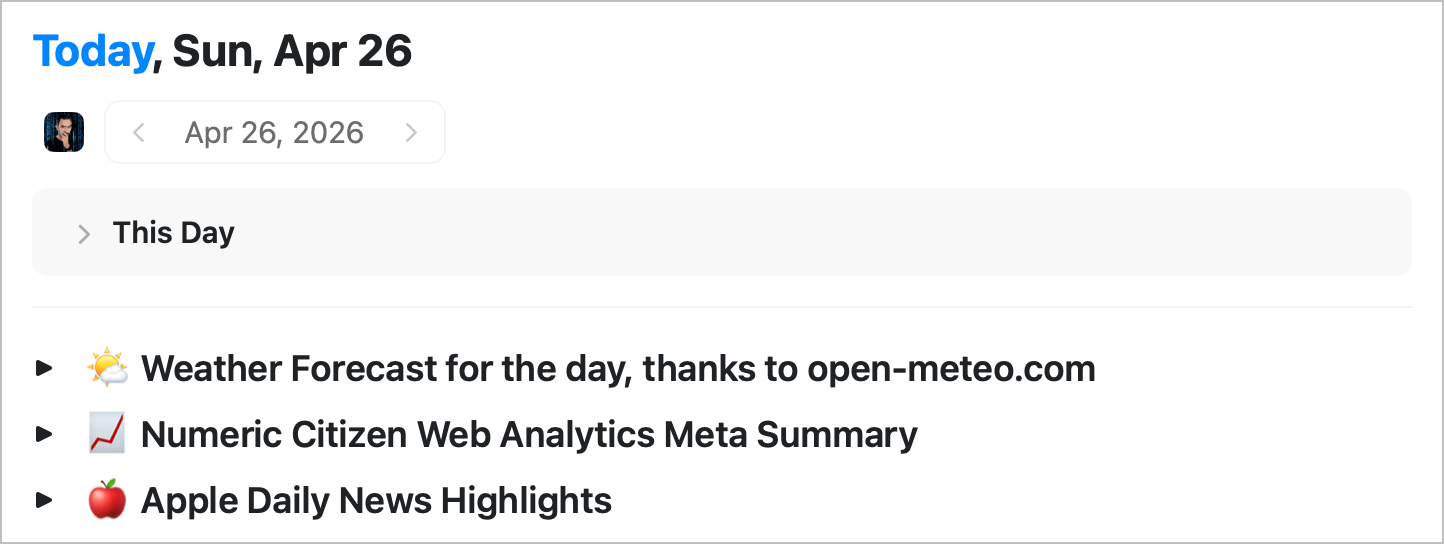
- Today's Forecast — Pulls weather data into the Craft daily note
- Tinylytics Insights — Injects site analytics summary into the Craft daily note
- Apple Daily News — Fetches MacSurfer headlines into the Craft daily note
- Setup Craft Daily Note — Creates the day's 8-section journaling scaffold in Craft
- Anthropic Daily Cost Report — Posts 7-day and 30-day AI spend breakdown to Discord
Example of automatically propulated Craft Daily note, thanks to n8n automation.
RSS & News Aggregation
A few workflows are used for content processing in the context of news consumption and Micro.blog timeline processing.
- RSS Daily Summary — Aggregates RSS feeds and delivers an AI-summarized digest
- Micro.blog Timeline Highlights — Summarizes Micro.blog activity via Claude
- Apple News Flash Alerts — Real-time Apple news alerts from RSS
- Apps & Services Release Highlights — Monitors release notes feeds for notable updates
Content & Publishing
Other workflows for supporting my content creation include:
- Craft → Ghost — Two workflows (specific and generic) push Craft documents to Ghost as drafts
- Ghost Publish Proxy — Triggers final publication on Ghost via webhook
- Craft Fetch Proxy — Fetches Craft document content on demand for downstream processing
- Poke to Craft / Peek at Ghost — Manual/chat-triggered utilities for quick content inspection
Newsletter & Email
A special workflow automation is processing email summarization on demand: simply forwarding an email to a dedicated Gmail account and after a few seconds I’ll receive a summary on my Discord server.
- Email Summarizer — Polls Gmail every minute; summarizes newsletters and posts to Discord
Maintenance
Finally, backing up my workflows is a must, just in case something really bad happens on my n8n instance.
- GitHub Backup — Backs up all n8n workflow definitions to a GitHub repo every Sunday
The Craft Agents main window
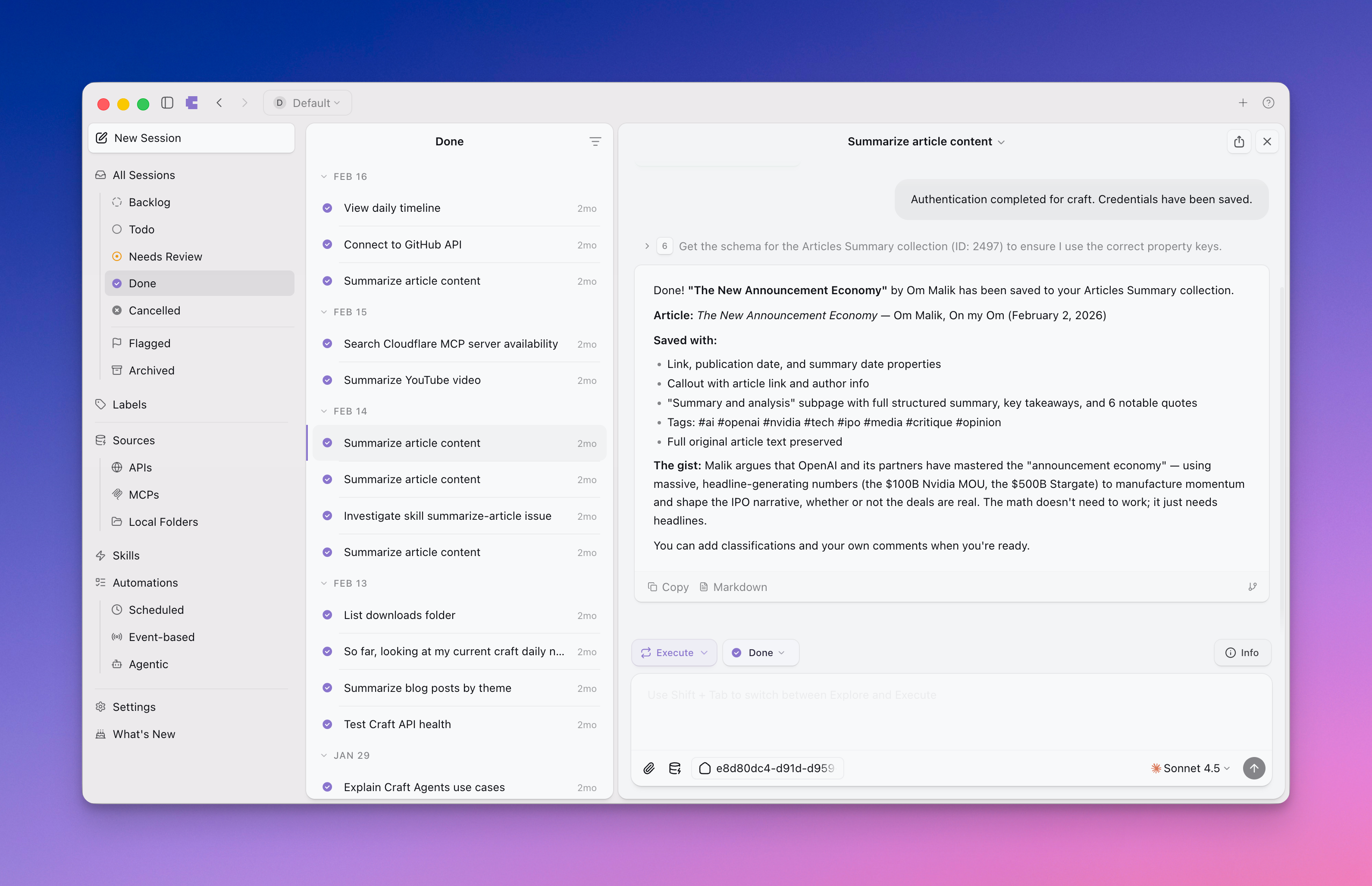
The updated diagram illustrates this: Craft consists of two parts—Craft content stored in the Craft cloud backend and various Craft clients, including the native general-purpose client and Craft Agents. Additionally, Craft now supports MCP and offers a comprehensive set of APIs, emphasizing the division between data storage and client applications. These latest additions to Craft are game changers and enable new use cases.
A few thoughts and observations about Craft Agents, a sort of spin-off of Craft, are worth sharing here. Think about Craft Agents as an orchestrator of AI agents. In many ways, Craft Agents can be compared to the Claude Desktop app. There is a high level of affinity between Craft Agents and Craft, connected via APIs or MCP. Consuming Craft content through Craft Agents is an obvious use case. Yet, I’m still not sure why the team behind Craft is spending so much effort on this, but it’s interesting to follow nonetheless. I’m still looking for clear use cases for it, hence the yellow dot (🟡) on its icon in the diagram. There are a few aspects of the app’s design and structure that I don’t like. I don’t like using the task manager to organize conversations. I don’t think task management belongs in this app. Plus, Craft Agents is a very hungry consumer of AI credits. It’s a major concern unless you subscribe to the highest tier of any AI provider (OpenAI, Anthropic, etc.). It’s worth noting that Craft also offers an assistant working inside Craft itself.
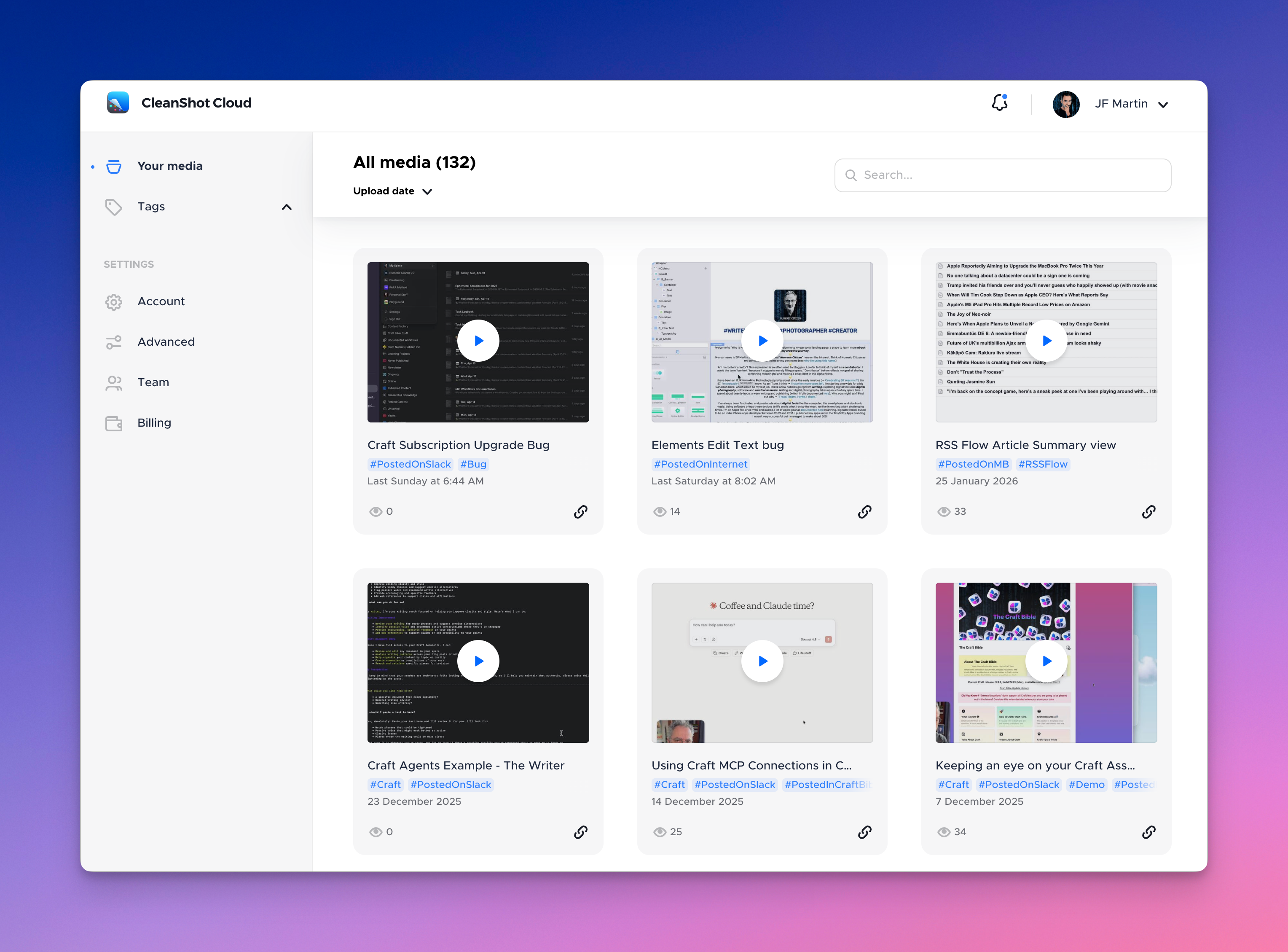
Also added to my digital ecosystem is CleanShot Cloud for hosting publicly shared screenshots or short screen recordings. I use that to share bugs or feedback. CleanShot X is sort of the client to CleanShot Cloud and is the best Mac utility you can get if you tae a lot of screenshots.
One last automation that prevented me from closing my IFTTT account was the process of automatically archiving my publications in DayOne. This process was briefly described in this blog post. Each time I share a blog post or an article, it is saved in DayOne. Micro.blog added a send-to-DayOne feature, which was the last needed nail in the coffin of IFTTT. It was such a relief.
Speaking of Micro.blog, I created a new website for sharing automated blog post digests on a monthly basis. Most of the process is supported by the use of AI summarization. It’s not fully automated but very effective. Each month I send my Micro.blog postss digest to Craft fo later processing using Craft Agents. The process takes less than 15 minutes to complete. I know there is a potential for a fully automated process. It’s on my todo list.
What’s out since the last update
Chillidog Web Hosting is out (the service hosting the Who Is Numeric Citizen website). It was replaced with Realmac Software Elements’ hosting solution. You can read the doc here. The transition was seamless. I prefer integrated solutions, which Realmac is now offering. Plus. Chillidog was purchased last year by Exact Hosting, and the purchase has been reported to degrade customer service.
Last fall, I added the ChatGPT Atlas browser to my ecosystem, but I removed it after switching to Claude AI. OpenAI Atlas was mainly used for summarizing articles, but now I do this within the Claude Desktop app. I still prefer using the ARC Browser, even though it might eventually be discontinued. The new browser, Dia, could take its place, but I’m interested to see how things unfold. Dia appears to require a Pro subscription to enable AI features in the browser. At $20 a month, I’ll pass.
Gone is Google News for cross-posting from Micro.blog. It never took off. Also gone is AnyBox, the very well-done bookmark manager available on all Apple platforms, but not available on the web, like Raindrop.io. I never liked Raindrop.io, so I built my own bookmark manager as a web-only app. It’s one of my new custom-built web apps.
Finally, the numericcitizen.io domain will be retired when it expires later this year, and the content hosted on a dedicated Craft subscription has already been moved to my main Craft subscription, helping me reduce costs. The meta.numericcitizen.me is taking over (my previous content was migrated there during 2025). Some of my content was also simply removed from public access.
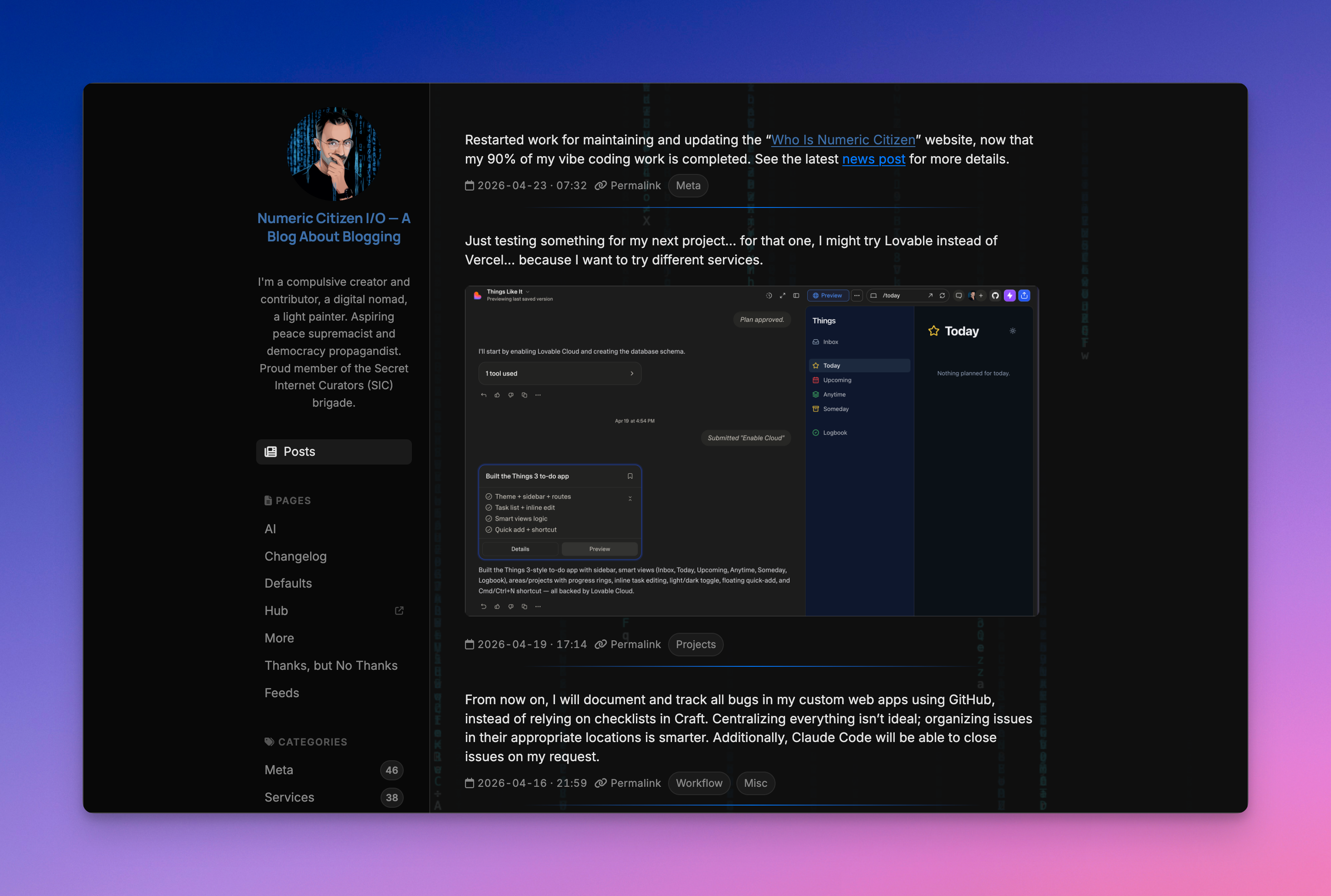
My newly redesigned metablog as seen in dark mode
Still pondering about these
You’ll find yellow dots on the diagram which points to services or apps that I’m reconsidering. Let’s review a few of them.
Plausible vs Tinylytics: I use two web analytics. Plausible has been around in my ecosystem since I left Google Analytics. Then came long Tinylytics and I wanted to support its developer plus it provides a great design compared to Plausible. Yet, I have a lot of historic data in the latter. Plus, I started using Tinylytics APIs to feed one of my workflows who inject data inside Craft daily notes and dashboard web application. I could replace this with Plausible’s APIs but I don’t feel it’s worth the effort.
Things 3, a popular and highly regarded task manager, is currently being reconsidered. I like managing my to-dos, but I don’t have many. If I want to eliminate Things 3, I could switch to Craft’s basic task management, but it’s quite limited. For now, my most likely option is to create my own app, much like I did with my RSS reader or bookmark manager. However, I’m not in a hurry to switch away since it doesn’t require a subscription, giving me plenty of time to decide and develop a replacement.
Ulysses is another case where I’m pondering its long-term usefulness. If I can post to Micro.blog or Ghost directly from Craft (using my custom-made n8n workflows), why should I continue paying for this app? The next renewal is a year from now.
Finally, my Flipboard account hosts a magazine that pulls content from my main website via its RSS feed. I have 8 followers, apparently. I never get any reactions or comments from this place. The bigger question: is Flipboard still a thing these days?
Risk management
In this edition of the diagram, I included red dots (🔴) to indicate potential disruption risks. For example, Anthropic recently adjusted Claude's credit consumption, leading to a fivefold increase in the number of credits needed to perform the same task; something I've noticed too. Additionally, Anthropic conducted an experiment in which new subscribers could access Claude Code only if they chose the Max subscription tier at $200 per month. Although they quickly reversed this change, it raises the concern that they might eliminate the $20 plan altogether. If that happened, I could face serious difficulties and might stop maintaining my web applications built with Claude Code. Vercel is another risk potential: I’m using the free tier, which is rather generous. If they decided to remove this free tier, I would have to reconsider my position: either drop my web application or accept paying the monthly price they charge.
Concluding thoughts
This evolution reflects a fundamental shift in how I approach my digital life. By embracing AI assistants like Claude and building custom tools tailored to my specific needs, I've moved away from cobbling together disparate services toward a more cohesive, intentional ecosystem. The transition from automation platforms like IFTTT to n8n, coupled with the ability to code solutions with Claude Code, has given me both flexibility and control—rare commodities in the world of Software-as-a-Service.
The introduction of AI summarization across my workflows has transformed how I consume information, while the consolidation of my web presence under fewer, better-managed domains simplifies my digital footprint. Yet this ecosystem remains dynamic and somewhat fragile, dependent on the sustained availability of key services and the pricing decisions of AI providers. The risk management considerations I've outlined aren't just technical footnotes—they're essential guideposts for maintaining digital independence in an increasingly interconnected world.
As I continue to iterate and refine this ecosystem, the principles remain constant: intentionality, control, and the ability to evolve. The next edition will likely bring even more changes, but I'm optimistic that the foundations I've built will prove resilient enough to adapt to whatever comes next.
Previous update to my digital ecosystem can be found here.