Should I Try Write.As? I Came, I Saw, Then I Left

I saw someone on Micro.blog using Write.as a platform for publishing a blog. After spending a few minutes on the blog and Write.as website, I find it very tempting; it’s clean, super simple, well-thought-out, and cheap. Maybe I should try it? Or maybe not. I’m already spread too thin. I feel it would be another rabbit hole. If all my current platforms were fully satisfying, I wouldn’t be looking at other places.

At the very least, I could open a free account and see if my impressions are valid.

[Update #1: 2022-05-19: I did take advantage of a special pricing for a five years subscription. You can find me on write.as: https://write.as/numericcitizen/]

[Update #2: 2024-05-20: I no longer use write.as since earlier this year. I deciced to bring the content to my main blog instead.]

My Blogger Workflow as of 2021-03

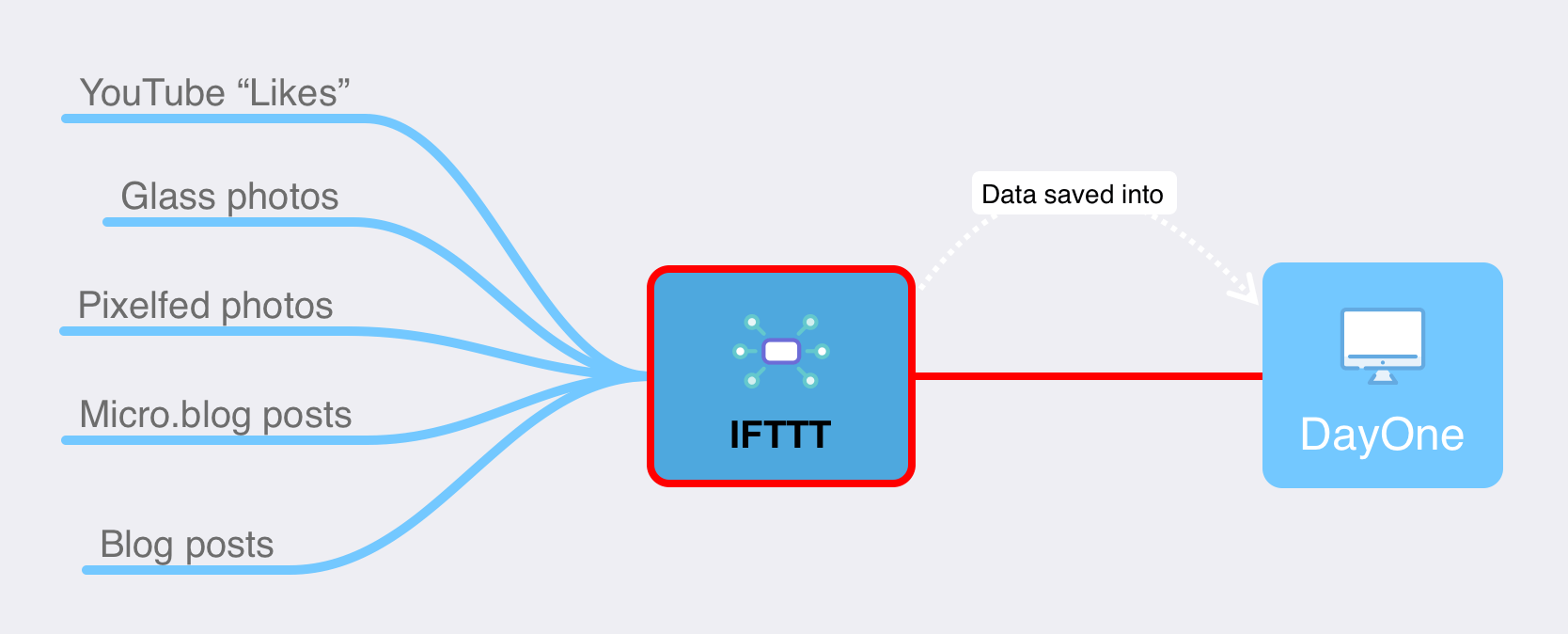
This is the first post on Numeric Citizen I/O about my blogger workflow. This website’s mission is metablogging, which means writing about the tools and services that I use as a blogger and content creator. I hope you enjoy the ride here. This is the most comprehensive update yet. In this workflow release, as of 2021-03, there are many important changes. Here is a run-down, in no particular order.

My blogger workflow as of 2021-03.

  1. First, as stated earlier, I created a new website about meta-blogging. It’s called Numeric Citizen I/O, which is hosted on Blot1. That’s where I’m talking about the tools and experience as a blogger and content creator. The domain name is hosted on GoDaddy. Domains ending with .io aren’t cheap, here are possible reasons why. I’m super happy with Blot. Their support is excellent. I learned how to properly use Git in my endeavour. I’m using Commento as a commenting service which is privacy friendly.
  2. Linktr.ee: is now my virtual visitor card. Super easy to set up. Lots of formatting options. Not cheap, though. In the past, I had an account on about.me which I closed because of its lack of formatting features. I’m pleased with Linktr.ee.
  3. Gone is the venerable MarsEdit on my Mac. Ulysses version 22 supports publishing to Micro.blog2. I do like MarsEdit, but I prefer Ulysses which is available on all Apple platforms.
  4. Gone is Linky, from my iOS devices. Used to be a great app for sharing links on Twitter and text highlighting. As my Twitter usage has dramatically reduced in recent months, I no longer need it. The app is no longer being updated, apparently, which is also contributing to its demise.
  5. Now in: Nova and Working Copy for publishing to Blot. Nova was recently reviewed on MacStories.net. I think it is important to show support for those developers who care to create real Mac software, not just ports of Windows apps.
  6. Now enabled is the automatic archive of my Micro.blog content to a Github repo. I like the idea of having my content available on Github. Using Nova, I cloned the repo on my Mac too. From time to time, I make pull requests to update my local repo.
  7. Craft is my new note-taking application, replacing Notion. Read my recent article on Craft. I still have content on Notion and I don’t know ye how and when I’ll be able to take it out. I’m waiting for their APIs release. I’m in no rush.
  8. Speaking of Craft, I’m using it to maintain a digital garden which can be found here. It’s super easy to nurture and the extensive formatting options of Craft allows me to have a decent website. You can leave comments by the way!
  9. Apple’s shortcuts, not shown here, play a small part in my workflow. One of them is to generate quotes from a web page by selecting the text that I want to quote. Another one is to create a page in Craft from a website. It’s very handy and covers a use case not available in Craft but which is available in Notion.
  10. I restarted my Vimeo page as an experiment and for storing short clips of user-interface micro-interactions from apps that I use and like a lot. You’ll find many examples from Craft. Vimeo is not cheap. Microinteractions are created using the screen recording feature of iOS, but are converted to GIF when needed in a blog post using IMGplay, an excellent GIF maker available on all Apple platforms.
  11. I’m still super happy with Plausible, a Google Analytics replacement. You can have a look at my visitor statistics for this site, for example.

From an idea to a blog post.

Under consideration

Reeder for maintaining a list of read later articles. I could use Craft for this instead. I created a page that contains all the bookmarks. This page is accessible from my digital garden, too. I like Reeder’s design for reading, though. Maybe there is a more profound problem: read later features like the one with Safari or with an app like Reeder don’t make me read more. I tend to forget about things I save in these lists. So, why give a damn about those app and service? If I don’t read an article that I find interesting in the first few hours or days, I’ll never read it. I’ll give myself some more time to think about this one.

Readwise: It is a fascinating service, but as my Twitter usage has dropped significantly, its usefulness is uncertain. Syncing highlights from Medium is interesting, though, because I’m a big reader of Medium content. The iPad app is lacking in certain areas. There is no Safari Extension that I’m aware of. Let’s see where it all goes from here.

A return of Things. Craft is able to export and import data to and from Things but not from Apple’s Reminder. The problem is that Things doesn’t have an URL field, which I depend on in Apple’s Reminder. I asked the Craft developers if support for Reminders was coming. It is coming. Things won’t make it back, I think.

Using Square on Linktr.ee to enable tips from my readers. Too bad only Square is supported, I would have preferred Stripes on which I already have an account setup to receive Medium payments. Furthermore, my experience shows that people don’t tip bloggers. Nobody really cares to support marginal content creator like me. Oh well, getting my rewards from the journey, instead.

Moving my Photo Legend Series to HEY World. I think it would be interesting to restart this photo series but this time on HEY World. It is super easy to publish, much easier than WordPress. That’s enough to consider this move.

Closing remarks

That’s it for this blogger workflow update. Things are starting to settle a bit. I don’t see major changes in the foreseeable future. I hope you made some discoveries with this blog post. Let me know in the comment section.


  1. That’s the website you are currently reading! ↩︎

  2. The exact date of Ulysses version 22 is still unknown at the time of publishing this post. ↩︎

Showing Support for Real Mac Software

I bought Nova in support of real Mac software developers

Nova’s main windows.
So, I decided to buy Nova, the best client for editing and publishing content to this Blot website using Git and Markdown. MacStories published a review of Nova just yesterday, emphasizing that Nova feels like a real MacOS application. I felt the need to show my support to Nova developers. We should celebrate great Mac apps. There are free alternatives like Atom or Visual Source Code, but they feel weird on the Mac.

Update: 2024-05-20: I no longer use Nova since I migrated from Blot to Craft & Micro.blog. I no longer need this type of editor.

Ghost 4 is Out! So What?

Ghost 4 is out, but is lacking one major feature.

Now, at version 4, Ghost, a self-hosting publishing platform, is buzzing again. To me, Ghost always looked like a modern version of WordPress. They share many similarities. The close integration of website and newsletter publishing is way better than it is on Substack. I’m thinking, what if I moved my main blog over there? I was tempted once to make a move. Others discuss why moving from one platform to another might be a bad idea. Matt Birchler:

“As I look at this Ghost 4.0 stuff focused on newsletters, my mind naturally goes, “ooh, I could use that, let me switch platforms!”

But the lack of a native mobile client for the iPhone or iPad was and still is a deal-breaker. For an open platform with APIs, it’s surprising no real client exists. Ulysses supports publishing on Ghost, but that isn’t enough. Oh, and those analytics—aren’t they too much?

Ghost 4 has lots of new stuff with issues. I’ll pass.

[Update #1: 2022-05-20: My monthly newsletter has been migrated to Ghost as I wrote in my last article on Substack]

Tips and Tricks on Optimizing Articles Exposure on Medium

To make a dent on Medium, optimizing exposure is a must.

I’ve been on Medium for many years, and I learned a few tips on maximizing article exposure along the way. These tips and tricks made a difference for me.

  1. If you plan to submit an article to a Medium publication, beware of busy publications: the exposure might not be what you expect. The turnover is too high, and your article won’t stay fresh for long. One example of such a busy publication is Mac’O Clock1^1. I did publish many articles for them over time. My content does get some traction, but it is for a very short period of time.
  2. Articles like “The Top 5 Utilities for macOS” are really popular. Opinionated articles tend to perform well, too. “The Rotten Side of Tim Cook’s Apple” is such an example. This article was published by The Startup2^2****, not on the Apple-centric Mac’O Clock. It still receives regular views and reads.
  3. Allow some content to be published outside the Medium paywall to increase your chances of being noticed (cross-post a link on Twitter, for example). It’s a difficult balance to achieve, though. If your article is interesting, people will get it for free; you’ll leave money on the table. Consider doing this as giving samples of your quality work.
  4. Publish on your term. Some publications require submitting an article in draft mode (not yet published). Depending on the publication owner’s schedule, it may require up to a few days before your article gets published. Sometimes, timing is everything. Consider publishing on your own if that’s the case.
  5. Reviews of hot tech gadgets are also popular, particularly from Apple.

Your mileage may vary. Many articles on how to be successful are already available on Medium. Search for them. You’ll get a better picture.

This article should have been published on Medium, behind their paywall, because it usually gets a lot of traction. Oh, well. I feel generous today3^3.

  1. I hate this magazine name.

  2. Contrary to its name, the magazine has little to do with startups.

  3. It will end up on Medium, but in a few days from being published here.

Cleaning up my WordPress Blog

Simpler is better.

If you know about WordPress, you probably know how bloated your WordPress site can become with heavy visual themes and lots of more or less useful plugins installed. Those using WordPress.com for hosting their WordPress website know how pushy WordPress.com can be. They really want you to use WooCommerce or ExactMetrics. I decided to do some spring cleanup this week by removing WooCommerce. Why did I have it set up?

During my early days on WordPress.com, I had the idea to allow readers to support me financially. I implemented WooCommerce to enable payment options, but it turns out that readers don’t often tip bloggers. So, I made the decision to remove the Tips page and disable WooCommerce. The result? My website now feels more responsive and visually appealing, a testament to the benefits of decluttering.

I should continue to remove unneeded features. Next up is the footer portion, which contains redundant features, and my sidebar, which contains my most recent tweets. They don’t really add value to the content. My main blog is available here: https://numericcitizien.me.

A Really Useful Git Beginner’s Guide

I’m using Git to maintain this blog, which runs on Blot. Up until now, my Git knowledge has come from YouTube. Today, I came across this Git beginner’s guide that I wish I had on hand before starting this blog. The nice thing about this guide is that it covers the command line commands plus a GUI-based tool, Atom, in that case. I’m mostly a GUI type of guy, but it’s always interesting to see what happens behind the scenes when interacting with Git.

Editing on the Go Is a Must

Editing and publishing on the go is a must, after all.

This weekend, I’m away from home. I thought I could get away with it and skip editing Blot posts on the go on the iPad. I was wrong. As I wrote at length here, the jury is still out on the best way to achieve this. For now, on the iPad, Working Copy is the best GIT client, and Ulysses is my preferred text editor. They have to work together.

So, I sat down and cloned the Git repo from Blot to my iPad using Working Copy. It took about a minute to complete. After confirming everything was set up correctly, I created an empty text file with the .md extension in Working Copy. From the Files.app, I tapped on it, and sure enough, Ulysses was launched. The file is shown in the “External Files” section in the library view. The publishing process went smoothly via a Working Copy commit followed by a push1.

This blog post was not just created, but also edited, previewed, and published from my iPad, away from home. I guess I found a satisfying solution, and it feels great to have accomplished this.


  1. When I get home, I’ll have to update my local repo on my Mac with a pull request with Nova (better than a fetch request; I don’t have any pending changes on my Mac). ↩︎

Using the iPad for Editing Blot Posts With a Git Client

Editing new content from the iPad for this blog poses some challenges.

I started writing this post using my iPad, Working Copy and Textastic1. The file was initially created within Working Copy’s sandbox, but I fetched content from the Blot Git repo to store the most recent changes locally on my iPad.

As with every app on the iPad, Working Copy runs within its sandbox. When cloning the Blot repo locally, files were placed in the application’s sandbox, which is inaccessible outside the iPad2. Ulysses uses external folders, so I can point it to my iCloud Drive, where I stored the cloned repo with Nova. Only Textastic can edit files with Working Copy’s sandbox.

Writing with Textastic and publishing with Working Copy feels geeky compared to a workflow based solely on Ulysses. It is geeky because I have to think about what I’m doing in regard to my local repo being up to date with the remote one. I must remember that after pushing this article on Blot, I’ll have to do a fetch when I go back to editing on the Mac. I’m not certain that I like this dance. Textastic is good, but not as a writing application like Ulysses. The former is more directed to developers, while the latter is for writers.

Textastic on the left, Working Copy on the right.

Make no mistake, this isn’t a review of Working Copy. Read this excellent review from MacStories instead. MacStories likes it because it enables better group collaboration. It sounds overkill for me since I’m alone editing my website. Working Copy can work in conjunction with Textastic. After re-reading their review of Working Copy3, I found out that, in fact, I could have replicated a similar setup to the one on my Mac: using Working Copy to edit the local repo of this blog sitting on iCloud Drive (instead of Working Copy’s sandbox)4. In that case, I would use Ulysses to edit files as usual, and Working Copy, you see them as uncommitted changes.

If I don’t redo my setup on the iPad5, compared to using Nova on the Mac, I find this to be much less intuitive. Maybe I should focus on using Ulysses everywhere for my writing needs and use the Mac to push content on my Blot blog. It’s not a big deal, and Numeric Citizen I/O is not a place where I’ll publish as often as on, say, Micro.blog. Having to sit in front of the Mac for the final posting isn’t a big deal.

One last thing: Working Copy wouldn’t be needed if my Git usage was limited to GitHub. Blot, on which Numeric Citizen I/O is hosted, uses its Git server, which requires me to use a Git client capable of connecting to it. I didn’t find a way to do this with the official GitHub client.

I’m still undecided about what to do to enable my iPad to edit this blog. My mobile needs are quite low as the pandemic continues, limiting our travel possibilities.


  1. This post wasn’t published from the iPad, after all. When I was ready to publish, I found out that the git push feature of Working Copy was only available to paying users. I chose to copy & paste content from Textastic to Ulysses and publish, as usual, using Nova on the Mac. ↩︎

  2. They are made available to other apps on the iPad, though. Files.app get’s a storage provider when Working Copy is installed. That’s how Textastic can edit Working Copy files. ↩︎

  3. Version 3.6 at the time. The current release is 4.5.9. ↩︎

  4. I tried using the “Setup synced directory” feature by pointing the Git-managed directory sitting on my iCloud Drive. Working Copy gave me a big warning of an unsupported configuration. I’m not sure what to think of this. There is the “Add folder” option, but it is only available to pro users. ↩︎

  5. I need the pro version to do this. ↩︎

Thinking Again About Text Editors

Thinking about text editor apps. Following a recent article from Jason Snell about finding the best markdown editor for the iPad, I started thinking about using Ulysses for all my text editing needs. Is it the best tool for all use cases? Probably not. But it is cross-platform, and for me, it’s a must. As I write this blog post, I’m using Nova text editor on my Mac to start editing, finishing in Ulysses. It depends. I’m unsure how my text editor selection happens when I start writing a new blog post. Maybe I should do the same as Mr. Snell, build a table of much-needed features, and see if Ulysses still fits my needs. On my to-do list, I plan to write a blog post about GIT clients for the iPad. Working Copy is a very popular one and includes a text editor. Jason Snell’s article refers to Textastic too. They compete against Ulysses, but the latter doesn’t do Git stuff. Like many blogs, it may be okay to use a different text editor, depending on the platform. I could use iA Writer on the iPad for this blog and Ulysses for the rest. Or maybe Working Copy would be a better choice because I’ll need to use it to push updates here anyway? As you can see, I’m constantly reflecting on the tools I use or plan to use and my workflow. It’s a never-ending process. Back to Ulysses. For now. Update #1: I’m not alone in rethinking my text editor choices. Chris Hannah, too.