I made a little update to my reading workflow, especially the part for newsletter. Look in the table on this page and sort by date to locate the most recent update.
My Content Creator Workflow & Digital Tools — Edition 2024-12
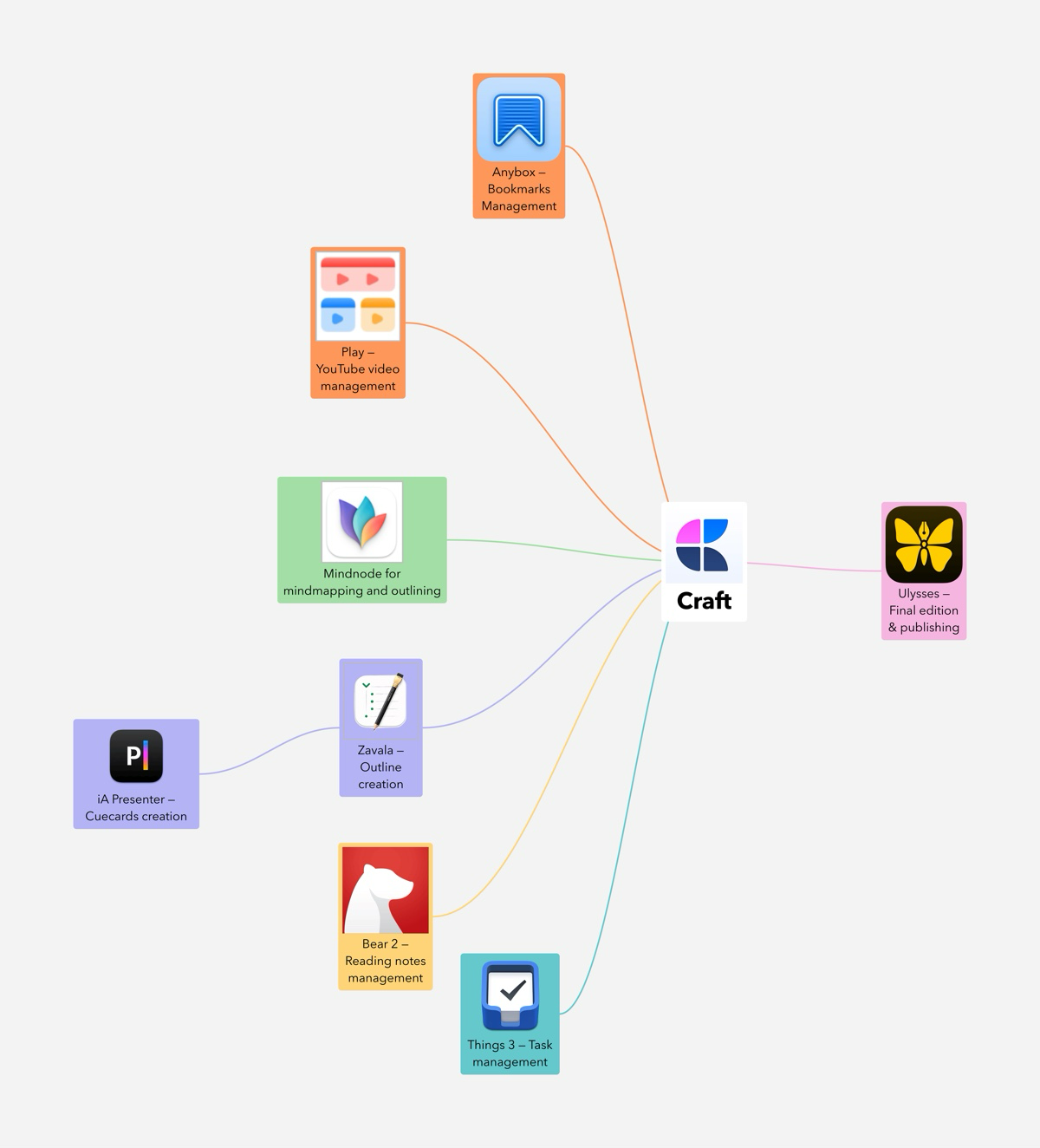
It’s been quite a long time since my previous content creator workflow update, more than a year actually, back in November 2023. With 2024 coming to an end, it’s time for a detailed update. First, consider the following overall diagram, then continue reading.
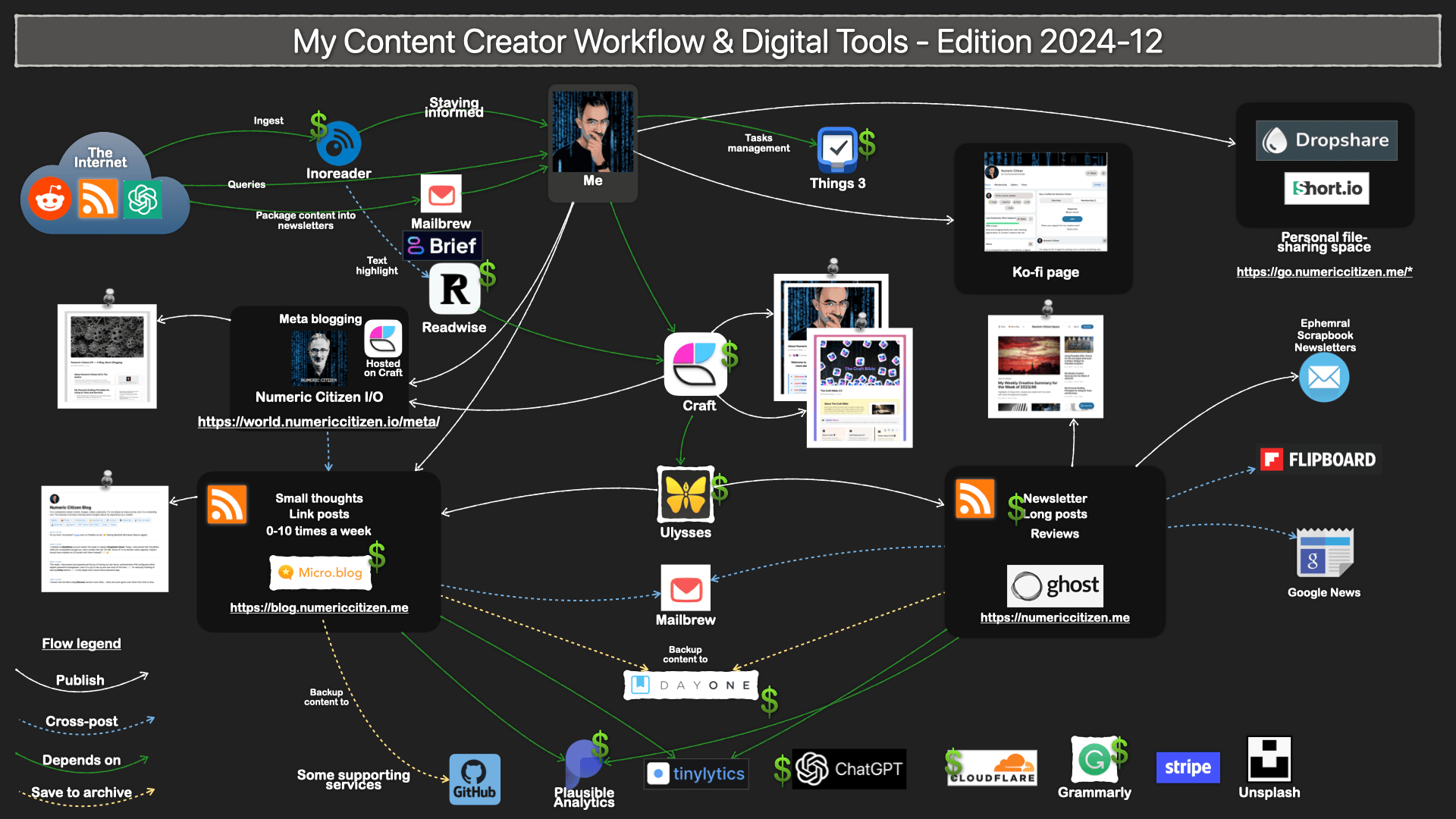
Outlining purposes: Zavala, a free open-source outliner, is nearly perfect for outlining YouTube video production. I don’t do detailed scripting before recording videos, but I like to create the outline. I was using Zavala until the release of Mindnote Next, but this might change. Mindnote is a superbly designed mind-mapping application that also supports the creation of outlines, which are more beautiful than those created in Zavala. One of Zavala’s strengths is that it is free but also easily exports a document into Craft via a simple drag-and-drop. I will see how it goes in 2025.
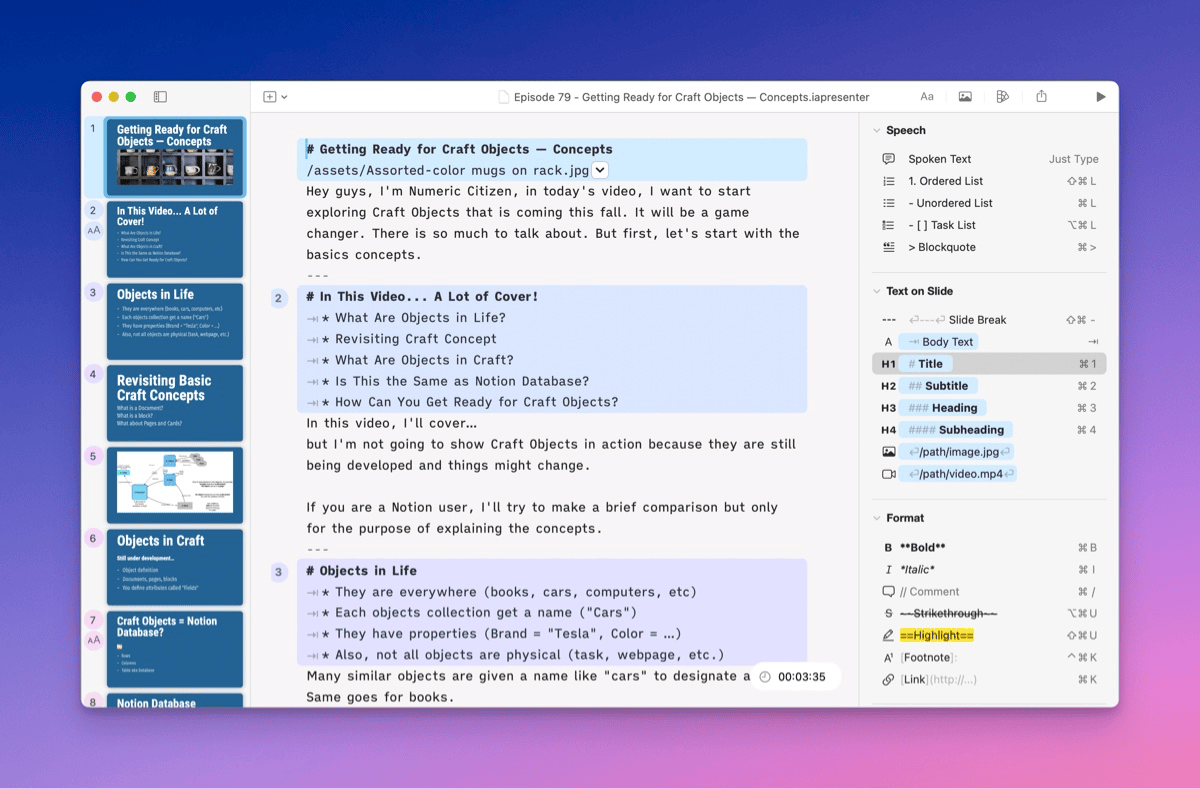
Presentation purposes: iA Presenter offers a unique approach to presentation creation. I rarely use presentation software outside of my day job, but when I do, it supports me while recording a YouTube video. A recent update to iA Presenter introduced an online presentation sharing feature that works really well and is beautifully implemented. For 2025, I’ll try to take advantage of this. iA Presenter is such a unique take on a very old software category I must keep trying to find a use for it.
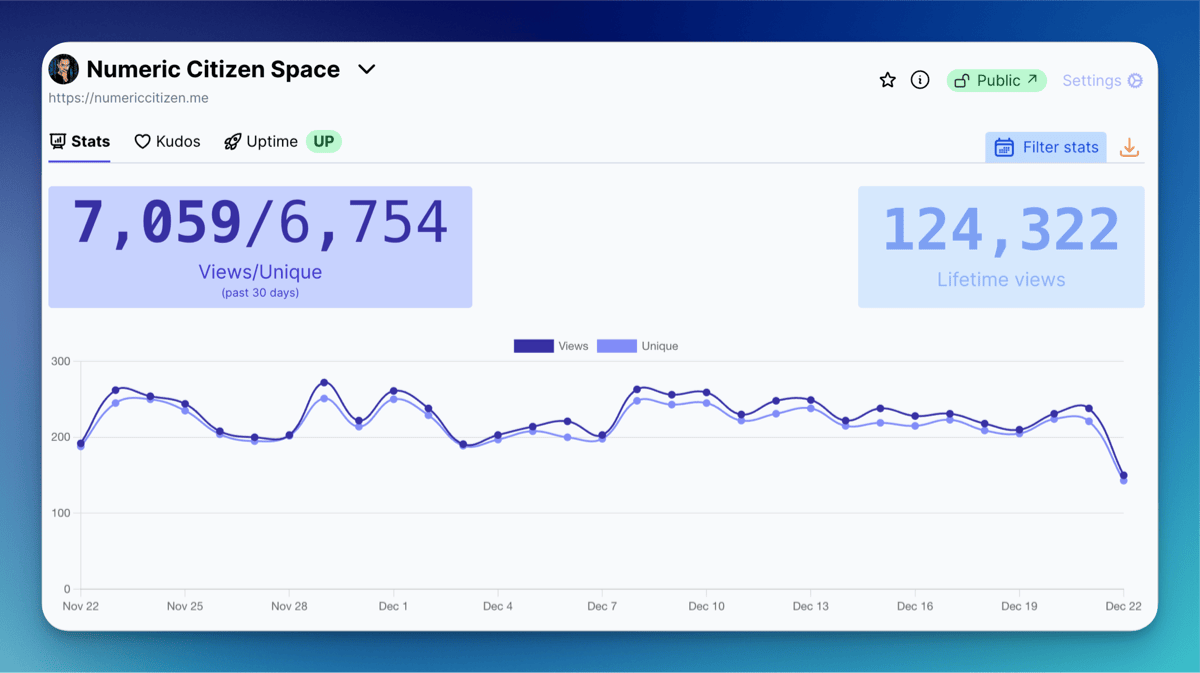
Website site analytics: Tinylytics joins Plausible in my toolset. I was happy with Plausible until this year, but the developer of Tinylytics is also the developer of Scribble.pages, a blog hosting service I really like. I decided to subscribe to Tinylytics as a support gesture for all his hard work building simple yet valuable web services.
Web bookmark management: I’m happy to introduce Anybox. Sure, it’s not raindrop.io, but it’s a great native Mac app, also available on the iPad and the iPhone. That’s all I need. My collection has less than four hundred bookmarks, all organized using folders and tags. It’s nothing fancy but practical.
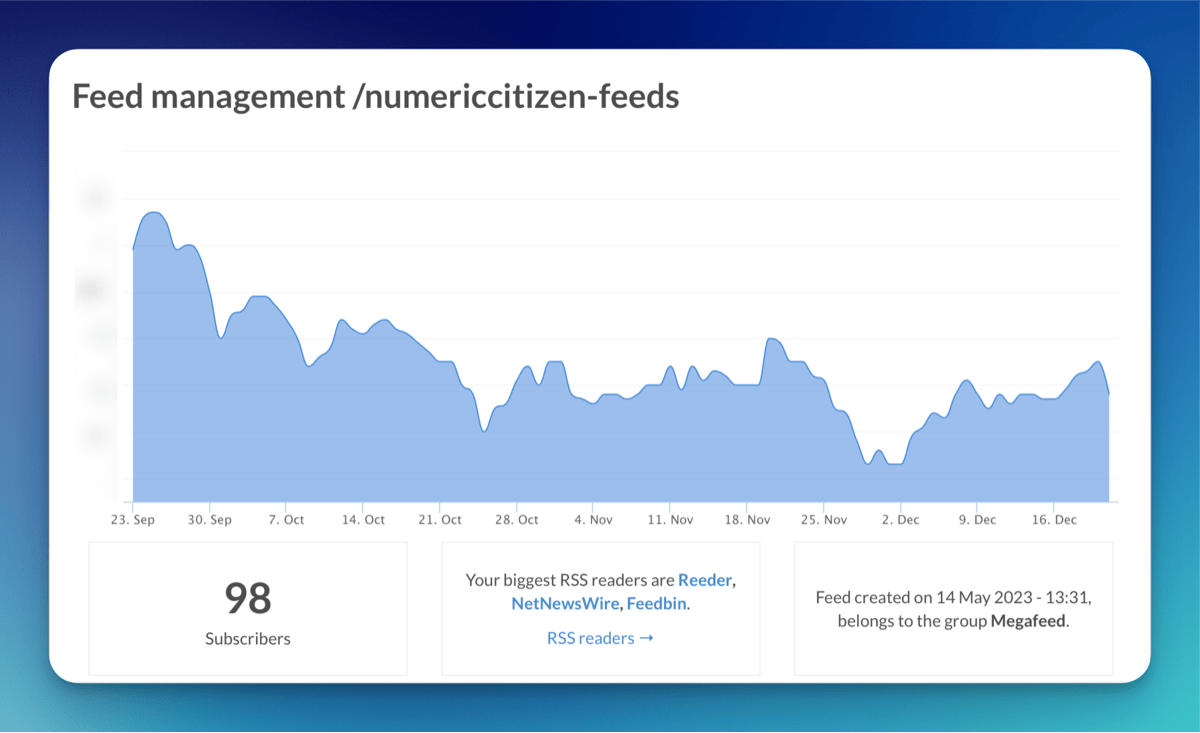
RSS feeds publishing: FeedPress is a simple yet effective way for adding a unified feed in front of all my different websites (Ghost, Micro.blog, Scribbles, Medium). Also, I offer an RSS megafeed that encompasses all my other individual RSS feeds, which can be found here: https://feeds.numericcitizen.me. The added value of using FeedPress is to enable RSS feed analytics, which other publishing platforms like Micro.blog, for example, won’t provide.
Podcasting purposes: Micro.blog is now my podcast hosting service of choice. The feature is built-in and very simple to configure and use. There are two ways for me to share a podcast episode: either use the narrated post feature of Micro.blog or use a traditional workflow, build an audio file using Screenflow, post-process it in Adobe Podcast, and convert it from WAV to MP3 using Permute before uploading the audio file to Micro.blog.
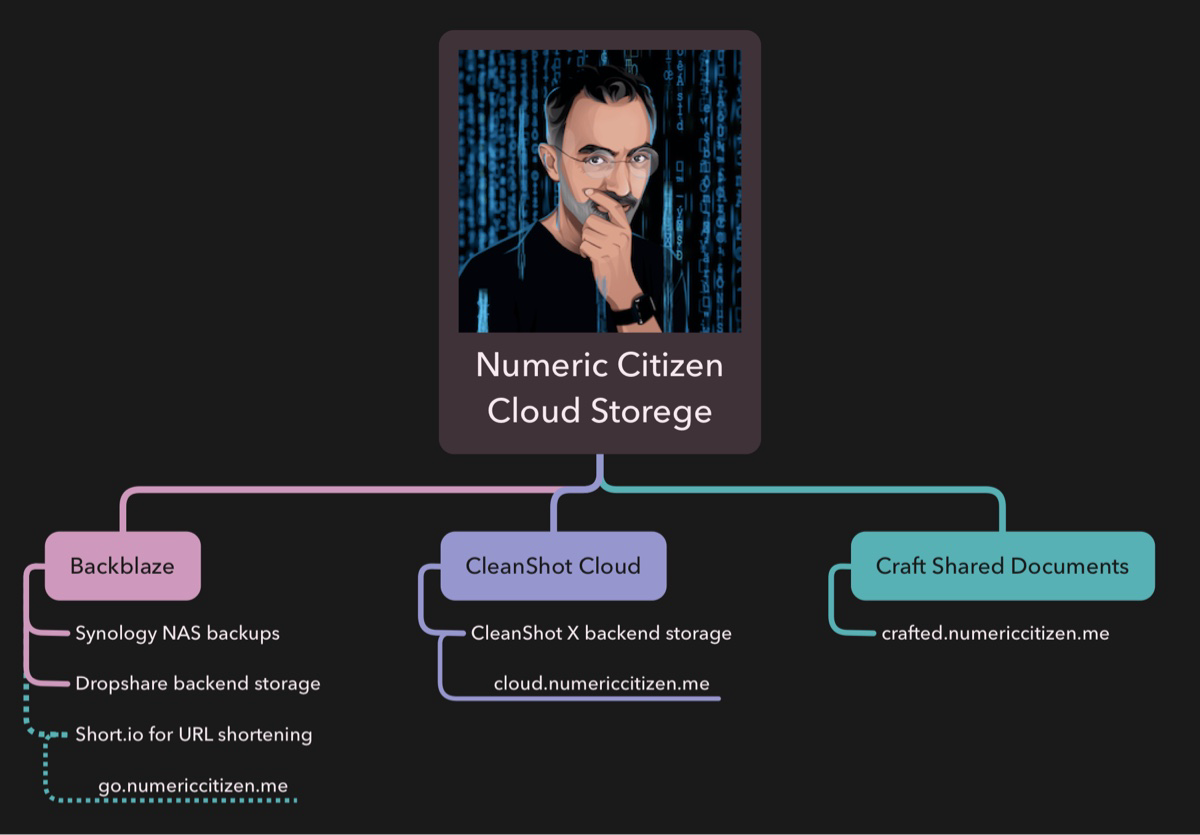
Files-hosting and cloud storage service: Dropshare will upload a file to Backblaze cloud storage, and Short.io will shorten the resulting URL. All my files are shared under the following domain name: https://go.numericcitizen.me, using my custom branding. Here is an example: https://go.numericcitizen.me/PLx2st2Y. This workflow was implemented in 2024 and works well. The only thing is that I don’t use it often enough, and it can compete with CleanShot Cloud, which I use more often when sharing screenshots or short video clips. Those media files are using the following URL: cloud.numericcitizen.me.
Specialized blog hosting: Micro.blog. I created a metablog on Micro.blog using one of the five blogs in my Micro.blog subscription. As you can conclude, I’m increasing my foothold on Micro.blog because it is cheap, effective and unique on the market.
Read-later service: I removed Omnivore because the service is no longer being developed, and I decided to focus on Inoreader instead. It’s not a perfect solution, but it is a cheaper one. I still depend on Readwise to sync text highlights from Inoreader.
Another blog hosting service, Scribbles, was. I’m using it to host short-form posts called Blips or longer ones using the /Now spirit under the following URL: https://blips.numericctizen.me.
One-page website hosting: Numeric Citizen Hub on Micro.blog has replaced my Linktr.ee page. I’m again focusing on Micro.blog for many of my online publishing needs while saving some money along the way. This one-page website is for hosting my visitor card, sort of. Micro.blog offers support for one-page websites, so I’m taking advantage of this.
When saving bookmarks on Miicro.blog, I take advantage of text highlights while reading the article that Micro.blog is keeping from the bookmark. Text highlights are synced to Readwise, too.
Website for my supporters: For prople who wants to show their support for my work, I have built a Ko-fi page that can be reached here: https://ko-fi.com/numericcitizen. It was created for the one dollars a month club initiative from Manuel Moreale. I’m one of his supporter.
Document writing and editing needs: Craft & Ulysses. Both apps are still at the center of my publishing needs. More than ever, I depend on Craft to gather my thoughts and notes, research, and write. Ultimately, content is exported into Ulysses for publishing to either Ghost, Micro.blog or, more recently, Medium.
Behind-the-scenes newcomers: Apple Freeform plays a more prominent role in helping me create diagrams. Freeform is joining Mindnote and Keynote for creating visual content when needed.
These are gone: All my domain name registrations are now entirely moved to Cloudflare, and gone is GoDaddy. Omnivore is being phased out by its developers; it’s gone, too.
Until next time
The continuous evolution of toolsets reflects the dynamic nature of technology and the diverse needs of users. No toolset is flawless, and each comes with its own set of strengths and weaknesses. This notion is evident in your evolving content creator workflow, where you adapt and integrate new tools, illustrating digital tools’ perpetual state of change. For 2025, I don’t expect too much change in my workflows. Don’t forget to visit my complete content creator toolset if you are curious about the individual tools that I’m using.
This document is also available as a Craft shared document.
Bye bye Hookmark, apparently my current subscription ended. I cannot justify subscribing to this app just to be able to browse hookmark files created when my subscription was active. I’ll need to update some of my Craft templates to remove all my hookmark file references. Tedious.
Combining Craft And Things 3 For My Writing Projects
This article is about how I’m using Craft and Things 3, which is behind any short or long article I share online. Here is what happens when I get a new post idea.
- In Things 3, Create an entry and set priority and desired or expected date of publication if known.
- In Craft, I create a new document, set the title and then copy the document’s deeplink to the clipboard.
- Still within Craft, I move the newly created document to the appropriate folder.
- Still within Craft, I update my private creator dashboard document optionally.
- Back to Things 3, and I paste the deeplink into the note field. It’s handy to jump from Things 3 to Craft with a single tap.
At this point, I can start my research, writing and editing of my article or blog post in Craft. Now, here is what happens after publishing my article:
- Mark the to-do item as done in Things 3.
- I update my private creator dashboard document by converting my deeplink to a new permalink that I put in the Recently Published section.
- I monitor the appropriate RSS feed for quality control. See this article about subscribing to my own RSS feeds.
There you have it. Craft plays a central role in my blogger workflow1. This blog post exposes what happens at the beginning and at the end of a new post idea. I hope you enjoyed it and maybe learned something.
-
Not all blog posts start in Craft. Far from it. ↩︎
On Sharing My Writings — What Goes Where
I recently got a few comments and questions from some followers on Micro.blog about my use of Scribbles versus Micro.blog blog hosting services. One guy couldn’t figure out why I was using Scribbles to write very short posts using a one-word title while I was using Micro.blog for longer posts, most of them without a title. I replied with a short answer, but I think I should elaborate for those who have been following me for some time or for those who just got here.

I use three distinct sites for posting written content. My main website (https://numericcitizen.me ), which came first, is currently hosted on Ghost. Next is my Micro.blog site (https://blog.numericcitizen.me), and, more recently, I added another small website hosted on Scribbles https://blips.numericcitizen.me. Let me explain each site’s purposes.
My main website is for posting longer articles like tech reviews (like “Five tools for efficient bloggers”) or for sharing long takes on a specific subject (like: “Five Steps for leaving Twitter”). My publication velocity is about one article per week. This is where my weekly creative summary newsletter gets published, thanks to Ghost’s built-in newsletter capabilities.
My second website is my daily blog, called “my blog,” and is where I post comments and thoughts about Apple, tech, photography, apps and services, and many other things. My blogging site is part of Micro.blog, there is a small community around it, thanks to Micro.blog fediverse support. Somehow, Micro.blog replaced Twitter for me, more than my presence on Mastodon did. I usually post around 10-20 weekly posts on Micro.blog. I like this place a lot for so many reasons.
I recently started using Scribbles, a small blog hosting service I like and want to support. I’m using this service to post short thoughts using a single-word title. These posts are then cross-posted to my Micro.blog timeline with a link going back to my Scribbles site. You can see an example of such a post appearing on my Micro.blog timeline in the following screenshot. Each post sports two emojis to help me spot them in my timeline. One thing I try to do is not to be too clickbait with my single-word title. The chosen word must be evocative or related to the post content.

The post on Scribbles gets cross-posted on my Micro.blog timeline by using one of the coolest features of Micro.blog: cross-posting of content coming from RSS feeds. This is shown in the following screenshot.

Micro.blog picks up posts from the Scribbles website RSS feed and will post content on my timeline, as well as cross-post it to Mastodon and Bluesky. This is POSSE in action. I’m a believer.
When I first thought about writing this article, I wasn’t sure where it would end up being shared. However, as the article grew in length and covered my blogging habits, it became obvious that it would go on my meta website, which is another one of my websites. There you have it.
On Sharing My Writings — What Goes Where
I recently got a few comments and questions from some followers on Micro.blog about my use of Scribbles versus Micro.blog blog hosting services. One guy couldn’t figure out why I was using Scribbles to write very short posts using a one-word title while I was using Micro.blog for longer posts, most of them without a title. I replied with a short answer, but I think I should elaborate for those who have been following me for some time or for those who just got here.

I use three distinct sites for posting written content. My main website (https://numericcitizen.me ), which came first, is currently hosted on Ghost. Next is my Micro.blog site (https://blog.numericcitizen.me) and, more recently, I added another small website hosted on Scribbles https://blips.numericcitizen.me. Let me explain each site’s purposes.
My main website is for posting longer articles like tech reviews (like “Five tools for efficient bloggers”) or for sharing long takes on a specific subject (like: “Five Steps for leaving Twitter”). My publication velocity is about one article per week. This is where my weekly creative summary newsletter gets published, thanks to Ghost’s builtin newsletter capabilities.
My second website is my daily blog, called “my blog,” and is where I post comments and thoughts about Apple, tech, photography, apps and services, and many other things. My blogging site is part of Micro.blog, there is a small community around it, thanks to Micro.blog fediverse support. Somehow, Micro.blog replaced Twitter for me, more than my presence on Mastodon did. I usually post around 10-20 weekly posts on Micro.blog. I like this place a lot for so many reasons.
I recently started using Scribbles, a small blog hosting service I like and want to support. I’m using this service to post short thoughts using a single-word title. These posts are then cross-posted to my Micro.blog timeline with a link going back to my Scribbles site. You can see an example of such a post appearing on my Micro.blog timeline in the following screenshot. Each post sports two emojis to help me spot them in my timeline. One thing I try to do is not to be too clickbait with my single-word title. The chosen word must be evocative or related to the post content.

The post on Scribbles gets cross-posted on my Micro.blog timeline by using one of the coolest features of Micro.blog: cross-posting of content coming from RSS feeds. This is shown in the following screenshot.

Micro.blog picks up posts from the Scribbles website RSS feed and will post content on my timeline, as well as cross-post it to Mastodon and Bluesky. This is POSSE in action. I’m a believer.
When I first thought about writing this article, I wasn’t sure where it would end up being shared. However, as the article grew in length and covered my blogging habits, it became obvious that it would go on my meta website, which is another one of my websites. There you have it.
The Date of Publication is a Must - Updated 2024-03-15
Have you ever searched the web for an article where you couldn’t see when it was published? It happens to me quite often. I don’t understand why such important information isn’t communicated to the readers.
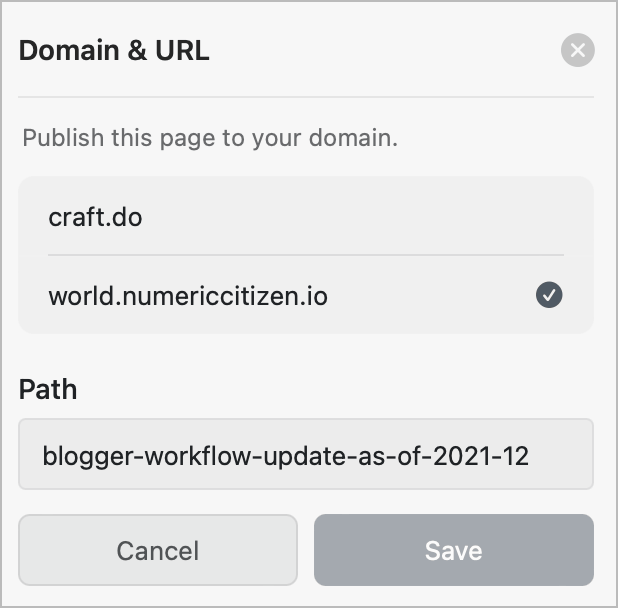
In a fast-moving numeric world, the publishing date helps the reader gauge the content’s relevancy. I set the publication date on all my websites because it adds context to the content. When I created Numeric Citizen I/O, I used a post slug format that includes the publication date. The path to the webpage is shown in search results, which makes searching the web a more useful experience. Below are examples of URLs to my websites.
https://numericcitizen.micro.blog/2021/03/07/about-those-webp.html
https://numericcitizen.me/2021/02/27/porting-office-work-a-bad-idea/
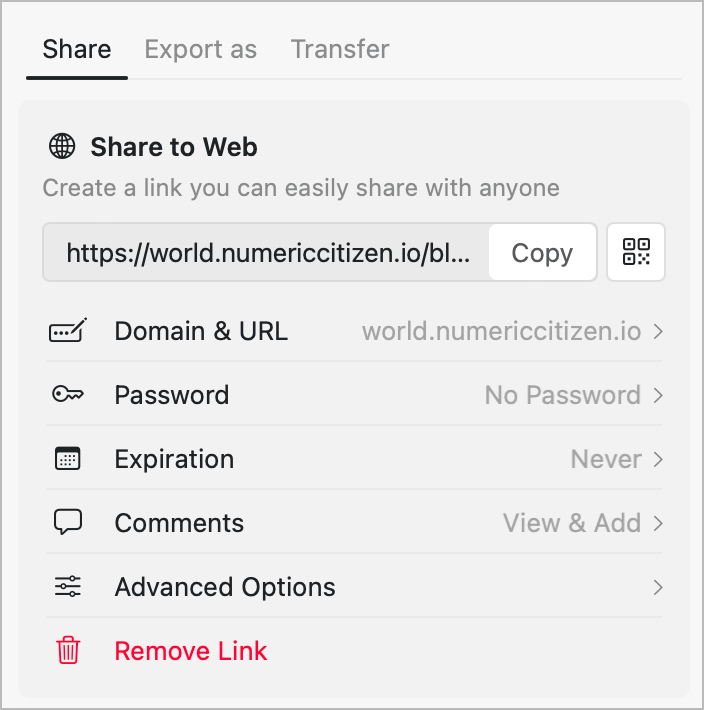
Update 2022-11-15: Sadly, since moving to a Craft-based hosting solution, the URL can no longer include the publication date. If you are a business plan subscriber, the workaround is to set the document as a separate website individually.
Update 2024-03-15: I realized that when I moved from WordPress to Ghost, I lost this notion of date in the URL. All previous content is still accessible using the old URL format, but newly published content no longer contains the publication date in the article’s URL. We cannot have it all, I guess.
This article was first published on 2021-03-17.
If you want a peak at my current reading notes management workflow, you might find this video interesting (Craft, Bear 2, Omnivore, Readwise).
How Do I Read and Process an Article
Let’s say I stumble on an article I wish to read and process. I’ll follow the following steps, covering the collection and archival stages.
- Save the article in Omnivore1,2.
- Set tags in Omnivore.
- Read the article, highlight text as needed and write comments if required.
- Summarize the article using Raycast AI. I have a Keyboard Maestro macro for that.
- Copy and paste the summary into the Omnivore notebook accompanying the article.
- Archive the article in Omnivore.
- Export the Readwise highlights (done automatically from Omnivore syncing).
- Import the created markdown files into Bear.
- Adjust tags if required.
I realize this workflow is essentially for the Mac. Nothing like this can be done on the iPad without a major tweak or two.
You can find this article on the “My Micro-Workflows Explained” website.
My Reading Workflow Explained
The many facets of my reading workflow needed to be examined and studied. When do I read, using which device and application? How is my reading affecting or contributing to my creative workflow? What happens when I find something interesting while I’m reading? How do I store important information pieces? How do I get back to them? How often and for what purpose? The answer to these numerous questions drive my choice of application for reading.
I’ve been thinking for a long time about ways to improve my reading workflow for a few reasons. First, I want to read more and more consistently. Two, I’m not sure which app is better to support this. I’ve been switching read-later service many times and until now, I wasn’t able to settle on one. Third, when reading, I want to get the most out of it and use the gathered knowledge more effectively. The following diagram depicts the flow of my reading workflow, inspired by the CODE methodology. Each box is explained in more detail below.

First, let’s start with my possible reading sources.
- RSS feeds can be imported directly into Omnivore by using the RSS feed address. I follow a few dozen feeds via Inoreader and Reeder, but just a few are selected to go directly into Omnivore for the quality of their content. As I’m writing this, four feeds are configured for direct importation. This feature was only recently introduced into Omnivore, and it works great. Occasionally, I go into Omnivore, select the RSS tag and start reading from there.

- Reeder is a very popular RSS reader. There are so many of them, but something hard to describe in Reeder sets it apart. Simplicity but not simplistic might be a good characterization. Reeder is also a great Inoreader client. Recently, I decided that for interesting articles in Reeder that I want to read, I save them into Things 3. One of the reasons is that when the article is read and analyzed, I can check it off from the to-do list, and Things will log this into the LogBook. I like the journaling capabilities of Things 3. I use it in my weekly creative summary.

- Safari is my go-to browser. Surfing the web triggers reading opportunities. When I’m not ready to plunge into a 2500-word article, I use the Omnivore Safari extension to save it for a read later occasion. Another possibility is to save a bookmark directly into Craft from Safari (via Copy & Paste, thanks to Craft Safari extension limitations). When this happens, it’s because I was looking for something in Safari and needed to keep the bookmark for later use. The same process sometimes happens right in Reeder. In that case, a simple “copy & paste” of the bookmark is executed from Reeder to Craft. But, overall, I try to save a bookmark into Things 3 for the same reason I do it from Reeder. Things 3 helps me keep track in an effective way of all my future readings.

- Things 3 helps me manage and be consistent with my creative activities. Unsurprisingly, it plays a role in the Collect portion of my CODE workflow. For each article I plan to read and possibly analyze, I create a new task in Things 3 with a link to the article in the task’s note. As I wrote previously, each time I check an item from the list, the item is logged in Things 3’s logbook. This way, I keep track of what I have read and when.

- From Things 3, I’ll open the link in Safari for the article I decided to read. Sadly, I cannot save the link from Things 3 to Omnivore directly. It’s possible only through Omnivore’s Safari extension. From there, if I think the article is long enough and needs more thorough reading, I’ll send it to Omnivore. I might save the bookmark into Craft also, depending on my needs. I often visit an article only to copy and paste its URL into a Craft document as a reference. However, I could directly import the article’s content into a new Craft document using a “CraftClip” shortcut. In this scenario, I want to import knowledge into Craft to backlink to it and select the portion to include as a quote in another document.
- Omnivore is my go-to “read-later” service. I won’t write a review here (maybe for another article). Once the content is saved into Omnivore (via the Safari browser extension or automatically from the few selected RSS feeds, articles are stored in Omnivore’s Inbox and are available for reading, highlighting, annotation and tagging. The nice thing about Omnivore is that it is free, it is constantly evolving, and, more importantly, I can copy and paste all my highlights and annotations in one click and paste them into a Craft document, and they will be formatted exactly the way it should be.
- Omnivore highlights are synced to Readwise. I also copy and paste the link to the stored article back into Craft for easier and quicker access.

- Central to my creative workflow, Craft is a repository of bookmarks from Safari, Reeder, and highlights stored in Readwise. I import those from time to time to consolidate knowledge. Anybox, a bookmarks manager, has a different role of holding bookmarks about specific subjects without contextual information. This is why I don’t consider Anybox part of my reading workflow.
- When working on a review or an article about a specific subject, I will create a unique document container in Craft based on a template I made (the template is available for sale here). Everything I read, potentially highlighted and annotated, might be stored in this container as a reference, a bookmark, or the full article. The idea is to bring related things closer together so I can build relations.
My reading workflow might look complex but it really isn’t. I’ve been testing it while reading articles about the iPhone 15 Pro Max. It’s not perfect but it is close to be just right for my needs. There are always possible improvements, but those will come in due time. Previously, my workflow was centered around Craft, you might take a look at the following video if you are curious.
My Reading Workflow Using Craft
Still to come: how do I read the newsletters I subscribe to? 🤔