Some Updates to My Blogging Setup

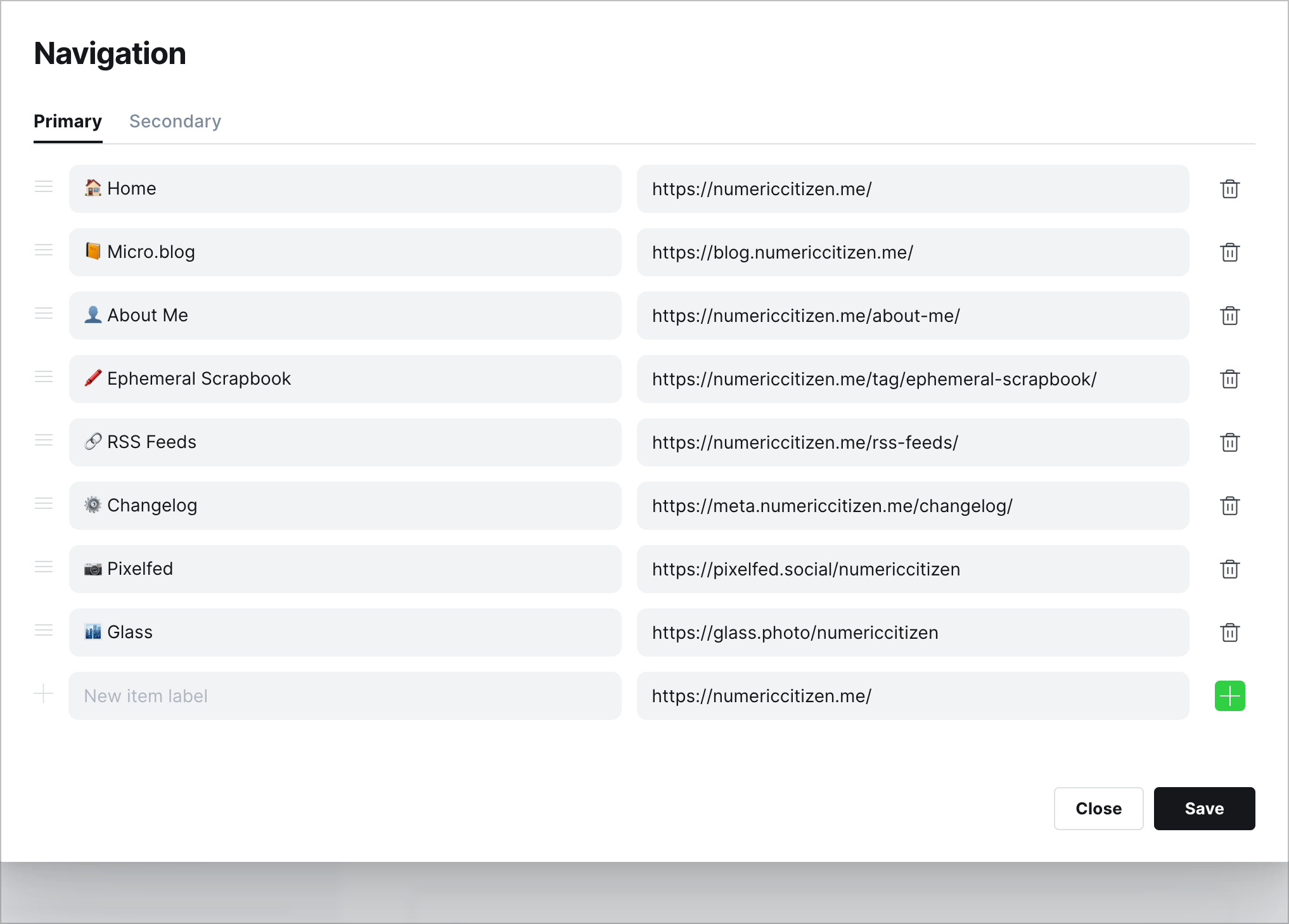
Following my departure from Twitter, as well documented here, it was time for me to make some changes to my blogging setup. First, as for my domain numericcitizen.me, I moved my DNS setup off WordPress.com to GoDaddy, so that everything is in one place. Plus, I have more control on GoDaddy than on WordPress.com. This change was required so I could add a subdomain, blog.numericcitizen.me and point it to Micro.blog, numericcitizen.micro.blog. My main site is not about blogging but about publishing longer articles on subjects that I care about, like Apple or general software and services matters. The change was easy to execute but took some time to go into effect.

Image.png

https://blog.numericcitizen.me (blogging site on Micro.blog)

https://numericcitizen.me (main site on WordPress.com)

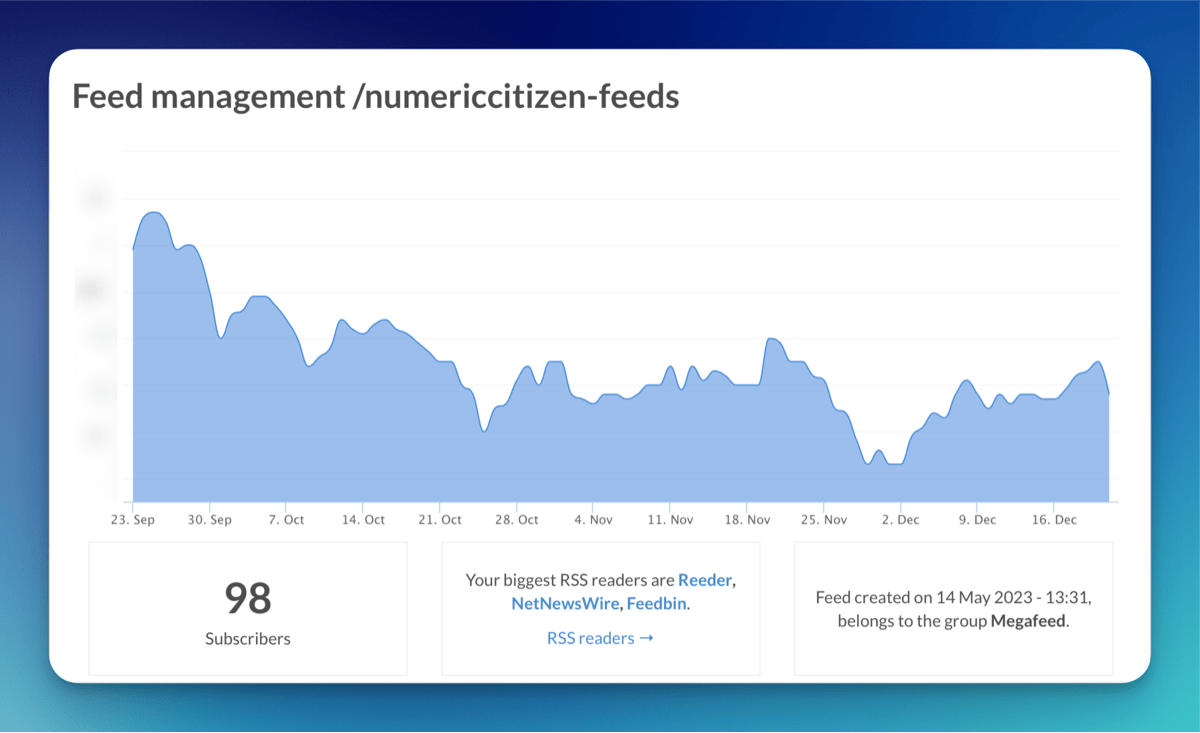
On Micro.blog, entering my custom domain name is mandatory and Micro.blog handles all the rest. Nothing is broken. Even the RSS feed still works. I also added a way for a reader to respond to any individual post by using a plugin named “Conversation on Micro.blog”. I had to create a custom theme, based on Marfa, for setting up the plugin. Again, that was super easy to achieve.

Image.png

Finally, I made a tweak to the CSS setup so the highlight colour is more in line with my avatar: some kind of blue.

nav.main-nav a.cta {

background: #fff;

color: #548EB9;

border: 2px solid #548EB9; }

nav.main-nav a.cta:hover {

background: #548EB9;

color: #FFFFFF;}

nav.main-nav a, #footer a, #post-nav a, p a{

box-shadow: inset 0 -2px 0 #548EB9;}

nav.main-nav a:hover, #footer a:hover, #post-nav a:hover, p a:hover {

box-shadow: inset 0 -25px 0 #548EB9;}

With these changes, I’m ready to start the year.

A Month After Migrating Off Blot.im — Observations

It’s now been a month since this website was migrated off Blot.im. The question you might ask: is the website getting as much traffic as it did before? The answer is no, a lot less traffic. According to this post, I got about 90 unique visitors daily during the 20 months with Blot.im. Now, under Craft, I’m getting less than 20.

Image.png

It’s hard to say why. Is the lack of RSS feed the reason? Now users need to come by often to see what’s new. I doubt people have time to waste doing that. The other reason might be that the new article posted here needs to be manually cross-posted on Twitter to get some exposure. Cross-posting to Reddit might help a lot as well, but the rules of many subreddit disallow self-promotion posts. Another factor might be that Craft doesn’t generate a sitemap, which is supposedly helping the Google search engine to process content. A quick search for something here works fine, though. The following Google search results for “my blogger workflow site:numericcitizen.io” reflect the updated website structure with the “world” subdomain followed by the trailing “/meta”.

Image.png

I don’t pay too much attention to visitors’ traffic; it’s more of a curiosity. If you’re looking into Craft for hosting a website, I hope to make you pause and think again about the implications. This meta website is more of a long-running documentation project that I share publicly. I don’t mind about Craft not being too SEO-friendly. Speaking of SEO, the site’s current Page Speed Insights does not look good at all.

Image.png

Image.png

Image.png

That could the other reason why this website isn’t performing too well.

My Content Creator Workflow as of 2022-12

It’s been a while since I shared details about my blogger creator workflow. From now on, I’m renaming it to “my content creator workflow” as it better reflects the coverage of my work. As you might expect, a lot has changed in a year. Without further due, let’s begin.

  • Cleanshot Cloud has been added to my toolset following an update to the Cleanshot application. I think it’s one of the best Mac utilities out there. I even wrote a love letter. The most recent update brings screenshots history which is really nice.

  • Raindrop.io is making a small comeback using the free tier for storing non-text bookmarks like things to watch. I didn’t subscribe to the service, and I explain why in this blog post “When War in Ukraine Influences My Application Choices - Numeric Citizen Blog.” I rarely use it, but when needed, it’s there.

  • Notion was dormant since I switched to Craft until recently when I started to use it more often in combination with IFTTT. I use it to store information like popular discussions about Craft on Reddit or YouTube videos that I liked. More details in this YouTube video that I made.

  • I became a subscriber of write.as as explained in [this article](https://numericcitizen-introspection.blog/friday-notes-63-i-writeas-myself/](https://numericcitizen-introspection.blog/friday-notes-63-i-writeas-myself/). There was a promotion earlier this year for a five-year subscription plan. I decided to make the plunge and give it a try. I’m using Write.as mostly when I’m musing about a very specific subject. The war in Ukraine has been one of those subjects. I like Write.as for its simplicity and its connection to Ghost, albeit without using it for every post.

    My write.as page.

  • Matter is becoming more of a nice read-later service. I like it a lot. But then, the long-awaited Readwise Reader is coming into beta and looks like a serious contender. In Early October, I was finally able to try the Readwise Reader application. I like it a lot too, but it offers a quite different experience than Matter. Which one will stick with me is still unclear, though, like many things as I wrote in [this article](numericcitizen.me/2022/07/0…](http://numericcitizen.me/2022/07/03/things-that-dont-stick-with-me/).

  • The Reminders app from Apple is removed from my workflow, as I’m trying to focus on fewer tools. Instead, I came back to using Things 3 for my weekly planning instead of relying on Craft’s to-do list and daily notes. What’s better than a task manager to manage… tasks? More details about this change in this YouTube Video “Why I’m No Longer Using Craft for My Daily Notes.”

  • Vimeo is out, but YouTube is in for hosting a series of videos about Craft. I could see myself creating videos about other subjects too in the future. At the time of publishing, I made 35 videos so far, I currently have a bit less than 500 subscribers. My goal is to hit the 1000 mark within the first year of producing videos.

  • I settled on using a few Apple shortcuts for storing web clips in Craft Inbox. I discovered MarkDownload, a Safari extension for downloading web articles in markdown files that are easy to import in Craft for reading and processing. CraftClip 1.3 is also in there for use on my iPad when I’m browsing the web and want to save an article for further processing and inclusion in Craft. My reading workflow is still in flux, though. I’m thorn between Matter and Readwise Reader. As described in my YouTube video, Craft plays an important role too as explained in this YouTube video “My Reading Workflow Using Craft

  • I closed my Blot.im account and move to Craft for hosting the Numeric Citizen I/O website, representing a 60$ savings that will serve to pay for the Craft Business plan. What if Blot.im disappeared? I asked myself this question recently.

    • A side-effect of moving to Craft for hosting my content is the loss of RSS feed support.
    • Blot.im was based on a GIT repo and for publishing I needed Nova, it has been removed from my workflow too as well as WorkingCopy for the iPad.
    • Commento was disabled and closed on all my blogs after closing my Blot.im account (another 260$ of yearly savings) and when Ghost introduced native comments. I was never or very rarely used by visitors to post comments anyway. What a waste of time and money.

Interesting Fact About My Twitter Usage

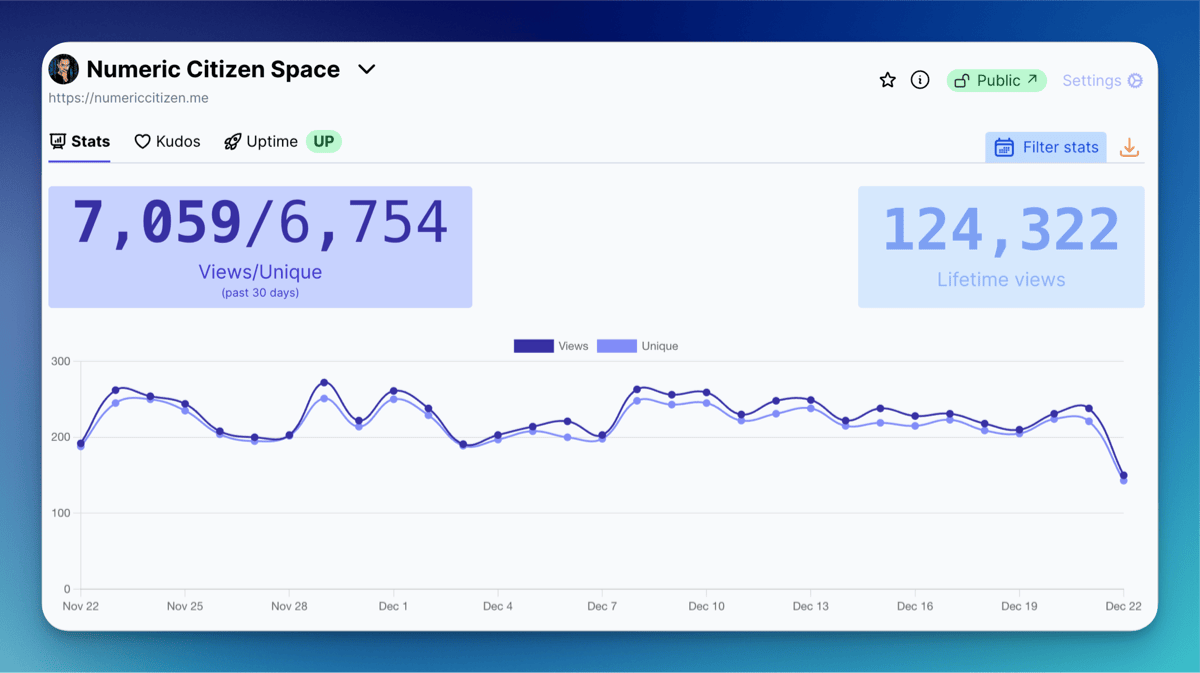
I spent a few moments this week analyzing Twitter’s influence on my blog’s visitors analytics using Plausible. Why? Because.

Plausible · numericcitizen.me

Plausible · numericcitizen.micro.blog

Numbers show that cross-posting on Twitter brings about 10-15% traffic to my blogs. It is much lower than I initially thought. Closing my account would minimally affect my exposure. These numbers show that I should care too much about Twitter’s future. I should look confidently beyond Twitter as a content creator.

Making YouTubes Videos - Observations & Notes

I’ve been making videos since early June of 2022. I wasn’t destined to produce content for YouTube as I’m more of a “written words” type of guy. So far, I have made 18 videos totalling more than two hours and a half of viewing time. Along the way of producing those videos, I learned a lot, and at this point, I feel pretty satisfied with my workflow. Here are my gathered observations and notes about my endeavour.

  • Craft is a great application for helping me stay organized and support my video creation workflow. I’m using a template for each new video with things to do, research notes, documentation, video script, and post-process steps are all part of the template. I also maintain a table of past and future videos. I’m very happy with Craft in that respect.
  • I did learn a few things about Craft along the way of producing these videos, for example, while preparing the video about explaining the differences between a document and a page in Craft, I learned that dragging a page to the navigation pane on the left portion of Craft main window, the page gets converted to a document.
  • As much as I love my M1 MacBook Air, exporting videos using ScreenFlow can take up to an hour. It’s the use case that makes me wish I had a more powerful MacBook Pro.
  • At Episode 15, I decided to use an external 1TB SanDisk SSD drive to store all my past and present episodes instead of my MacBook air internal drive. This way, I can plug the drive on my M1 Mac mini when I’m ready to export a finished video. Remember that a MacBook Air has no fan, and after 10 or 15 minutes of intensive use, the Mac will throttle down the CPU to prevent overheating. There is no such thing on the Mac mini; the CPU can run at max power for as long as needed, shortening the video rendering time.

  • Having an external drive to store my videos also enabled me to use my Mac mini which uses an Apple Studio Display which brings much more space to work with while doing video editing.

  • Doing the video montage on the Apple Studio Display helps a lot and helps me reduce the time it takes to create a new rendering.
  • A typical folder containing a recorded episode contains the Screenflow document, the episode header image in full and lower resolution and the resulting .MP4 video file, ready for upload in YouTube Studio.
  • Speaking of Screenflow: it’s a great application, but it is afflicted with a few bugs here and there. Updates to fix those are slow in coming. At some point, I contemplated the idea of switching to Final Cut Pro but doing so would still require me to keep Screenflow. So I’m sticking to it. Oh and I don’t like iMovie. Maybe I should look back at LumaFusion? But I don’t want to do production on the iPad.
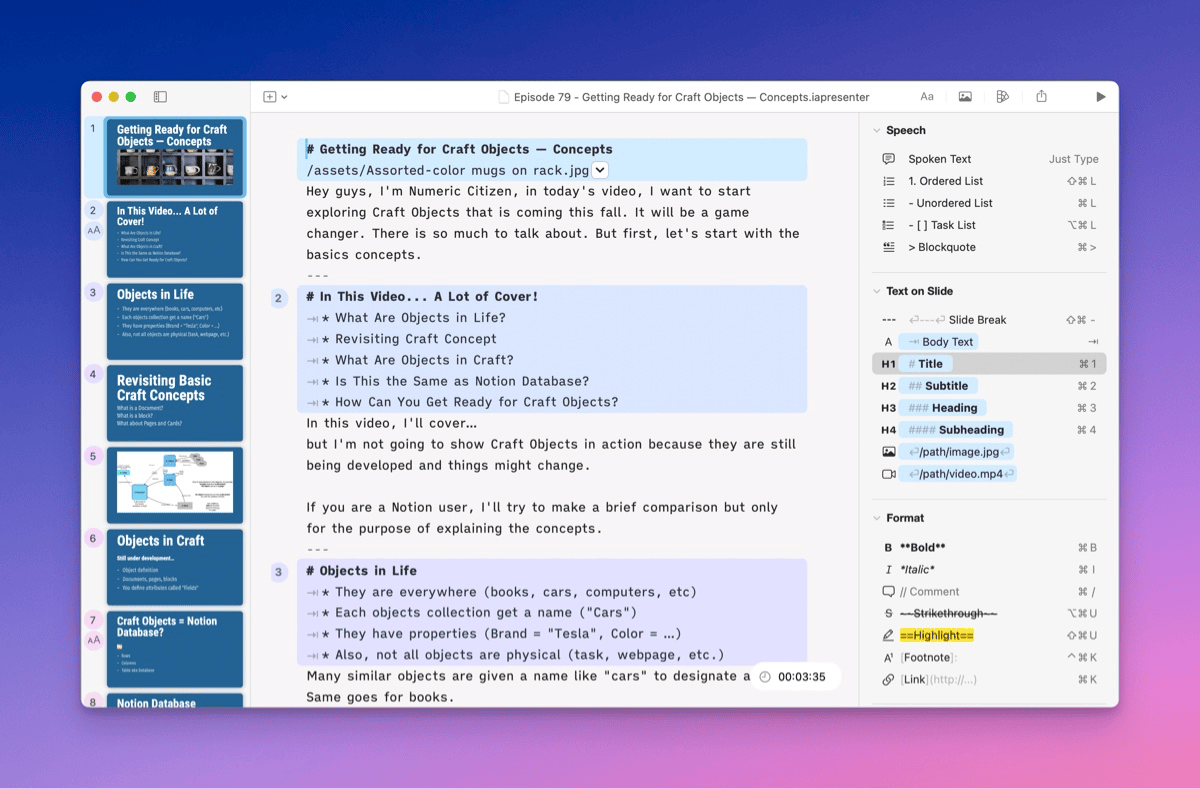
  • With each video, I’m perfecting something in my process or in the final product. My best montage can be found in Craft Doesn’t Need to be Notion and “Learn the Differences Between Documents and Pages.” I’m recording with a 4K Logitech Brio webcam, but I’m planning to use the Opal C1 webcam when the software gets more mature, and bugs are fixed. I’ll update this post after putting it to work and compare it with the Logitech.
  • It took me a while to understand how chapters on YouTube work. Publishing from within Screenflow doesn’t export chapter markers (another Screenflow bug?). To get my markers exported, I need to first export them to an .MP4 file, then manually upload them to YouTube. That’s annoying.
  • Google, unsurprisingly, offers a comprehensive plethora of analytics. It’s really a rabbit hole for those like me who love numbers. So far, I’m happy with the numbers, except for people retention. Surprisingly, people don’t stick around for a long time at my videos. Is my content that bad? Is this a major trend on YouTube or something that is closely tied to my content? Looking at my comments and likes ratio, these are vastly positive and aren’t indicating a problem with the content and the visual quality of my work. The retention time tends to increase as I produce longer videos.
  • It makes a noticeable difference when posting a new video is coupled with a post on Reddit, Circle and Slack, as well as Buffer on Twitter.
  • Being active on Reddit, Slack and Circle helps a lot to increase awareness about my videos, and I’m getting many new subscribers each day. On average, I’m getting about three new subscribers per day, which could mean that by the end of my first year of publishing content on YouTube, I could reach close to 1000 subscribers. This looks unrealistic. If I ever get past 500 subscribers, I’ll be happy.
  • When I’m referring to one of my blog articles in the episode notes, I do get visitors. YouTube seems a great way to help grow visitor traffic.
  • According to my Linktr.ee analytics, I can see positive impacts on visitors and conversion rates.
  • Credibility seems to be building over time as I’m posting on a regular basis new content. I’m getting a score of close to a 100% likes ratio, which is a good indication that I’m doing good, but is this sustainable?
  • I don’t pay too much attention to time release timing of a new video. YouTube processing into 4K takes forever. I tend to release a new video on the day after it has been uploaded and transcoded by the YouTube back-end.
  • Most popular video: “Planning my week ahead using Craft Daily Notes.“ People are looking for productivity hacks, and I should probably do more of these videos in the future.

You can view a behind-the-scenes video here.

My Blogger Workflow as of 2021-03

This is the first post on Numeric Citizen I/O about my blogger workflow. This website’s mission is metablogging, which means writing about the tools and services that I use as a blogger and content creator. I hope you enjoy the ride here. This is the most comprehensive update yet. In this workflow release, as of 2021-03, there are many important changes. Here is a run-down, in no particular order.

My blogger workflow as of 2021-03.

  1. First, as stated earlier, I created a new website about meta-blogging. It’s called Numeric Citizen I/O, which is hosted on Blot1. That’s where I’m talking about the tools and experience as a blogger and content creator. The domain name is hosted on GoDaddy. Domains ending with .io aren’t cheap, here are possible reasons why. I’m super happy with Blot. Their support is excellent. I learned how to properly use Git in my endeavour. I’m using Commento as a commenting service which is privacy friendly.
  2. Linktr.ee: is now my virtual visitor card. Super easy to set up. Lots of formatting options. Not cheap, though. In the past, I had an account on about.me which I closed because of its lack of formatting features. I’m pleased with Linktr.ee.
  3. Gone is the venerable MarsEdit on my Mac. Ulysses version 22 supports publishing to Micro.blog2. I do like MarsEdit, but I prefer Ulysses which is available on all Apple platforms.
  4. Gone is Linky, from my iOS devices. Used to be a great app for sharing links on Twitter and text highlighting. As my Twitter usage has dramatically reduced in recent months, I no longer need it. The app is no longer being updated, apparently, which is also contributing to its demise.
  5. Now in: Nova and Working Copy for publishing to Blot. Nova was recently reviewed on MacStories.net. I think it is important to show support for those developers who care to create real Mac software, not just ports of Windows apps.
  6. Now enabled is the automatic archive of my Micro.blog content to a Github repo. I like the idea of having my content available on Github. Using Nova, I cloned the repo on my Mac too. From time to time, I make pull requests to update my local repo.
  7. Craft is my new note-taking application, replacing Notion. Read my recent article on Craft. I still have content on Notion and I don’t know ye how and when I’ll be able to take it out. I’m waiting for their APIs release. I’m in no rush.
  8. Speaking of Craft, I’m using it to maintain a digital garden which can be found here. It’s super easy to nurture and the extensive formatting options of Craft allows me to have a decent website. You can leave comments by the way!
  9. Apple’s shortcuts, not shown here, play a small part in my workflow. One of them is to generate quotes from a web page by selecting the text that I want to quote. Another one is to create a page in Craft from a website. It’s very handy and covers a use case not available in Craft but which is available in Notion.
  10. I restarted my Vimeo page as an experiment and for storing short clips of user-interface micro-interactions from apps that I use and like a lot. You’ll find many examples from Craft. Vimeo is not cheap. Microinteractions are created using the screen recording feature of iOS, but are converted to GIF when needed in a blog post using IMGplay, an excellent GIF maker available on all Apple platforms.
  11. I’m still super happy with Plausible, a Google Analytics replacement. You can have a look at my visitor statistics for this site, for example.

From an idea to a blog post.

Under consideration

Reeder for maintaining a list of read later articles. I could use Craft for this instead. I created a page that contains all the bookmarks. This page is accessible from my digital garden, too. I like Reeder’s design for reading, though. Maybe there is a more profound problem: read later features like the one with Safari or with an app like Reeder don’t make me read more. I tend to forget about things I save in these lists. So, why give a damn about those app and service? If I don’t read an article that I find interesting in the first few hours or days, I’ll never read it. I’ll give myself some more time to think about this one.

Readwise: It is a fascinating service, but as my Twitter usage has dropped significantly, its usefulness is uncertain. Syncing highlights from Medium is interesting, though, because I’m a big reader of Medium content. The iPad app is lacking in certain areas. There is no Safari Extension that I’m aware of. Let’s see where it all goes from here.

A return of Things. Craft is able to export and import data to and from Things but not from Apple’s Reminder. The problem is that Things doesn’t have an URL field, which I depend on in Apple’s Reminder. I asked the Craft developers if support for Reminders was coming. It is coming. Things won’t make it back, I think.

Using Square on Linktr.ee to enable tips from my readers. Too bad only Square is supported, I would have preferred Stripes on which I already have an account setup to receive Medium payments. Furthermore, my experience shows that people don’t tip bloggers. Nobody really cares to support marginal content creator like me. Oh well, getting my rewards from the journey, instead.

Moving my Photo Legend Series to HEY World. I think it would be interesting to restart this photo series but this time on HEY World. It is super easy to publish, much easier than WordPress. That’s enough to consider this move.

Closing remarks

That’s it for this blogger workflow update. Things are starting to settle a bit. I don’t see major changes in the foreseeable future. I hope you made some discoveries with this blog post. Let me know in the comment section.


  1. That’s the website you are currently reading! ↩︎

  2. The exact date of Ulysses version 22 is still unknown at the time of publishing this post. ↩︎

The First Post of a Long Series

Writing about my numeric experience isn’t new for me. When I was an indie iOS developer (2009-2013)1, almost at the same time I started learning Objective-C, I opened a Blogger site called “buildingiphoneapps.com2. The idea behind this was to share my experience of learning a new language and a new programming platform. I wanted to share my discoveries, my challenges, etc. It was fun while it lasted. This website started my experience of being a blogger. So, today, welcome to Numeric Citizen I/O - a metablog from Numeric Citizen.

Meta definition according to Wikipedia:

Any subject can be said to have a metatheory, a theoretical consideration of its properties, such as its foundations, methods, form and utility, on a higher level of abstraction. In linguistics, grammar is considered as being expressed in a metalanguage, language operating on a higher level to describe properties of the plain language (and not itself).

Meta?

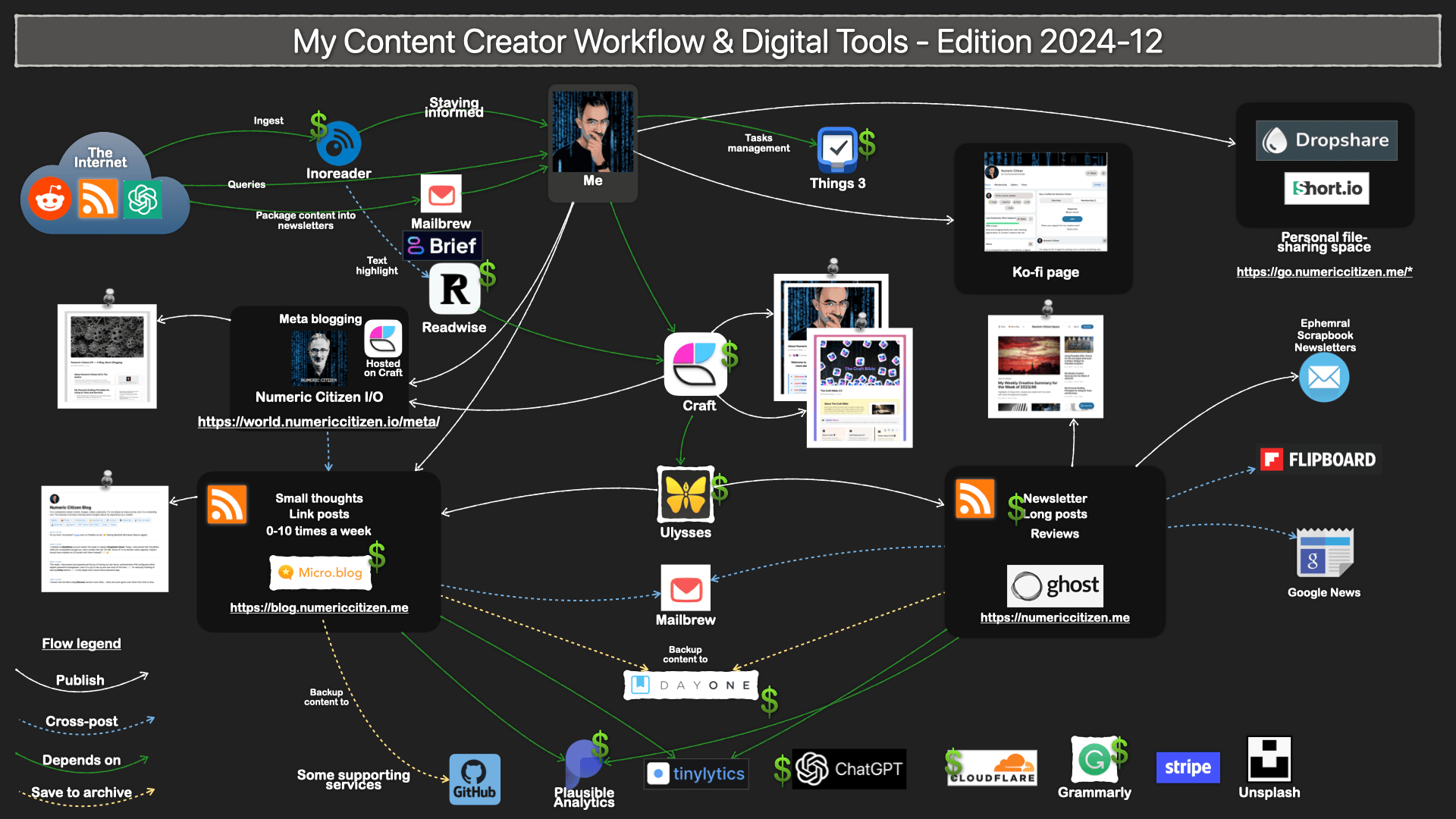
This blog is all about meta-blogging3. What? You might think? In other words, this blog is about the tools, services and workflow I depend on daily to build and maintain my online presence. I think that many people find it interesting to know how things are done behind the scenes. This is the purpose of this blog. From time to time, I’ll post updates when a new tool, application, or service comes into play. I’ll also document workflow changes or retired services. From now on, updates will be published here. While waiting for the next post and to get a sense of my current blogger workflow, consider the following diagram. It doesn’t reflect the presence of this blog yet. Wait for an update very soon.

Why?

But why use a separate website to write about blogging? I’m glad you asked. Here is why. Each of my websites has a specific audience and content type. Think of my websites as different specialized TV channels. Each of them fills a specific role or targets a specific audience. I think it is better for a blog to stay focused on its core subjects. Each website can have its own personality and visual theme to support it. That’s why.

Make sure to visit the About page for more details about this blog. You can leave a comment, too; I would be more than happy to engage in the conversation! To do so, just hit the post’s publishing date to see an individual post and add your comment at the bottom. Thanks.


  1. I developed a password manager for the iPhone. ↩︎

  2. I think part of this website is still available on the internet archive. ↩︎

  3. WARNING This site is nearly ready to serve its purpose. Things will probably change a bit in the next few weeks, though. ↩︎

My Updated Blogger Workflow as of 2021-01

As a content creator, I’m always looking for new ways, tools and services to improve my workflow to be as efficient as possible. If something no longer fits my needs, I’m not afraid to make changes. The last update to my blogger workflow dates back to last November. Since then, I made quite a few important changes.

My Blogger Workflow as of 2021-01.

What’s in?

First, I added my Synology DS720+ as a central tool to manage my digital assets, mostly pictures used in my publications. I acquired this NAS last year to consolidate my numerical assets, and I cannot overstate how good this product is. The first use was to back up important files and archives later I added the digital assets use by taking advantage of Synology Moments, a photo library service that comes with the product. Read more about my use of Synology NAS here.

Next, an important addition is Craft. I’m still in the early stages of working with Craft, and I plan to write about my observations in the near future. Meanwhile, let’s say Craft is a similar yet quite different beast than Notion. It has a cleaner and really polished design and helps me gather digitals tidbits, write and organize my thoughts. You can have a look at a few micro-interaction examples with Craft on my Vimeo page. I don’t plan to kick out Notion from my workflow yet. Notion is much more powerful than Craft. I think there is a place for both of them in my toolset.

Speaking of Vimeo, I’m back for another year as a paying subscriber. I much prefer Vimeo to YouTube (you know my stance on data privacy protection and Google, right?). I used Vimeo to publish a video about why I’ll never be a YouTuber. I’m also creating a collection of short clips of great micro-interactions with apps. Craft is one of the collections. My Vimeo profile page is here.

To create short animation clips in my publications, I use GIF files. Those are created from video clips and then converted to animated GIFs using the powerful ImgPlay application available on iOS, iPadOs and macOS Big Sur (thanks to the M1-powered Macs!). For me, it’s the best animated GIF creation application out there. Think of ImgPlay as a Final Cut Pro but for animated GIF creation.

Finally, the diagram doesn’t show my use of Apple’s Shortcuts to automate many repetitive tasks. One shortcut is used to add a device frame to any screenshots. Screenshots are prettier this way. Another shortcut saves interesting links into Apple’s Reminders app for future link posts. Finally, another one is used to create an archive of my microblog front page from time to time using Newsy.

Example of my microblog front page screenshot created from a shortcut.

What’s out?

Google Analytics is out, thanks to Plausible, a great alternative. I wrote about my switch recently and decided to walk the talk regarding my stance on data privacy protection. While not as powerful as Google Analytics, it does the job quite well for my basic needs. Since closing my Google Analytics, Databox was no longer needed.

A mature workflow

After many updates in the last 18 months, I think my blogger workflow is in an equilibrium and mature state. We never know when a new application or service pops up and can make a difference for me as a content creator looking for efficiency. That being said, I don’t expect much change for the foreseeable future.

My Updated Blogger Workflow as of 2020-11

It’s been a while since I updated my blogger workflow. The last time was back in September of 2020. It’s time for some tweaks.

The number of services I pay for has increased. Now, I’m paying for IFTTT and Buffer. IFTTT has improved its offerings this year and started to offer a paid tier. I recently added an automation where new posts from my Micro.blog RSS feed will get saved to a Google Sheet document. It makes it much easier to find previous post references when working on my Numeric Citizen Introspection newsletter.

Archives of references to my Micro.blog posts.

I’m paying for Buffer because of the added features I get in return. I get more channels and better post-management. All of my blog posts are now queued to Buffer. From there, I can choose when my blog post will be reposted. Sometimes, I may elect not to repost some of my work. Another use of Buffer is when an Apple event comes up. I will schedule tweets in advance. On the event day, I can focus on the event itself. It’s working fine for me this way.

The other addition is in fact a return of an old buddy: Reeder 5, the venerable RSS feed reader. I’m still depending on News Explorer (read my review here). I’m using Reeder 5 because of the Read Later feature, where I put all my internet articles that I want to eventually read. It works great, supports tags and runs on all Apple platforms.

Reeder 5 Read Later view.

Probably on the way out is MarsEdit. It’s not that the app is bad; quite the contrary. What I’m looking for is to consolidate my writing apps. Ulysses is rumoured to introduce support for Micro.blog beginning of next year. If that’s the case, I’ll drop MarsEdit.

In the next few weeks, I’m looking forward to Apple finally approving my submission of this blog for publication on Apple News. They recently updated their review process and asked all content creators to resubmit their articles and answer questionnaires. We’ll see.

Finally, I updated the general look of the diagram to make it easier on the eyes. I hope you’ll like it! Are you a blogger too or a content creator? What is your workflow?

My Updated Blogger Workflow as of 2020-09

Since the last update to my blogger workflow, Substack has been an important addition. Here is why and how I’m using Substack, a content publishing platform that is gaining traction for writers and bloggers like me.

Why Substack?

As you probably know, I recently started something new: a monthly newsletter about Apple, photography, privacy protection and climate change. I could have done it with Mailchimp or other similar services. Substack is free. For a few months, I’ve been paying attention to a nascent publishing platform named Substack. I do see more and more bloggers and writers publishing on it. One example is M. G. Siegler with 5ish.org.

I’m using Notion to gather my highlights during the month, coming from the usual sources and generated newsletters I get from Mailbrew. When the end of the month arrives, I go to my desk, sit down and do my write-up on my iMac. There is no native iPadOS app for Substack. Yet. This doesn’t bother me too much because it forces me to do it in a stretch. The newsletter is sent in the first week of every month. A link is cross-posted to Micro.blog.

Expect a review of Substack in the coming weeks, but first I need to gain more experience and insights into this service. Stay tuned for that one.

Cleanup required

Some cleanup had to be done too. I decided to remove any references and cross-posting to Reddit as it doesn’t generate traffic at all. Reddit is a special place (a jungle?), and I’m not sure if it fits me. Lastly, I’m still waiting for Apple News to approve my submission of this blog as a publication. It’s been months since I submitted my blog for review. I asked for support on the Publisher portal available on my icloud.com page. My expectations are low. I do hear here and there that Apple has become picky about which publication they allow. My fingers are crossed.

Finally, I wanted to update you about the visitor trend for this blog. The following graph shows sign of a slow and painful recovery following Google’s algorithms changes last November.

Recovery for this blog’s wound caused by Google is long.