Getting Ready for Google's May 2021 Algorithm Update
Getting ready for the upcoming Google May 2021 algorithm update. See how I improved my Page Insights score by more than 225%.
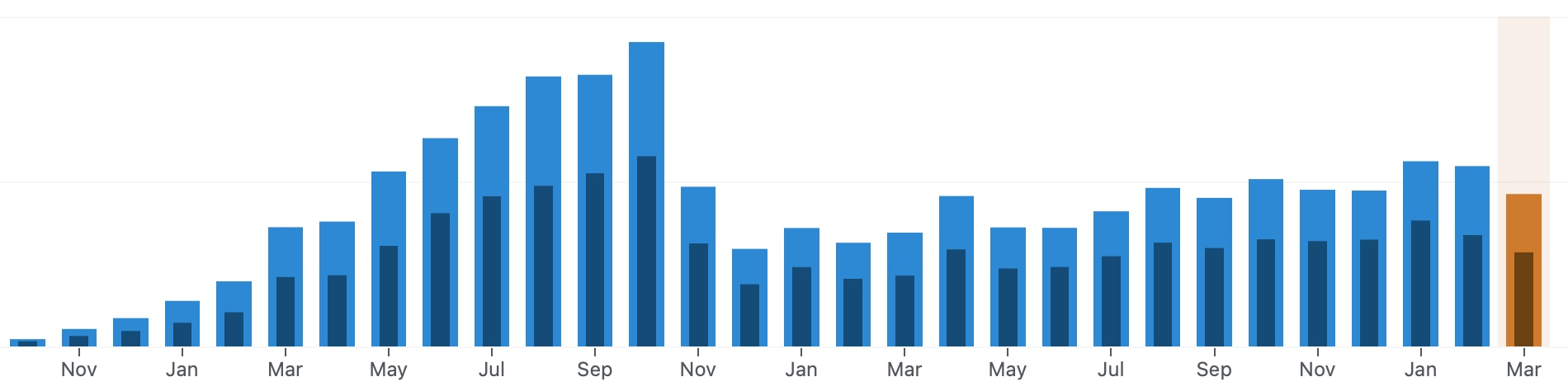
In May, Google will tweak its ranking algorithm again by including new experience metrics into the equation. Those changes were first announced back in May 2020. According to a recent post on Yoast’s blog:
In May 2021, Google will add Core Web Vitals as ranking factors in its algorithm. This means your site’s page speed and page loading time will impact your rankings.
And, from Liz Moorehead of ImpactPlus:
…these “page experience signals” will be rolling out in May 2021 as part of an algorithm update, meaning how well you measure up against these page experience factors will positively or negatively affect your rankings after this update takes effect.
After reading this, I was expecting the worst. I felt like it was like a storm waiting to strike. The feeling is not really cool, a feeling of “deja vue”. In November 2019, something happened to my blog visitors analytics: it dropped by more than 50% in just a few days. I was astonished and didn’t really know what happened or if I broke something with my blog. I did some research and found out that it was the consequence of a ranking algorithm change by Google1, an update that put my blog at a disadvantage2.
Preparing for this upcoming change, I had to find ways to minimize the impacts on my main blog, fearing I would lose traffic again.
The starting point
At first, when I started to look into this matter, I discovered the pagespeed insights tool from Google3. Don’t miss this insightful article about why PageSpeed Insights is an important tool. As you might expect, I tried it against my websites. According to this tool, my main blog didn’t score well, both from a mobile user perspective and a desktop user perspective, albeit it did a bit better for the latter. Both scores weren’t in the “green range”. I ran the test many times, and sure enough, on average, the scores were bad. Consider the following two scorecards.

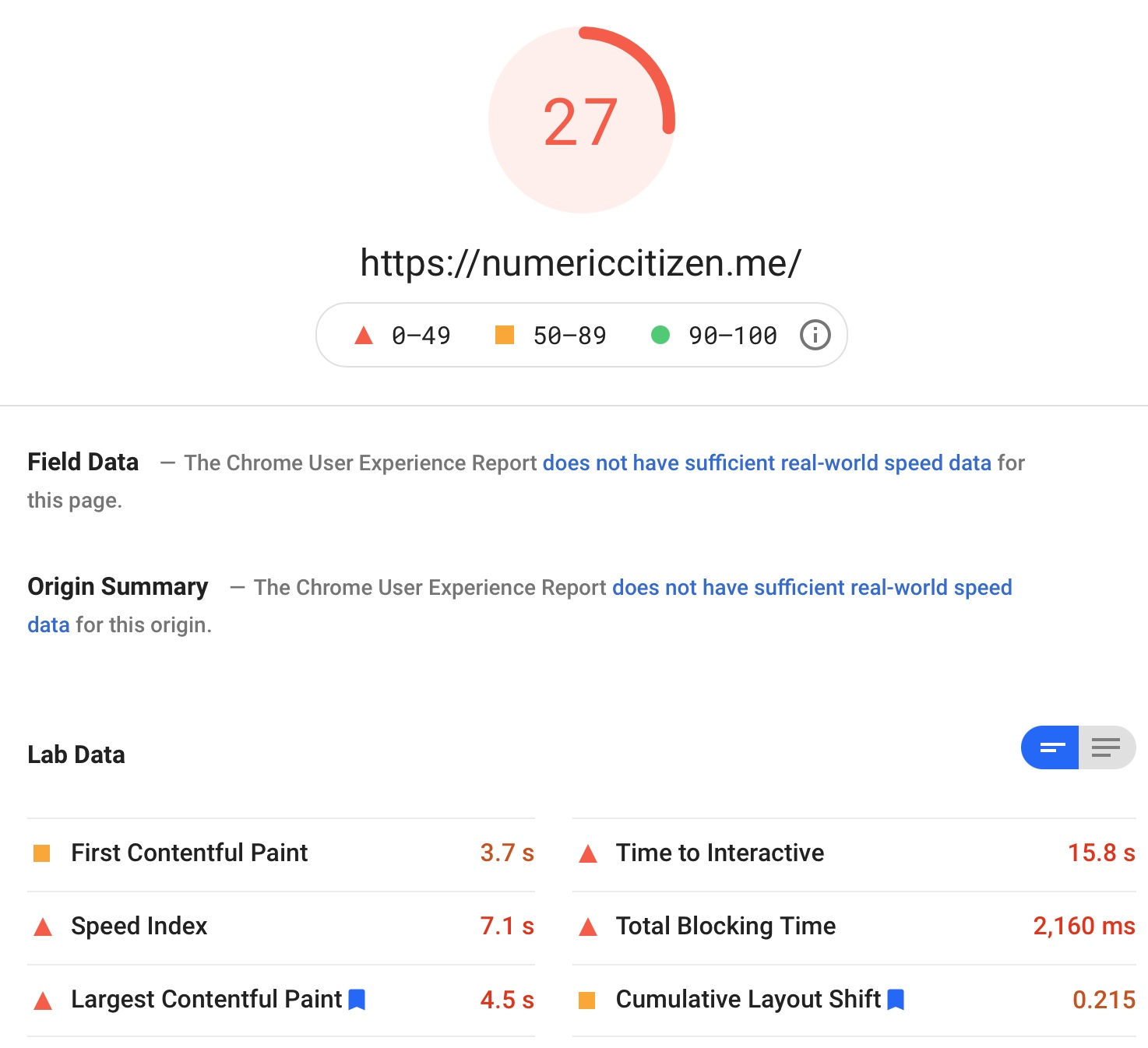
That’s not good, but it serves as the starting point. I had to make improvements on all fronts. Does all WordPress websites need to be slow? They certainly have a bad reputation in that respect. As a Business Plan subscriber on WordPress.com, I get to run my website on its own virtual instance. This makes a big difference. Yet, the next steps weren’t clear to me.
Improving the mobile experience
The worst score shows that mobile users were the most affected. How many visitors come from the desktop, and how many come from mobile devices? According to my Plausible analytics, surprisingly, most of my visitors come from desktops, not mobile devices, as shown in the following table. Yet, the score needed some improvements.

A big change was to remove support for Google’s AMP page format. AMP pages aren’t the best idea for the open web and, according to my testing, made my website run slower. Disabling AMP support in WordPress.com is as simple as turning off a switch. After doing so, I could already observe big improvements in loading time, but that wasn’t enough to get my score into the green zone. What else could I do?
Revisiting my WordPress plug-in usage
WordPress is well-known for its support of plug-ins. The more plug-ins installed, the higher the possibility of a slower-than-normal website. It’s easy to have a plug-in overload. For my optimization work, I had to revisit the usefulness of each of them.
I simplified my blog’s main page a bit by removing a rarely used footer widget. This widget allowed people to subscribe to my Mailbrew newsletter. This change improved response time quite a bit. For some reason, the Mailbrew widget contained many scripts calling Mailbrew’s home, which increased latency.
The Twitter timeline widget was also removed; I don’t think people cared much about my latest tweets showing up there4. By removing the sidebar on the main page, content retakes the center stage in a cleaner page layout.
The IndieWeb support plug-ins (three in total: IndieWeb, Micropub, IndieAuth) were disabled because I suspected they could negatively impact the performance. After re-testing the website, the speed didn’t change much; those plugins were re-enabled5. Media Cleaner and Mailchimp support were no longer needed and were removed, too, but I don’t think they negatively impacted my website loading time.
Other plug-ins like CoBlocks, add a richer set of block types in the WordPress editor. This plug-in adds a few scripts and CSS according to my research. By disabling this plug-in, some of my posts would break, not that there are many of them but still, some care is required here.
Adding two optimization services to my toolbox
In “How to speed up WordPress”, I discovered two paying services: the first one is WP Rocket, to optimize many internal aspects of my WordPress website and Imagify to optimize images.
After reading about WP Rocket’s capabilities, I installed the plug-in. After installing the plug-in, WP Rockets does many optimizations behind the scenes without any intervention. Then, I poked around the provided features and started to enable options one by one, carefully testing my website at each step, as suggested in the plug-in documentation, to see if anything was broken. At each step, everything was loading perfectly. At the end of this process, I did a new round of performance testing using the page insight tool, and to my delight, my score went up even more.
In summary, the following options in WP Rocket were enabled:
- Cache / Enable caching for mobile devices
- Cache / Enable caching for logged-in WordPress users
- File Optimization / Minify CSS files
- File Optimization / Optimize CSS delivery
- File Optimization / Minify JavaScript files
- File Optimization / Load JavaScript deferred
- File Optimization / Delay JavaScript execution
- Media / LazyLoad for images
- Media / LazyLoad for iframes and videos
- Media / Add missing image dimensions
- Preload cache
All in all, I’m pleased with WP Rocket. The optimizations may not provide a night and day difference, but they do add up to make my website a better web citizen.
Next up is a companion service to WB Rocket, Imagify. It is simple to install and configure. The free version allows for optimizing 500 MB of image content. I went with the unlimited version so I could process all my published content. It took 12 hours to process about 5 GB of images. The end result is that my image library size was reduced by 62%. That’s a big improvement. As expected, optimized images look pretty much the same as before.
Other considerations
I considered using a content delivery network service (CDN), but after much thought, some internet research, I decided not to do so. My blog doesn’t use a lot of heavy content like videos, only some pictures and many screenshots. I don’t think this would have made much of a difference6 for most of my visitors7. The following is a Lighthouse test result for speed access according to geographic locations. The next graphic shows where my visitors are coming from.

My website performance by geographic locations

My website visitors’ origins
My WordPress theme is flexible and allows for many customizations. This means a lot of CSS is involved. I’m also using custom fonts that add some weight to the website. According to SolarWinds’ Pingdom tool, the main page of my blog weighs about 784K, where 40% is for the fonts, 27% for images and 26% for scripts and CSS. Repeated tests show the main page loads in about 3 seconds or less. This doesn’t fit with my observation when I’m visiting my website from my machine, which seems to load faster than in 3 seconds. Three seconds isn’t bad, isn’t it? Anyway, I’m not planning to undo my font selection, as the standard ones are ugly as hell.
Another step was to look at Google-related stuff. Since I’m using Plausible Analytics, references to Google Analytics were no longer needed and were removed from WordPress.com configuration settings found in the JetPack settings. Good riddance.
Final scores and looking forward
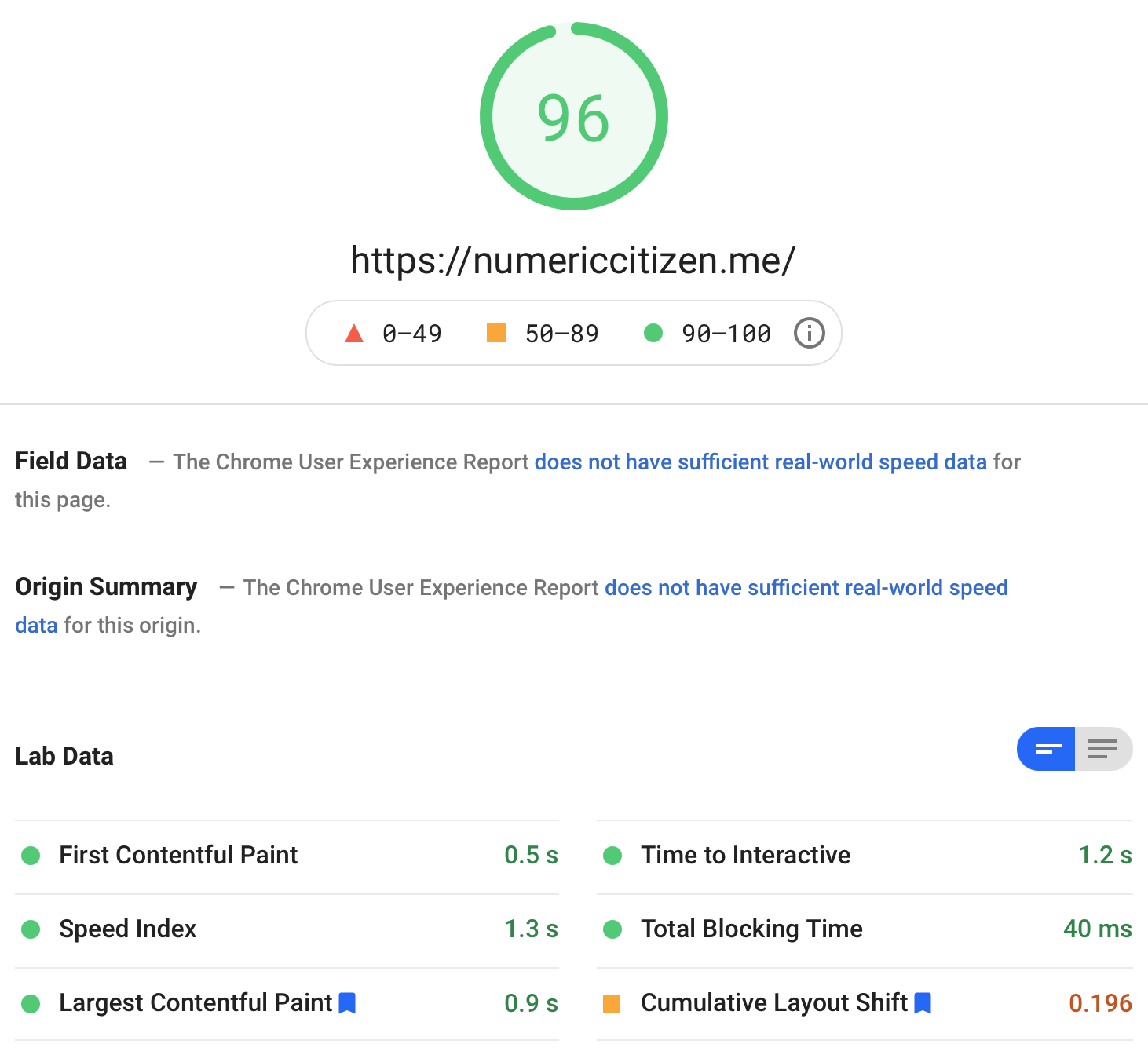
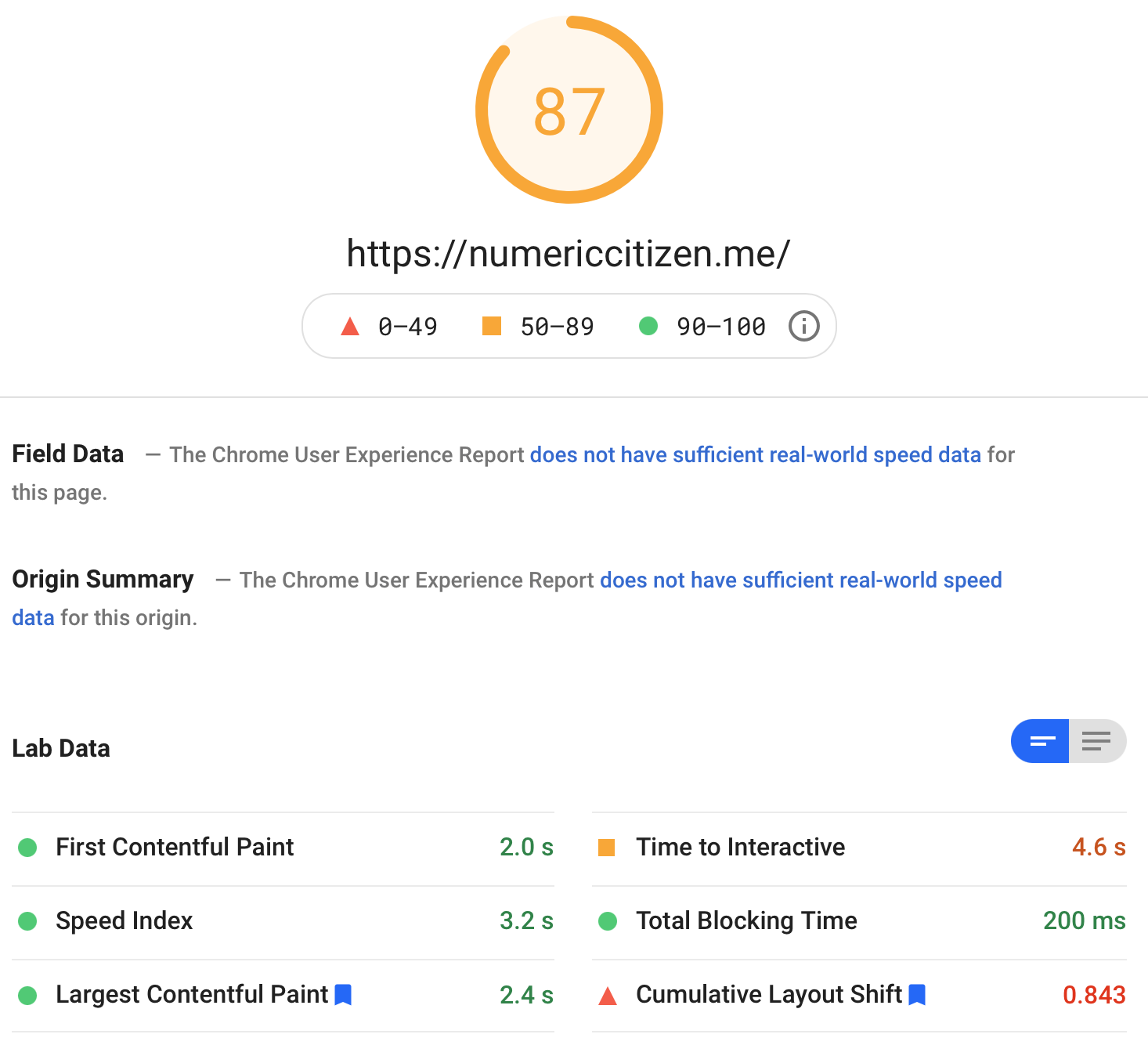
I’m happy with all the improvements I’ve made to my website. The improvements were the most impressive on the mobile version. It could be better, but I’m utterly happy with where the score stands now.
Keep in mind that WordPress-based sites are dynamically generated. A lot of processing happens behind the scenes when hitting the homepage with a browser. My microblog and the site you are reading are static-generated and fast to load. But, if you compare the loading times of all these sites, you’ll find that they are comparable.
Now, the big question: Am I ready for Google’s 2021 algorithm update? I think so. Will my optimization efforts be rewarded? Who knows? Google is like a beast that we have to feed, and please, who knows if he will like the meal served this time.
By increasing my website’s score for mobile users by as much as 225% and by more than 25% for desktop users, and by meeting most of Google’s requirements for “website providing a great user experience,” I hope that the upcoming Google changes in May will be beneficial.
-
I wasn’t the only victim of Google’s action. ↩︎
-
This change prompted me to change the type of content that I post on my main blog: longer posts with more meaningful content. ↩︎
-
Anyway, I recently reduced my Twitter usage by a lot, as fully documented in this blog post. ↩︎
-
IndieWeb plugins provide a useful integration of comments from other websites. ↩︎
-
According to my research, my blog is hosted on WordPress.com in the US, where most of my visitors come from. ↩︎
-
WP Rocket offers a CDN service for 7$ a month. I’m not willing to pay for that. ↩︎